Features & Pricing
Explore everything you get with QRelix, the free QR code generator for dynamic, trackable QR codes with full logo customization and editable destinations.
- Home
- Features & Pricing
QR Code Features & Pricing: Everything Included, No Trial Timer
QRelix.com is a free dynamic QR code generator with no trial timer, no credit card, and no surprise paywall. Create unlimited QR codes, edit the destination any time, and design each one with your own logo and colors.*
Heads up: free QR codes are capped at 50 scans each and show a brief QRelix-branded screen before forwarding. Full scan analytics are included on every plan.
* Every free QR code shows a brief QRelix-branded screen on each scan and works for its first 50 scans. After that, the code pauses until you upgrade to Pro. Full scan analytics are included on every plan. Very high-volume, commercial-scale traffic may also require a subscription so we can keep QRelix fast and free for everyone else.
Complete QR Code Solutions
Everything you need to create, manage, and track QR codes. From simple URLs to complex social media integrations with full branding customization.
QR Code Types
Create any type of QR code for your specific needs
General
URL
Link to websites
Note
Display text messages
WiFi
Connect to networks
Maps
Open location in maps
vCard
Share contact info
Send pre-filled emails
Phone
Make calls or send SMS
Social Media
YouTube
Open channels & videos
Open profiles & posts
Open profiles & pages
Twitter (X)
Open profiles & tweets
TikTok
Open profiles & videos
Open professional profiles
Venmo
Open profiles, pay, or request
Coming soon
Telegram
Coming soon
Advanced Features
Customization
Colors, styles, logos
Password Protection
Secure access control
Analytics
Track scans & insights
Bulk Generation
Create multiple codes
Time Expiration
QR codes with an expiration date
File Upload
Share files directly from a QR code
Webhooks
Coming soon
Complete Branding Control
Customize every aspect of your QR codes to match your brand identity
QR Code Customization
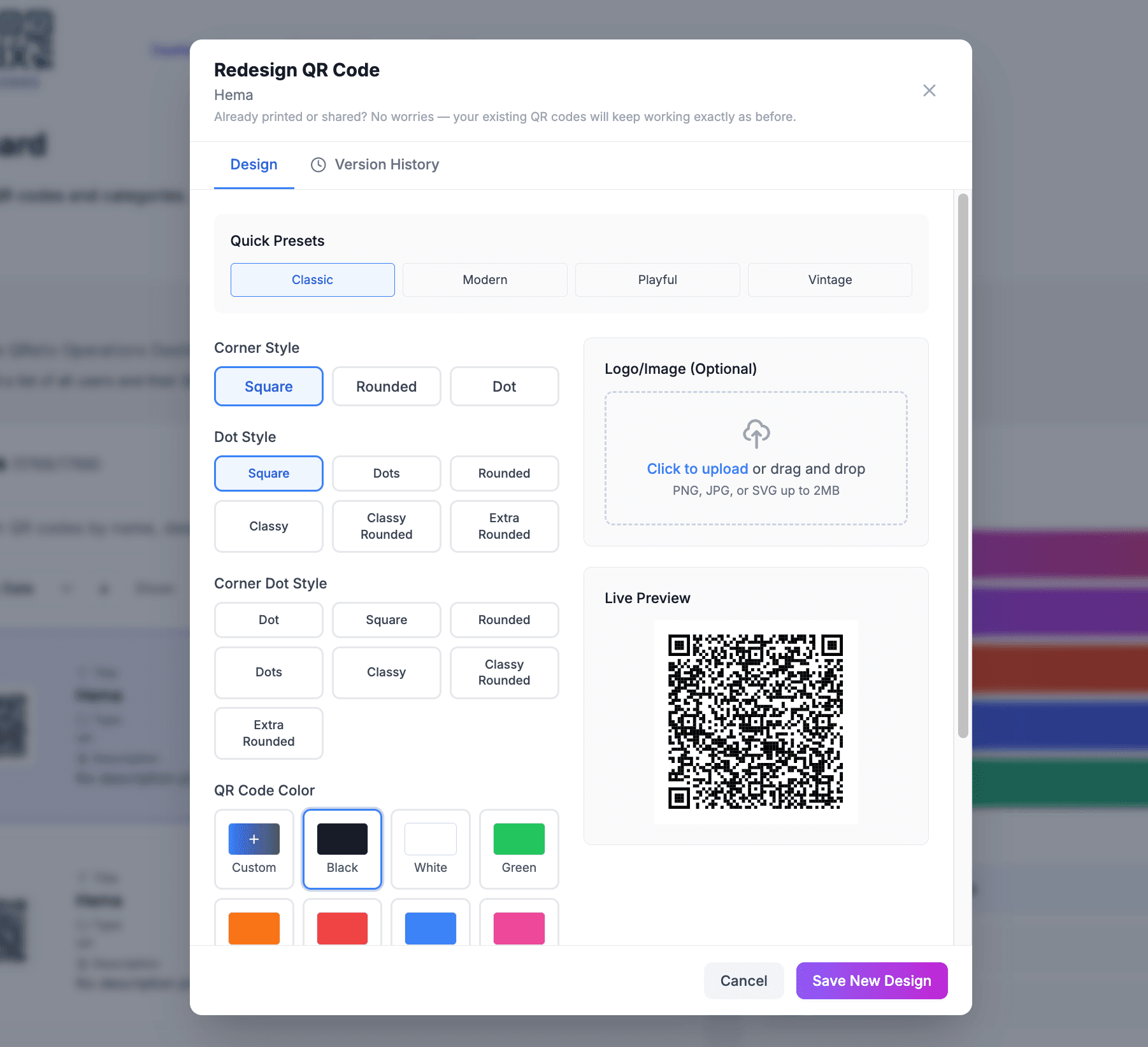
Customize QR code colors, add your logo in the center, and choose from various design patterns to match your brand perfectly.
Branded Landing Pages
Your custom logo and branding appear on all landing pages, creating a seamless brand experience for your customers.
White-Label Experience
Create a completely white-label experience where your customers see only your branding, not Qrelix's, across all touchpoints.
Advanced Security & Control
Protect your QR codes with enterprise-grade security features
Geofencing
Restrict QR code access to specific geographic locations. Perfect for location-based marketing and security.
- • Set location boundaries
- • GPS-based restrictions
Scan Limits
Control how many times your QR code can be scanned. Set daily, weekly, or total limits.
- • Daily scan limits
- • Total scan caps
Password Protection
Add an extra layer of security with password-protected QR codes. Users must enter a password to access content.
- • Custom passwords
- • Secure access control
QR Code Management
Advanced management tools for organizing and controlling your QR codes
Round Robin URLs
Distribute traffic across multiple destination URLs. Perfect for load balancing and A/B testing.
- • Traffic distribution
- • Load balancing
Status Management
Enable or disable QR codes instantly. Perfect for managing campaigns and controlling access.
- • Instantly enable/disable
- • Status notifications
Export Options
Download your QR codes in multiple formats including PNG, SVG, JPG, and high-resolution options.
- • Multiple formats (PNG, SVG, JPG)
- • High-resolution downloads
Integration with Your Favorite AI Tool
Connect QRelix to AI assistants using the Model Context Protocol (MCP)
Natural Language Control
Create QR codes, update destinations, and run bulk operations, all through conversation with Claude, ChatGPT, or Cursor.
Conversational Analytics
Ask your AI assistant for scan counts, location breakdowns, device stats, and top performers, no dashboard needed.
Secure OAuth Authentication
Industry-standard OAuth 2.0 with PKCE. No API keys to manage. Just sign in once and your token refreshes automatically.
Analytics & Tracking
Comprehensive analytics to understand your QR code performance
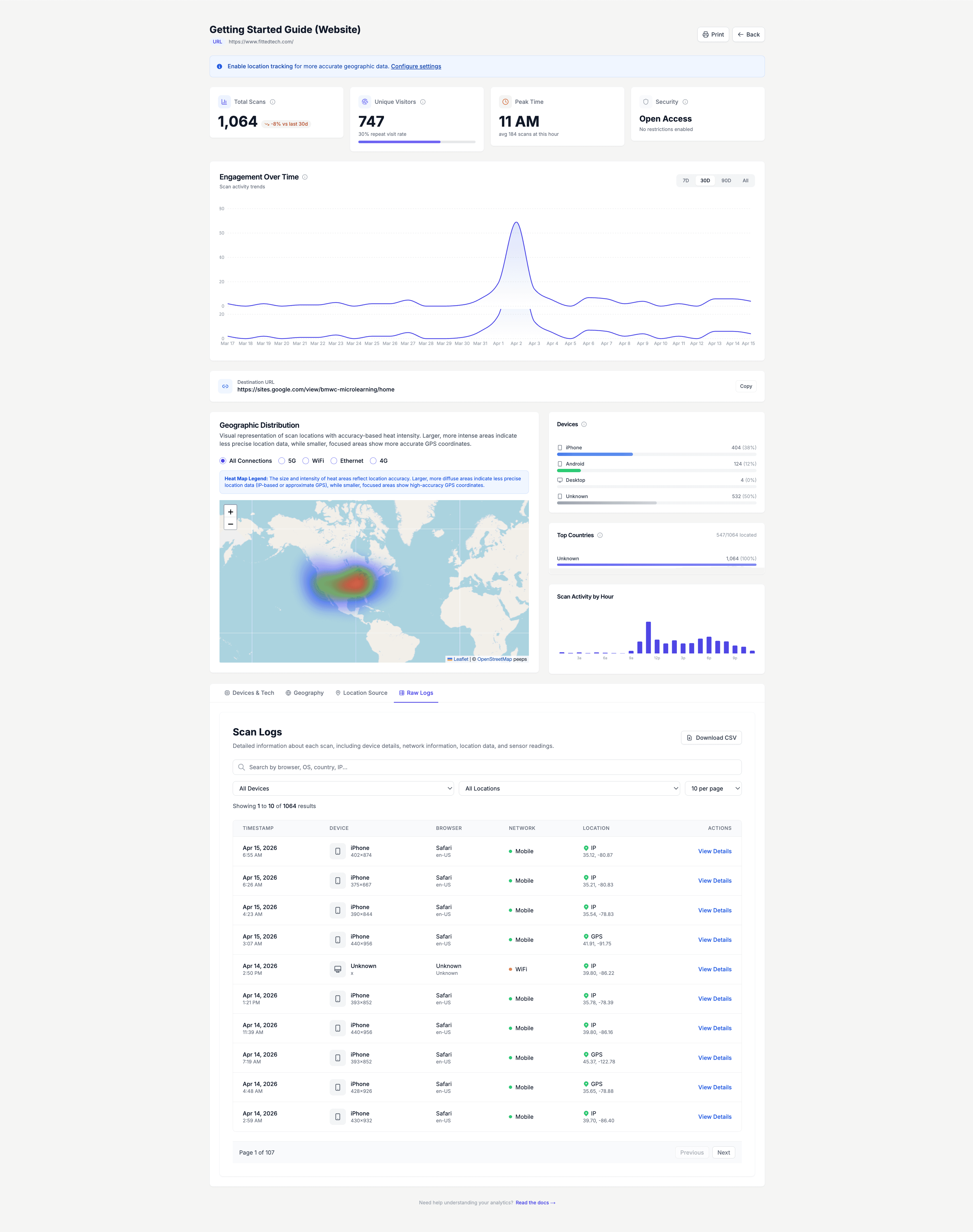
Location Tracking
Track where your QR codes are being scanned with detailed geographic analytics and heat maps.
- • Geographic scan data
- • Country and city tracking
- • Interactive heat maps
Device Detection
Understand your audience with detailed device analytics including mobile vs desktop usage.
- • Mobile vs desktop tracking
- • Operating system detection
- • Browser analytics
Time-based Analytics
Analyze when your QR codes are being scanned with detailed time-based analytics and trends.
- • Hourly scan patterns
- • Daily and weekly trends
- • Peak usage times
Scan History
Detailed scan logs with timestamps, locations, and device information for complete audit trails.
- • Complete scan logs
- • Timestamp tracking
- • Detailed audit trails
Real-time Monitoring
Monitor QR code performance in real-time with live analytics and instant notifications.
- • Live scan tracking
- • Real-time notifications
- • Instant analytics updates
Export Reports
Coming SoonExport detailed analytics reports in multiple formats for further analysis and sharing.
- • CSV and Excel exports
- • PDF reports
- • Scheduled reports
Simple, Transparent Pricing
Choose the plan that's right for you
Free
- Unlimited dynamic QR codes
- Every QR code type
- Real-time scan analytics
- Edit your destination anytime
- Custom colors and logo
- 50 scans per QR code
- Print-ready 300 DPI SVG downloads
- Shows a brief QRelix screen on every scan
- Codes pause after 50 scans
QRelix Pro Plan
- Everything in Free
- Unlimited scans, codes never pause
- No QRelix branding on your scans
- Security suite (password, expiration, geofencing)
- Faster redirects and priority support
- Early access to new features
Why Choose QRelix?
See how our platform compares to traditional QR code solutions
Traditional QR Codes
- Static content only
- No analytics or tracking
- Limited customization
- No security features
QRelix QR Codes
- Dynamic content updates
- Real-time analytics & insights
- Advanced customization options
- Built-in security features
Ready to Get Started?
Join thousands of businesses using QRelix QR Codes to engage their audience and track results.
100% free, no credit card.
Free QR codes show a brief QRelix-branded screen and stop after 50 scans. Upgrade to Pro for $5.99/mo to remove the screen and unlock unlimited scans.