QR Codes That Power Events
From ticket scanning to live schedule updates, QR codes simplify every touchpoint of your event. Track attendance, measure engagement, and update information on the fly.
How Events Use QR Codes
Practical ways to integrate QR codes into your events workflow, each one trackable with real-time analytics.
Event Ticket QR Codes
Generate unique QR codes for each ticket that can be scanned at the door. Track check-in times and attendance in real-time.
Attendee Check-In
Replace paper sign-in sheets with QR code scanning. Attendees scan a code at registration and you capture their details digitally.
Conference Schedule Links
Print QR codes on event programs that link to the live schedule. Update session times or rooms and attendees see changes instantly.
Venue Map & Wayfinding
Place QR codes throughout the venue linking to interactive maps, booth locations, or specific session rooms.
Speaker & Sponsor Profiles
Add QR codes to name badges or booth signage that link to speaker bios, sponsor websites, or networking profiles.
Post-Event Feedback
Display QR codes at session exits linking to feedback surveys. Capture attendee sentiment while the experience is fresh.
QR Code Types for Events
QRelix supports 6+ QR code types. These are the most popular for events:
See every scan, in real time
Event marketing runs on a countdown, and this dashboard shows how your promotion is landing against it. The scan trend chart tells you whether the posters and email footers are building momentum in the weeks before the doors open, the geographic view shows which cities your registrations are scanning from, and the device breakdown shows whether scanners are on iPhone, Android, or desktop — so you know what your registration page needs to be built for. One glance separates the channels filling seats from the ones eating budget.
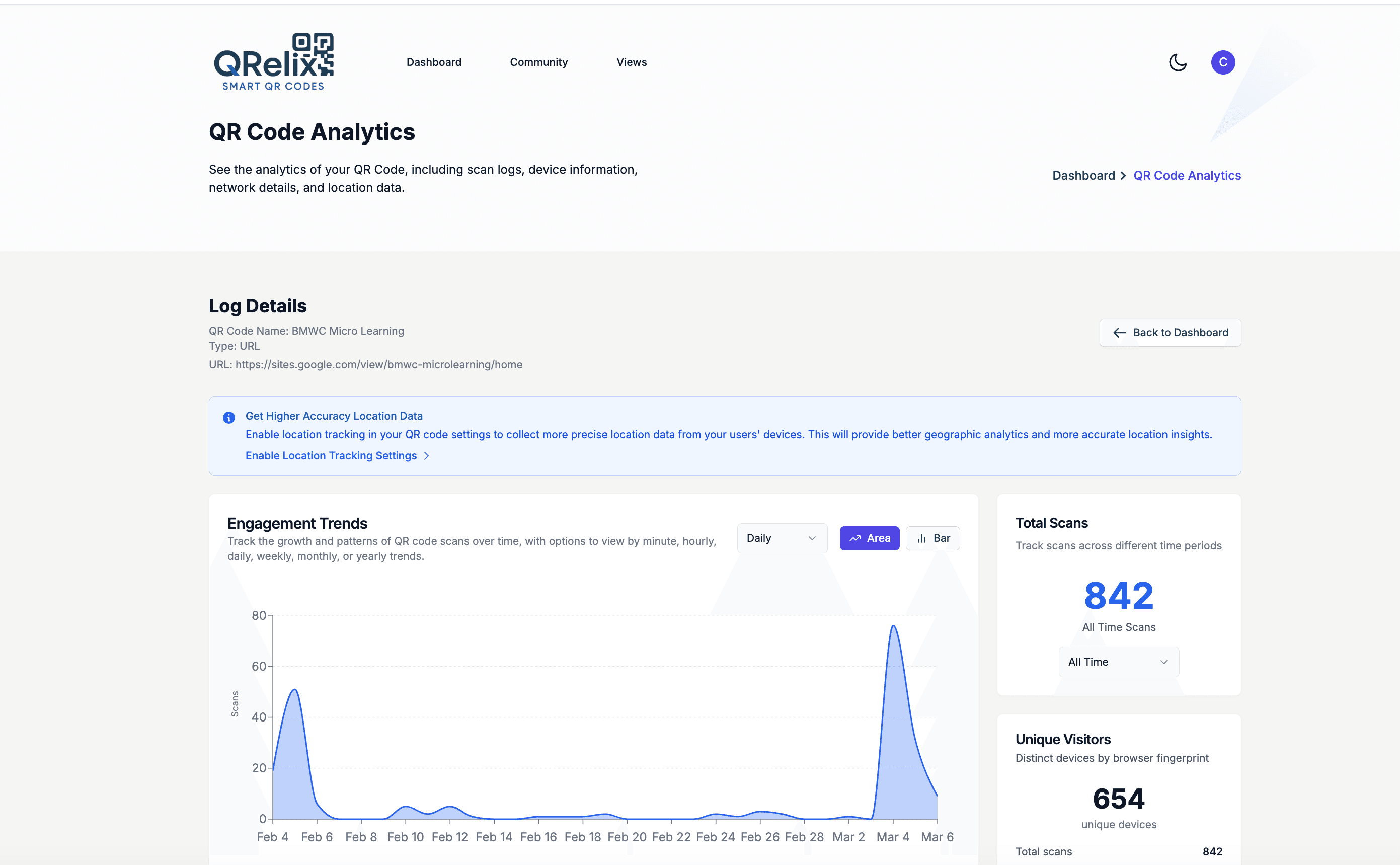
How to run your event's QR codes from one dashboard
- 1
Create dynamic codes for each event touchpoint
Start at /create-qr-code with a URL code pointing to your registration page, and add a Calendar code so attendees can save the date in one scan. Make every code dynamic: banners, badges, and programs get finalized weeks early, and dynamic codes let the content keep moving after the files ship to the printer.
- 2
Brand each code to match the event identity
Apply the event's colors and logo with the live preview. On a sponsor wall or badge, a branded code looks like part of the design instead of an afterthought — and attendees are more comfortable scanning a code that visibly belongs to the event. Style presets keep the look consistent across every code you create.
- 3
Print with the venue in mind
Download SVG for large-format pieces — step-and-repeat banners, entrance signage, projected slides — since vector output scales to any size without degrading. Use the 300 DPI PNG for programs, badges, and table cards. Codes scanned from a distance need to be dramatically larger than handheld ones, so size signage codes generously.
- 4
Track scans through every phase of the event
Watch the dashboard as promotion ramps: the trend line shows which week's push worked, geography shows where attendees are coming from, and per-scan logs capture device and time detail. After the event, repoint the same codes to your feedback survey or next year's announcement — the printed materials keep working.
“We switched from paper check-in to QRelix QR codes at our annual conference. Registration time dropped from 3 minutes per attendee to 10 seconds.”
QRelix user · Events industry
Frequently Asked Questions
Can I use QR codes for event ticket scanning?
Yes. Create unique QR codes for each ticket and use QRelix scan tracking to monitor check-ins. Set scan limits to prevent ticket sharing, so each code can be limited to a single scan.
How do I update event information after printing materials?
With dynamic QR codes, the printed code stays the same but the linked content updates instantly. Change your schedule, add a new speaker, or update the venue map, and attendees always see the latest version.
Can I track how many people attend each session?
Create separate QR codes for each session room or activity. QRelix analytics show scan counts by time, helping you measure session popularity and plan capacity for future events.
How big does a QR code need to be on a banner or projected slide?
Match size to scanning distance: a code should be roughly one-tenth as wide as the distance people scan it from, so a banner read from 20 feet needs a code around 2 feet wide. For projected slides, make the code a generous portion of the slide and hold it on screen long enough for a full room to scan. Download the SVG from QRelix — vector files scale to banner size with no quality loss.
Can one QR code rotate between multiple destination links?
Yes. QRelix supports round-robin URL rotation, where a single code cycles scans across a list of destinations. At an event, that can distribute attendees across parallel signup slots, split traffic between session feedback forms, or spread a giveaway entry across multiple pages. You set it up once on a dynamic code and the rotation happens automatically on each scan — the printed code never changes.
How do I shut off a QR code after the event ends?
Set an expiration when you create the code — dynamic QRelix codes can expire on a specific date or after a set number of scans. Badges, programs, and banners tend to outlive the event, and expiration stops leftover materials from sending people to a dead or outdated page. If you'd rather keep the code alive, repoint it to a post-event page like the photo gallery or next year's registration instead.
Events guides & tutorials
- QR Codes for Event Marketing: How to Drive Registrations, Streamline Check-Ins, and Measure ROI
- QR Campaign Tracking: How to Measure Multi-Channel QR Campaigns Free (2026)
- QR Code Lead Capture: Turn Every Scan Into a Real Lead (Free 2026 Setup)
- Round-Robin URLs
Try the free tools events use most
Ready to Create QR Codes for Your Events?
Free, no credit card. Create dynamic, trackable QR codes in seconds. Upgrade to Pro to remove the QRelix-branded redirect shown on free scans and unlock unlimited scans.
Create QR Code Free