QR Codes for Modern Healthcare
Streamline patient intake, appointment scheduling, and clinic navigation with secure, trackable QR codes. Password protection and expiration controls keep sensitive links safe.
How Healthcare Use QR Codes
Practical ways to integrate QR codes into your healthcare workflow, each one trackable with real-time analytics.
Patient Intake Forms
Place QR codes in waiting rooms that link to digital intake forms. Patients fill out paperwork on their phone before their appointment.
Appointment Scheduling
Add QR codes to business cards, receipts, and appointment reminders that link directly to your online scheduling system.
Telemedicine Session Links
Send patients a QR code that links directly to their virtual visit. One scan opens the video call, with no app downloads or login hassles.
Clinic Wayfinding & Directions
Place QR codes at building entrances that open maps directions to your specific suite or department within a large medical campus.
Health Education Materials
Link QR codes on discharge paperwork to post-visit care instructions, medication guides, or educational videos.
Prescription & Refill Links
Add QR codes to prescription bags that link to your pharmacy's refill portal or medication information pages.
QR Code Types for Healthcare
QRelix supports 6+ QR code types. These are the most popular for healthcare:
See every scan, in real time
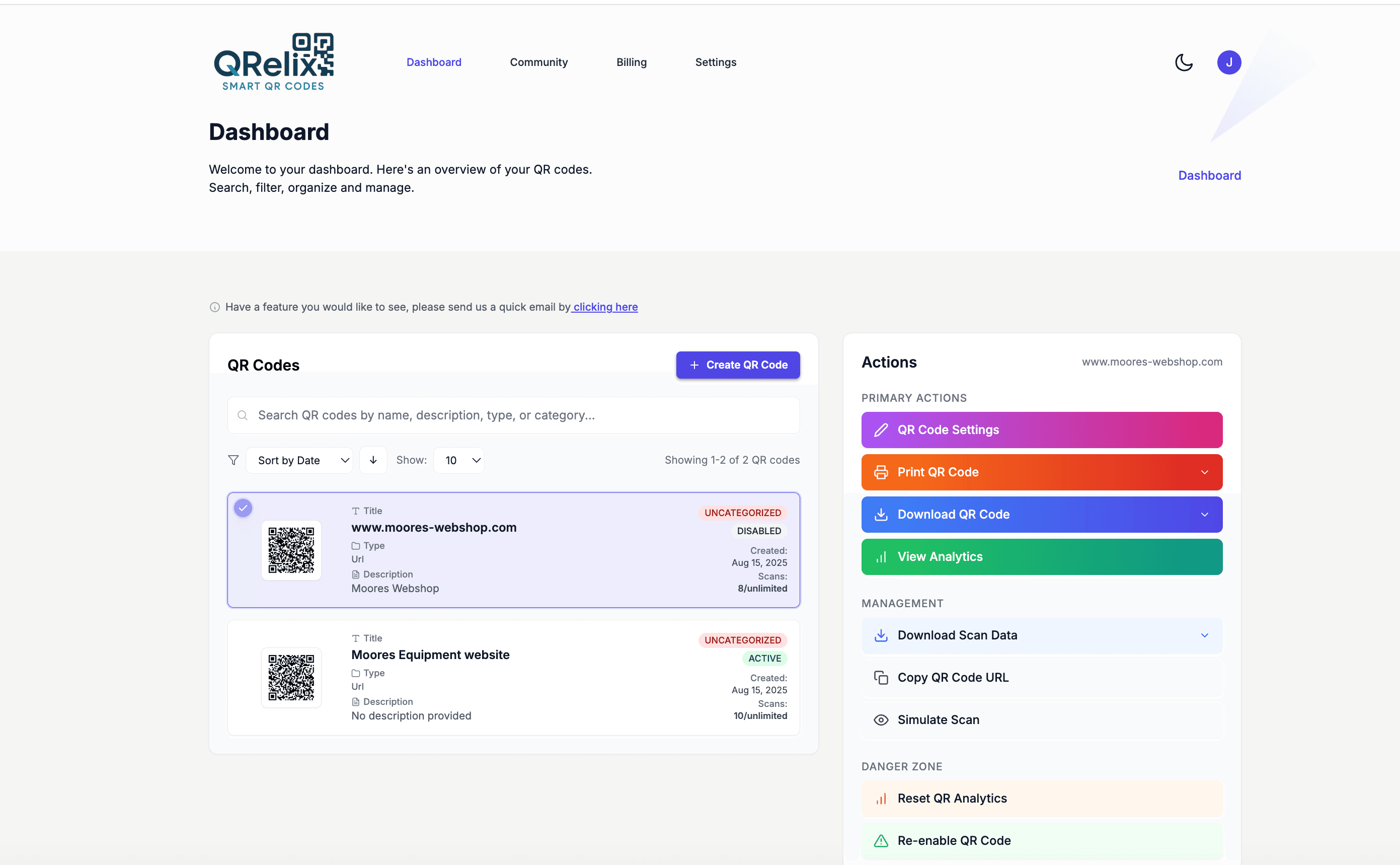
A clinic rarely runs one QR code — it runs dozens. Intake form codes at the front desk, wayfinding codes in the parking garage, education material codes in exam rooms, refill line codes in discharge packets. This dashboard view is how you keep that under control: every code grouped into categories with labels, so the front-desk team can find and update the intake code without scrolling past cardiology's patient handouts. When a form URL changes, you fix it in one place — no hunting through printed signage across three floors.
How to roll out QR codes across your clinic or practice
- 1
Create a code for your highest-traffic touchpoint
Start at /create-qr-code with the task patients repeat most — usually the intake form. Choose the URL type and link your intake or scheduling page. Use a dynamic code: when your forms vendor changes a link or you switch scheduling systems, you update the destination once instead of reprinting every clipboard sign and appointment card.
- 2
Apply your practice branding
Set the code to your practice colors and embed your logo with the live preview. In a waiting room, a branded code reads as official clinic material rather than an anonymous sticker, which matters for patient trust. Keep contrast high — dark modules on a light background scan most reliably.
- 3
Print for check-in desks, exam rooms, and packets
Download the 300 DPI PNG for appointment cards and discharge paperwork, and the SVG for larger signage like lobby posters and wayfinding placards. Post codes where patients wait — check-in counters and exam rooms — since those are the moments they have their phone out and time to use it.
- 4
Organize by department and review scan data
Label each code by department or location in the dashboard, then watch the analytics. Scan counts show which materials patients actually use, device breakdown tells you whether to test your forms on iPhone or Android first, and hourly activity shows when the front desk should expect intake-form traffic.
“We put QR codes on every appointment reminder card. Patient no-shows dropped 25% because scheduling a follow-up is now one scan away.”
QRelix user · Healthcare industry
Frequently Asked Questions
Are QRelix QR codes secure enough for healthcare use?
Yes. QRelix offers password protection and expiration controls so you can restrict access to sensitive links. QR codes can be set to expire after a specific date or number of scans.
Can I track how many patients scan my QR codes?
QRelix provides real-time analytics on scan counts, device types, and timing. This helps you understand patient engagement without collecting personal health information through the QR code itself.
What format should I use for printed materials in a clinic?
QRelix generates 300 DPI SVG files, the highest quality format for print. These scale to any size from small business cards to large lobby posters without losing clarity.
Do elderly patients need a special app to scan QR codes?
No. Modern iPhone and Android cameras scan QR codes natively — patients open the camera, point it at the code, and tap the link that appears. For older patients, print the code larger than you otherwise would, place it flat at counter level with good lighting, and add a short printed instruction like "point your phone camera here." Front-desk staff can walk a patient through it once; it usually sticks.
Can I manage QR codes for multiple clinic locations in one account?
Yes. The QRelix dashboard organizes codes with categories and labels, so you can group codes by location and department — "Northside – intake," "Downtown – wayfinding" — and manage them all from one place. Each code keeps its own analytics, including geography, so you can compare scan volume across sites. When a system-wide link changes, such as a patient portal migration, you update each affected code's destination without reprinting anything.
Can I make a QR code stop working after a seasonal campaign ends?
Yes. Dynamic codes can be set to expire on a date or after a set number of scans, which fits seasonal material like flu shot clinic flyers or a limited enrollment window. Rather than letting leftover posters point patients at stale information, the code stops resolving on your schedule. You can also skip expiration and repoint the same code to next season's page, keeping year-over-year scan history in one place.
Healthcare guides & tutorials
- QR Code for Appointments: Free Booking Links That Get You More Bookings (2026)
- QR Code Booking System: How to Build a Free One in 2026 (Calendly, Cal.com & Resy)
- Security and Access Controls
- Managing Your QR Codes
Try the free tools healthcare use most
Ready to Create QR Codes for Your Healthcare?
Free, no credit card. Create dynamic, trackable QR codes in seconds. Upgrade to Pro to remove the QRelix-branded redirect shown on free scans and unlock unlimited scans.
Create QR Code Free