QR Codes Built for Restaurants
Replace static menus with dynamic QR codes that update in real-time. Track which dishes get the most views, run promotions, and drive repeat visits, all from one dashboard.
How Restaurants Use QR Codes
Practical ways to integrate QR codes into your restaurants workflow, each one trackable with real-time analytics.
Digital Menu QR Codes
Create scannable table-top menus that update instantly. Change prices, add seasonal items, or run daily specials without reprinting a single card.
Online Ordering Links
Link QR codes directly to your online ordering platform. Customers scan, order, and pay. No app download required.
Table Reservation QR Codes
Place QR codes on your storefront, flyers, or social media that link directly to your reservation system.
Loyalty Program Enrollment
Print QR codes on receipts or table tents that instantly enroll customers in your loyalty program.
Customer Feedback & Reviews
Place QR codes at checkout linking to your Google Reviews or feedback form. Track which locations drive the most reviews.
WiFi Access QR Codes
Let guests connect to your WiFi network with a single scan. No more shouting passwords across the counter.
QR Code Types for Restaurants
QRelix supports 6+ QR code types. These are the most popular for restaurants:
See every scan, in real time
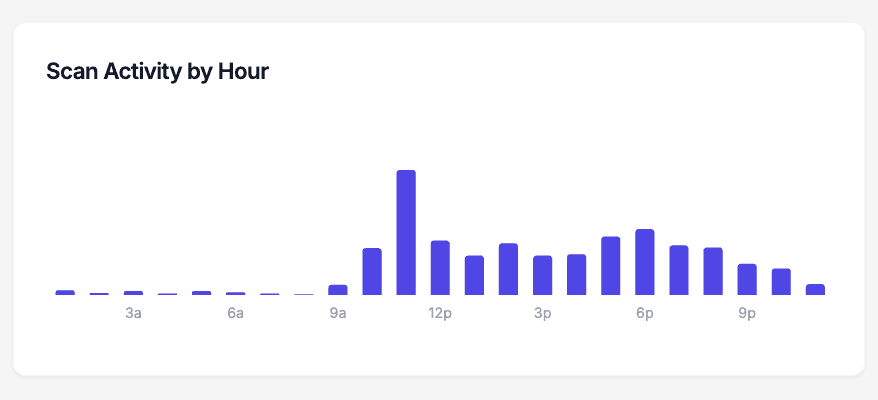
Menu scans follow service, and the analytics prove it. This chart shows scan activity by hour for a single QR code — for a restaurant, that means you can see the lunch rush hit your table tents at noon, the dinner peak at 7 pm, and the dead hours in between. If Friday nights spike and Tuesday lunch flatlines, you have real data for deciding when to run specials, when to schedule an extra server, and whether the code on the patio tables gets scanned at all. Every dynamic QRelix code includes this hourly breakdown.
How to set up QR codes for your restaurant in 10 minutes
- 1
Create a dynamic menu code
Go to /create-qr-code and pick the URL type. Link it to your menu — a PDF, a menu page on your site, or your online ordering link. Because the code is dynamic, you can swap in a brunch, happy hour, or seasonal menu later without touching a single table tent.
- 2
Match the code to your brand
Set your brand colors and drop in your logo using the live preview. A code that matches your menus and signage gets scanned with more confidence than a generic black-and-white square. Style presets get you a clean look in a few clicks if you don't want to fuss with design.
- 3
Print it for tables, windows, and counters
Download the print-ready 300 DPI SVG or PNG. Use SVG for anything large — window decals, sandwich boards — and PNG for table tents and counter cards. Keep the code at least an inch wide on tables, larger in windows, and leave white space around it so phone cameras lock on fast.
- 4
Track your dining room, bar, and patio
Open the dashboard to watch scans come in. The hourly activity chart shows your real rush periods, and device data tells you whether diners are on iPhone or Android. Create separate codes for the dining room, bar, and patio, and the dashboard shows which area drives the most menu views.
“We replaced all our paper menus with QRelix QR codes. Updating daily specials takes 30 seconds instead of a trip to the printer.”
QRelix user · Restaurant industry
Frequently Asked Questions
How do I create a QR code menu for my restaurant?
With QRelix, upload your menu as a URL or link to your online menu page. Customize the QR code with your restaurant's brand colors and logo, then download in print-ready 300 DPI SVG format. Place it on tables, windows, or takeout bags. Update the linked menu anytime without reprinting the QR code.
Can I update my menu without reprinting the QR code?
Yes. QRelix dynamic QR codes let you change the destination URL at any time. Update your menu, prices, or seasonal items and the same printed QR code will link to the new content instantly.
How do I track which tables or locations get the most scans?
QRelix analytics show scan counts by location, device, time of day, and more. Create separate QR codes for each table or location to compare engagement across your restaurant.
What size should a QR code be on a restaurant table tent?
At least 1 inch (2.5 cm) square for arm's-length scanning, and 2 inches or more for counter signs or window placement. Leave a white margin around the code and keep strong contrast between the code and its background. Print from the 300 DPI PNG or SVG that QRelix generates so the code stays crisp — a blurry code printed from a low-resolution screenshot is a common reason table codes fail to scan.
Do QR code menus work if my restaurant has weak cell service?
Scanning works — the camera reads the code without a connection — but loading the menu requires internet. If cell coverage is poor inside your building, post a WiFi QR code at the door or on each table so guests join your network first, then scan the menu code. Keep the menu itself lightweight: a fast-loading page beats a heavy PDF when the signal is marginal.
How do I keep printed QR codes readable through spills and daily cleaning?
Laminate table tents or use waterproof stock, and print from the 300 DPI SVG so edges stay sharp at any size. Because QRelix codes are dynamic, physical wear is the only reason you'd ever reprint — menu changes happen in the dashboard, not at the printer. When you do replace a damaged tent, reprint the same code file and your scan history continues uninterrupted.
Restaurants guides & tutorials
- Boost ROI: Create QR Code with Tracking for Restaurant Menus
- WiFi QR Code: How to Create One, Best Practices, and Why Your Business Needs It
- Google Review QR Code: How to Get More 5-Star Reviews on Autopilot
- Downloading and Printing Your QR Code
Try the free tools restaurants use most
Ready to Create QR Codes for Your Restaurants?
Free, no credit card. Create dynamic, trackable QR codes in seconds. Upgrade to Pro to remove the QRelix-branded redirect shown on free scans and unlock unlimited scans.
Create QR Code Free