QR Codes That Drive Retail Sales
Bridge the gap between physical stores and digital experiences. Link packaging to product pages, run trackable promotions, and build loyalty programs that customers actually use.
How Retail Use QR Codes
Practical ways to integrate QR codes into your retail workflow, each one trackable with real-time analytics.
Product Page Links
Add QR codes to product packaging or shelf tags that link to detailed product pages, reviews, ingredients, or how-to guides.
Discount & Coupon Codes
Print QR codes on receipts, flyers, or in-store signage linking to exclusive discounts. Track redemption rates across locations.
Loyalty Program Enrollment
Place QR codes at checkout that instantly enroll customers in your rewards program. No app download, no paper forms.
In-Store Promotion Tracking
Create unique QR codes for each display or campaign. Compare scan data to see which promotions drive the most engagement.
Size & Fit Guides
Add QR codes to clothing tags that link to size charts, fit guides, or styling suggestions. Reduce returns by helping customers choose right.
Customer Review Collection
Print QR codes on shopping bags or receipts linking to your Google Reviews or product review page. Turn satisfied customers into advocates.
QR Code Types for Retail
QRelix supports 6+ QR code types. These are the most popular for retail:
See every scan, in real time
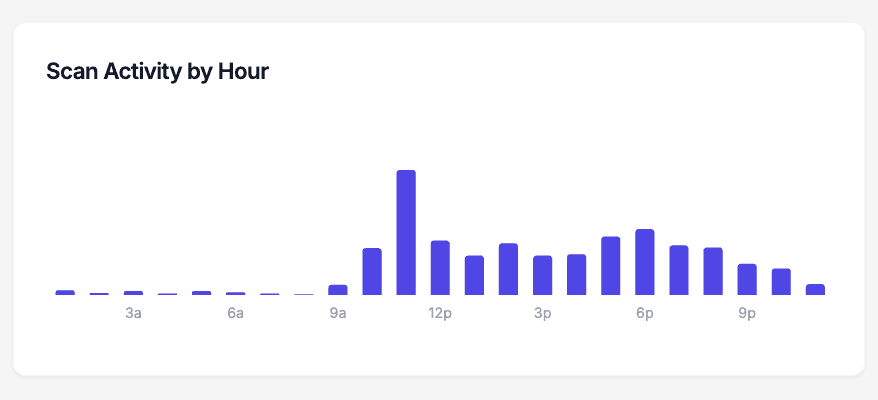
Every shelf talker, window cling, and receipt insert in your store generates scan data the moment a customer scans it. This chart shows scans by hour of day for a single QR code, so you can see whether the endcap display works during the lunch rush or after work, and whether the window cling pulls evening foot traffic after close. Match the pattern against your staffing schedule and register data, and you know which displays earn their shelf space.
How to set up QR codes in your retail store in 10 minutes
- 1
Create a dynamic QR code for the promotion
Go to /create-qr-code and choose the URL type. Point the code at the product page, coupon, review form, or fit guide you want shoppers to reach. Make it dynamic so the destination can change when the promotion does — the printed displays stay exactly as they are.
- 2
Match the code to your store's branding
Set your brand colors and drop in your logo with the live preview. A branded code on a shelf talker reads as part of the display rather than a sticker someone added, and shoppers scan codes they recognize as official.
- 3
Download at 300 DPI and place it at eye level
Export the print-ready 300 DPI SVG for window clings and large signage, or the PNG for shelf talkers and receipt inserts. Place the code at eye level next to the product it references, with a short line telling shoppers what they get for scanning.
- 4
Watch hourly scan patterns in the dashboard
Open the dashboard to see scan counts, the iPhone-versus-Android split, and scan activity by hour of day. If the endcap code only moves during the evening rush, you know when to staff the demo table — and which displays to retire at the next reset.
“We added QRelix QR codes to our seasonal displays. Scan analytics showed us which products customers were most curious about, so we adjusted inventory accordingly.”
QRelix user · Retail industry
Frequently Asked Questions
How can QR codes increase in-store sales?
QR codes bridge physical and digital shopping. Link shelf tags to online reviews, product videos, or comparison pages. Customers who scan QR codes are already engaged, so they convert at higher rates than passive browsers.
Can I track which store locations perform best?
Create separate QR codes for each location or display. QRelix analytics show scan counts, timing, and geographic data so you can compare performance across your retail footprint.
What's the best QR code format for product packaging?
QRelix generates 300 DPI SVG files that scale to any size (from tiny price tags to large window displays) without losing print quality. SVG is the industry standard for packaging design.
How big should a QR code be on a shelf talker or window cling?
Size the code for its scanning distance. A shelf talker scanned at arm's length works at roughly an inch square, while a window cling read from the sidewalk needs to be several times larger. The reliable test is to print a proof at actual size and scan it from where a shopper would actually stand. QRelix exports print-ready 300 DPI SVG and PNG, and SVG scales to any size without losing sharpness.
Can I change where a QR code points after the packaging is already printed?
Yes, if it is a dynamic code. Dynamic QR codes store a redirect, so you can point the same printed code at a new product page, an updated coupon, or a recall notice without reprinting a single label. Static codes, including ones made with free browser tools, are fixed at creation and cannot be edited, which is why packaging that outlives its first destination should use a dynamic code.
Do shoppers need an app to scan QR codes in my store?
No. Modern iPhone and Android cameras scan QR codes natively; a shopper points the camera at the code and taps the link that appears. No download, no separate scanner app. What matters more is context: put a short line next to the code that says what the shopper gets, like 'Scan for the fit guide,' and keep the code at eye level with clear space around it.
Retail guides & tutorials
- QR Codes for Retail: How to Drive In-Store Sales and Track Every Customer Touchpoint
- QR Code for Business: Driving Foot Traffic – Pros & Cons for SMBs
- Google Review QR Code: How to Get More 5-Star Reviews on Autopilot
- Downloading and Printing Your QR Code
Try the free tools retail use most
Ready to Create QR Codes for Your Retail?
Free, no credit card. Create dynamic, trackable QR codes in seconds. Upgrade to Pro to remove the QRelix-branded redirect shown on free scans and unlock unlimited scans.
Create QR Code Free