QR Codes Built for Libraries
Help patrons find books faster, check out without a line, and discover digital resources, all with dynamic QR codes you update from one dashboard. Track scans across every branch.
How Libraries Use QR Codes
Practical ways to integrate QR codes into your libraries workflow, each one trackable with real-time analytics.
Catalog & Availability Lookup
Place QR codes on shelf end-caps and genre displays that link directly to your OPAC search page. Patrons scan to see if a title is available, place a hold, or browse related titles, no terminal required.
Self-Checkout QR Codes
Attach QR codes to book spines or inside covers linking to your self-service checkout flow. Patrons scan and borrow from their phone, cutting wait times at the circulation desk.
Event & Program Sign-Ups
Print QR codes on flyers, bulletin boards, and social media for story times, author talks, and maker-space workshops. Track registrations by location to see which displays drive the most sign-ups.
Digital Resource Access
Link QR codes to e-book platforms, databases, or streaming services like Libby, Kanopy, or your local digital collection. Place them in the stacks so patrons discover digital options right next to physical ones.
Study Room & Equipment Reservations
Post QR codes on study room doors and equipment stations that link to your reservation system. Patrons book a room or a 3-D printer session with a single scan.
Patron Feedback & Surveys
Place QR codes at exits and service desks linking to quick satisfaction surveys. Track response rates by branch to identify service gaps and celebrate wins.
QR Code Types for Libraries
QRelix supports 6+ QR code types. These are the most popular for libraries:
See every scan, in real time
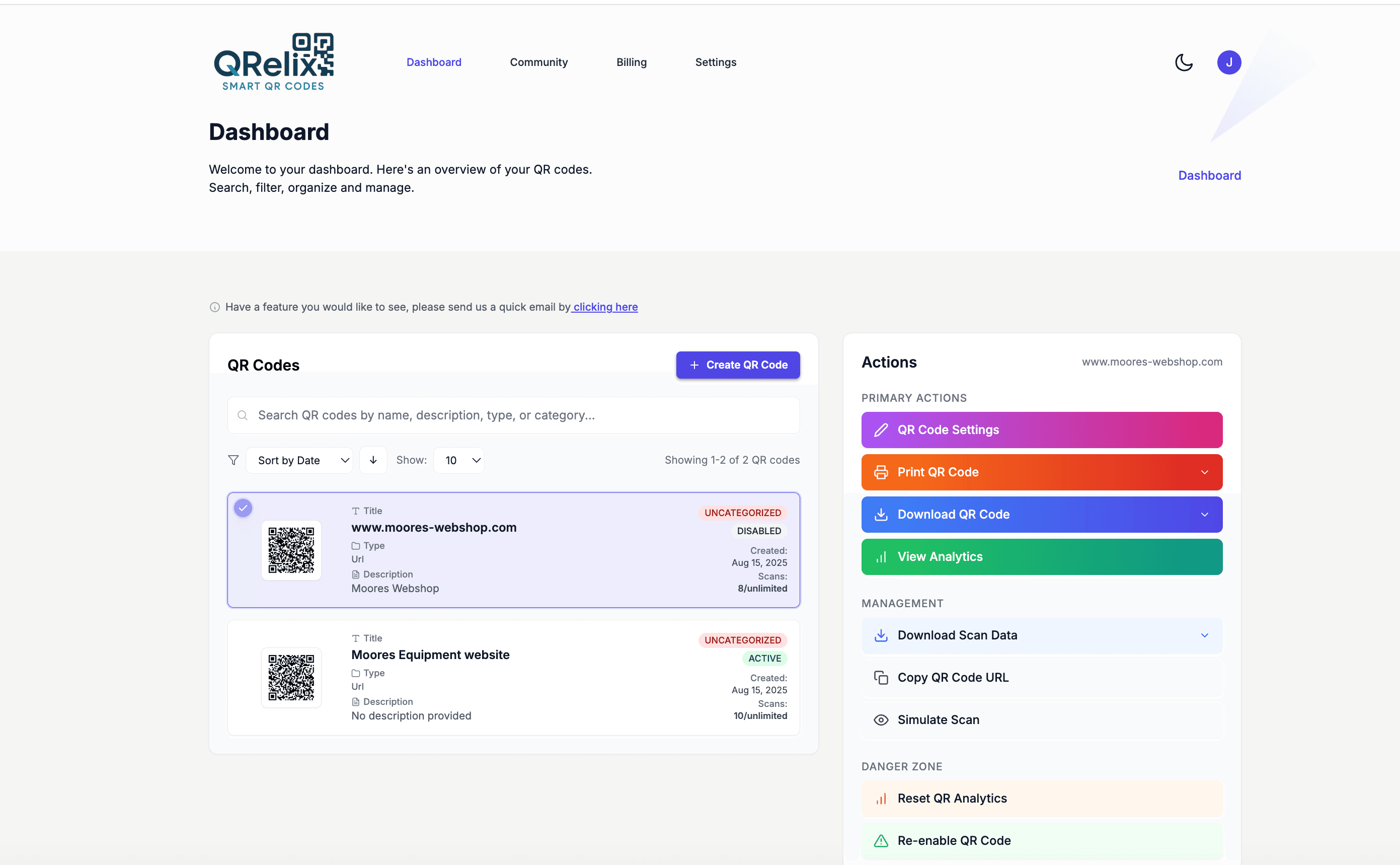
A library runs more QR codes than almost any business: shelf-end signs pointing to the catalog, study room doors with reservation links, WiFi cards at the reading tables, and a fresh batch of program flyers every season. The organizer keeps that sprawl manageable. Codes live in categories — one per branch, one per program series — with labels and quick actions, so the person updating the summer reading flyer link doesn't have to scroll past forty study room codes to find it. When a program ends, you repoint its code at the next one instead of printing new signs.
How to roll out QR codes across your library in an afternoon
- 1
Create one dynamic code per touchpoint
Start at /create-qr-code. Use the URL type for catalog searches and program sign-ups, the File type for reading guides and branch maps, and the WiFi type so patrons join the network without asking at the desk. Dynamic codes let you change any destination later — a new sign-up form each season, same printed sign.
- 2
Brand the codes so patrons trust them
Apply your library's colors and add your logo with the live preview. A consistent look across shelf signs, flyers, and room placards tells patrons the code is official. Keep strong contrast between the code and its background so older phones scan it on the first try.
- 3
Print at 300 DPI and laminate for the stacks
Download the print-ready 300 DPI SVG or PNG. Laminate the copies headed for shelf ends and study room doors — they take daily handling — and leave a white margin around each code. Test-scan with both an iPhone and an Android camera before posting; both scan natively with no app.
- 4
Sort codes into categories and watch the numbers
In the dashboard, group codes by branch and by program series with categories and labels. Scan counts and hour-of-day activity show when patrons actually use each display, and when a semester ends you edit the destination — the sign on the door stays put.
“We added QRelix QR codes to every end-cap display. Patrons love scanning to see what is available, and our hold requests doubled in the first month.”
QRelix user · Library sector
Frequently Asked Questions
How do libraries use QR codes for catalog access?
Create a QRelix dynamic QR code linking to your online catalog (OPAC) and place it on shelf signs, genre end-caps, and the circulation desk. Patrons scan to search titles, check availability, or place holds without queuing at a terminal. Update the link anytime, no reprinting needed.
Can QR codes replace barcodes on library books?
QR codes can supplement traditional barcodes by encoding richer data, since a single scan can open a book's catalog record, reader reviews, or related titles. QRelix dynamic QR codes also give you scan analytics so you know which titles generate the most interest.
How can I track which library programs get the most interest?
Create separate QRelix QR codes for each event flyer or display. The dashboard shows scan counts by code, date, device, and location, letting you compare program interest across branches and time periods to plan future programming.
Do QR codes work in parts of the library with no cell signal?
A dynamic QR code needs an internet connection on the patron's phone to load its destination, so dead zones in the stacks are a real constraint. The fix is a static WiFi code from the free WiFi QR code generator, posted at the entrance and reading tables: static codes encode the network credentials directly into the pattern, so they scan with no connection at all, and once patrons join your network every other code in the building resolves normally.
How do we manage QR codes across multiple branches?
Create separate codes for each branch and group them with the dashboard's categories and labels — one category per branch, labels for program series. Each code reports its own scan counts, device mix, and geography, so you can compare how the same summer reading display performs downtown versus at the east branch. When one branch changes a link, you edit only that code; the others are untouched.
Can a program flyer's QR code expire after registration closes?
Yes. Dynamic codes support expiration by date or by scan count, so a sign-up code can stop working the day registration closes or after the room hits capacity. A cleaner option for recurring programs is to skip expiration and edit the destination instead — the fall flyer's code simply starts pointing at the spring session, and any old flyers still hanging around keep working.
Libraries guides & tutorials
- WiFi QR Code: How to Create One, Best Practices, and Why Your Business Needs It
- QR Codes for Event Marketing: How to Drive Registrations, Streamline Check-Ins, and Measure ROI
- QR Code Asset Tracking: Free Setup for Equipment, Tools & IT in 2026
- Managing Your QR Codes
Try the free tools libraries use most
Ready to Create QR Codes for Your Libraries?
Free, no credit card. Create dynamic, trackable QR codes in seconds. Upgrade to Pro to remove the QRelix-branded redirect shown on free scans and unlock unlimited scans.
Create QR Code Free