QR Codes Built for Insurance
Simplify claims, streamline policy access, and supercharge agent marketing with dynamic QR codes. Update destinations as coverage changes, and track every scan from card to conversion.
How Insurance Use QR Codes
Practical ways to integrate QR codes into your insurance workflow, each one trackable with real-time analytics.
Insurance Card QR Codes
Add a QR code to digital or printed insurance cards that links policyholders to coverage details, provider networks, and emergency contact info, no app download needed.
Claims Submission QR Codes
Print QR codes on policy documents or vehicle stickers that open a pre-filled claims form. Policyholders scan, snap photos of the damage, and submit, all from their phone.
Policy Renewal & Management
Include QR codes on renewal notices that link directly to account portals. Customers review coverage, update payment methods, and renew in seconds.
Agent Marketing Materials
Add QR codes to business cards, brochures, and door hangers that link to quote request forms. Track which channels and agents drive the most leads.
Field Adjuster Verification
Equip adjusters with badge QR codes that link to official verification pages. Policyholders scan to confirm identity and company affiliation before granting access.
Payment & Billing QR Codes
Print QR codes on invoices and billing statements that open your payment portal with account details pre-loaded. Reduce late payments and support calls.
QR Code Types for Insurance
QRelix supports 6+ QR code types. These are the most popular for insurance:
See every scan, in real time
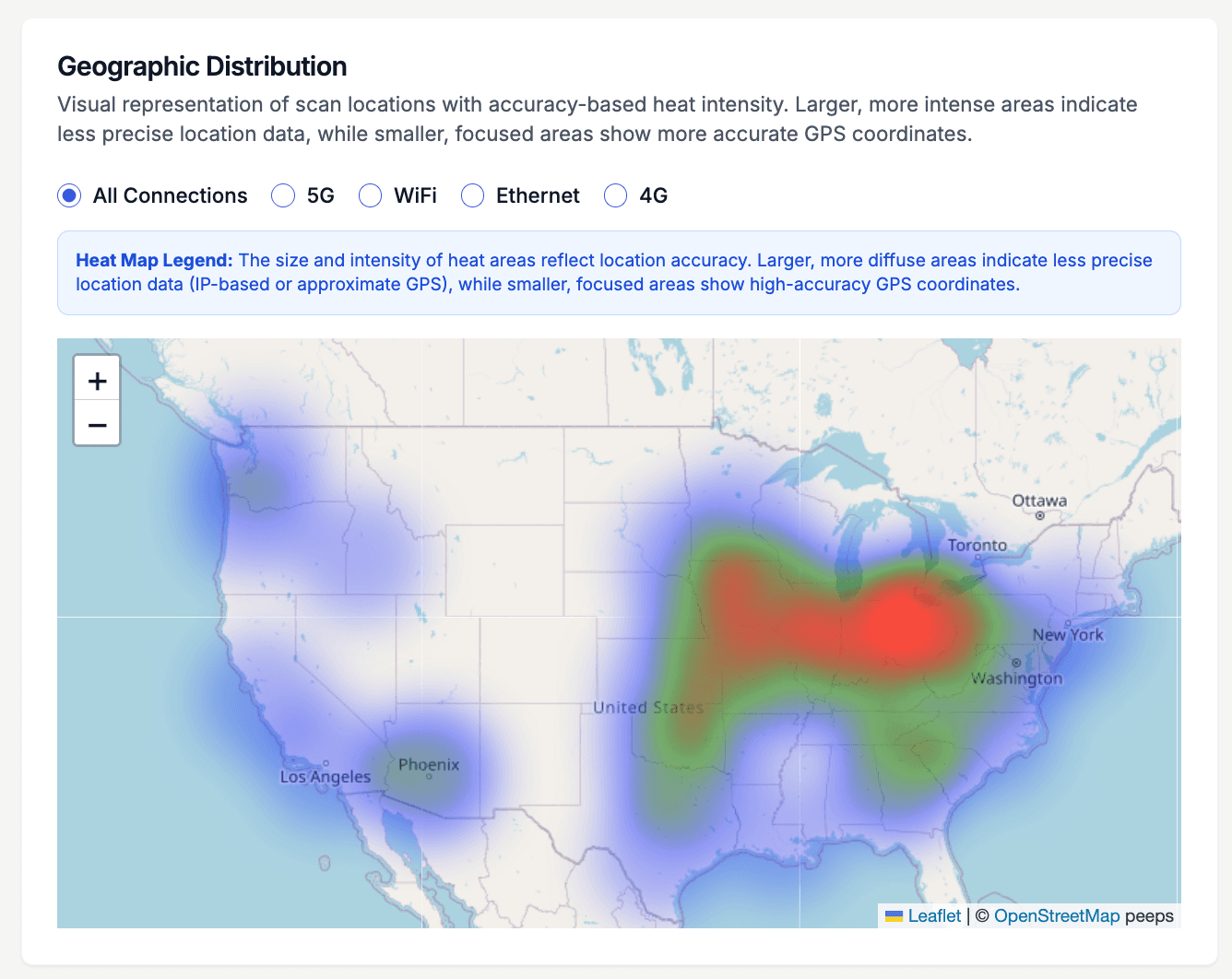
An agency prints QR codes on things that travel: renewal notices mailed across three counties, ID cards riding in glove boxes, door hangers left after a hail storm. The geographic heatmap shows where those codes actually get scanned. When claims-intake scans cluster in the zip codes a storm just crossed, adjusters know where the volume is coming from. When one county's renewal mailer produces scans and another's produces silence, you know which book of business needs a follow-up call. It is the difference between mailing and knowing.
How to set up insurance QR codes in 10 minutes
- 1
Create a dynamic code for claims intake
Go to /create-qr-code and choose the URL type, pointing the code at your claims form or policyholder portal. Because the code is dynamic, ID cards printed years ago keep working through portal migrations and vendor changes — you edit the destination once instead of reissuing cards.
- 2
Brand the code so policyholders trust the scan
Apply your agency's colors and embed your logo using the live preview. Policyholders are rightly wary of anonymous QR codes on anything that looks like a bill, and a code carrying the same branding as the letterhead gives them a reason to trust it. Keep contrast high for reliable scanning.
- 3
Download 300 DPI files for cards and mailers
Export print-ready 300 DPI SVG or PNG files for your print vendor. Place codes on ID cards, renewal notices, agent business cards, and post-storm door hangers. On mailed documents, print a short line under the code stating where it leads so recipients know what to expect before they scan.
- 4
Track scans by region, device, and time
The dashboard's heatmap shows which counties and zip codes respond to each mailer, while per-scan logs record timestamp, device, and location. After a storm, watch claims-intake scans cluster in the affected area to anticipate volume. At renewal season, edit destinations to the current forms without reprinting a single card.
“We added QRelix QR codes to every renewal mailer and saw our online renewal rate jump 34%. The scan analytics also showed us which ZIP codes respond best to direct mail.”
QRelix user · Insurance industry
Frequently Asked Questions
How do insurance companies use QR codes?
Insurance companies use QR codes on insurance cards for instant policy access, on claims documents for faster submission, on renewal notices for one-scan renewals, and on marketing materials to drive quote requests. QRelix dynamic codes let you update the linked destination (like switching from an old claims portal to a new one) without reprinting.
Can I add a QR code to an insurance card?
Yes. Create a QRelix dynamic QR code that links to a policy details page, provider directory, or emergency claims form. Print it on physical cards or embed it in digital wallet passes. If the linked content changes, update the destination instantly.
How do QR codes speed up insurance claims processing?
QR codes on policy documents or vehicle stickers link directly to pre-filled claims forms. Policyholders scan, upload photos, and submit without calling an agent. QRelix analytics show which claim types are submitted most and where, helping you optimize the process.
Are QR codes secure enough for insurance documents?
Yes, when set up correctly. The QR code should link to your secured portal, not contain policy data itself — sensitive information stays behind your existing login, and the code is just the door. For documents that need tighter control, dynamic codes support password protection and expiration by date or scan count, so a code on a claims packet can stop working when the claim closes.
What happens to printed QR codes when our portal URL changes?
Nothing breaks — that is the point of dynamic codes. The code printed on ID cards, renewal notices, and office signage points to a redirect you control, so when your portal moves to a new URL or you switch claims vendors, you edit the destination once in the dashboard and every card already in a wallet keeps working. Static codes, by contrast, would all need reprinting.
Can each agent in our agency have their own QR code?
Yes. Create a vCard code per agent so prospects save contact details in one tap, or a URL code pointing to each agent's quote page. Organize them in the dashboard with labels by agent or office, and the per-code scan counts show whose business cards and yard signs actually generate contact — useful signal when you decide where marketing dollars go.
Insurance guides & tutorials
- Elevate Your Business Card: How to Create QR Code with Tracking for Impact
- Branded QR Codes Are Now a Trust Signal: The Quishing-Era Playbook for Marketers
- QR Code Data Capture: How to Build a Free Field-Inspection System (No Software Required)
- Security and Access Controls
Try the free tools insurance use most
Ready to Create QR Codes for Your Insurance?
Free, no credit card. Create dynamic, trackable QR codes in seconds. Upgrade to Pro to remove the QRelix-branded redirect shown on free scans and unlock unlimited scans.
Create QR Code Free