QR Codes for the Automotive Industry
Put QR codes on window stickers, service reminders, and dealership signage. Link customers to vehicle specs, financing options, and service scheduling, all trackable.
How Automotive Use QR Codes
Practical ways to integrate QR codes into your automotive workflow, each one trackable with real-time analytics.
Vehicle Window Stickers
Add QR codes to window stickers on the lot linking to full vehicle specs, photos, pricing, and financing calculators. Shoppers browse after hours on their phone.
Service Appointment Booking
Print QR codes on service reminder stickers, oil change receipts, and windshield cards linking directly to your service scheduling page.
Vehicle History & Carfax Links
Attach QR codes to used vehicle listings linking to vehicle history reports, inspection results, and maintenance records.
Test Drive Scheduling
Place QR codes on lot signage and newspaper ads that link to an online test drive request form. Capture leads even when the showroom is closed.
Parts & Accessories Catalog
Add QR codes in the service waiting area linking to your parts and accessories catalog. Customers browse while they wait, and add to their service order.
Customer Review & Referral
Print QR codes on thank-you cards at delivery linking to your Google Reviews page and referral program sign-up.
QR Code Types for Automotive
QRelix supports 6+ QR code types. These are the most popular for automotive:
See every scan, in real time
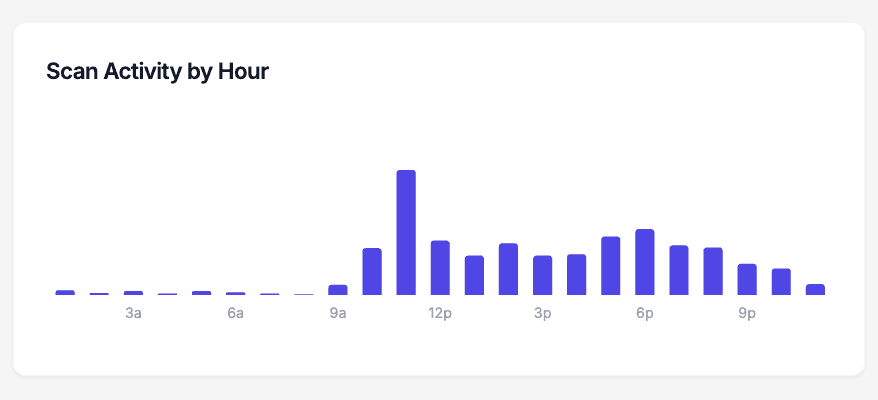
Shoppers walk your lot after close. They cup their hands against the glass, read the window sticker, and leave without talking to anyone. The scan-activity-by-hour chart makes that invisible traffic visible: when window sticker codes get scanned at 8 p.m. on a Tuesday or across a Sunday afternoon, the bars show it. That tells you which hours your lot actually draws shoppers, when evening floor coverage would pay for itself, and whether your weekend advertising is moving people onto the pavement.
How to set up QR codes at your dealership in 10 minutes
- 1
Create one dynamic URL code per vehicle
Go to /create-qr-code, choose the URL type, and link the code to that unit's page on your site — the photos, price, and specs a shopper wants while standing at the glass. One code per VIN keeps the analytics clean, and the dynamic destination can change when the unit does.
- 2
Brand the code with your store's colors and logo
Apply your dealership's colors and drop the logo in the center with the live preview. A branded code on a window sticker reads as part of the store's materials rather than a random sticker, which matters when you are asking a stranger on a dark lot to scan it.
- 3
Print at 300 DPI and place it at eye level on the glass
Download the print-ready 300 DPI SVG or PNG for your window sticker or hang tag template. Place the code at standing eye level on a side window, sized at least 2 x 2 inches, and avoid heavily tinted glass and spots where overnight lot lighting throws glare.
- 4
Watch hourly scans and repoint codes when units sell
In the dashboard, watch per-vehicle scan counts and scan activity by hour to see when the lot is busiest. When a unit sells, edit the code's destination to a comparable in-stock vehicle or your inventory page so a leftover tag never sends a shopper to a dead listing.
“We added QRelix QR codes to every vehicle on the lot. After-hours web traffic to our listings jumped 60%. Turns out people love browsing the lot on Sunday and scanning for details.”
QRelix user · Automotive industry
Frequently Asked Questions
How do car dealerships use QR codes?
Dealerships place QR codes on vehicle window stickers, lot signage, and print ads linking to full vehicle details, financing options, and test drive booking. Shoppers browsing after hours can scan and engage from the sidewalk.
Can I track which vehicles get the most interest?
Create a unique QR code for each vehicle on your lot. QRelix analytics show scan counts per code, so you know which cars shoppers are scanning most and can prioritize those in your advertising.
How do QR codes help with service department retention?
Stick QR codes on oil change reminder stickers and service receipts that link to your online booking page. Customers scan when it's time for service instead of calling around. QRelix analytics show when customers scan, helping you time follow-up reminders.
What happens to a window sticker QR code when the vehicle sells?
You repoint it. Because QRelix codes are dynamic, you edit the destination in the dashboard — to a comparable in-stock unit, your inventory search page, or a trade-in offer — and the printed code keeps working. You can keep a standing set of codes and reassign them as inventory turns instead of generating a fresh code for every delivery. The scan history stays with each code either way.
Can each salesperson have their own QR code?
Yes. Create a vCard code per salesperson so a scan saves their name, number, and email straight to the shopper's phone, or a URL code pointing to their scheduling page. Each code has its own scan counts in the dashboard, which gives you a simple read on which team members' cards and desk placards actually get used. Use labels to group codes by person or department.
Where should QR codes go on a vehicle so shoppers can actually scan them?
Standing eye level on a side window works best. Avoid deeply tinted glass, spots where lot lights or sun create glare, and dashboard placements that force shoppers to shoot through the windshield at an angle. Print at least 2 x 2 inches — larger on trucks and SUVs where the window sits higher. Modern iPhone and Android cameras scan natively, so a clean, well-placed code is all a shopper needs.
Automotive guides & tutorials
- QR Code Lead Capture: Turn Every Scan Into a Real Lead (Free 2026 Setup)
- QR Code for Appointments: Free Booking Links That Get You More Bookings (2026)
- Google Review QR Code: How to Get More 5-Star Reviews on Autopilot
- Elevate Your Business Card: How to Create QR Code with Tracking for Impact
Try the free tools automotive use most
Ready to Create QR Codes for Your Automotive?
Free, no credit card. Create dynamic, trackable QR codes in seconds. Upgrade to Pro to remove the QRelix-branded redirect shown on free scans and unlock unlimited scans.
Create QR Code Free