QR Codes That Make Your Wedding Seamless
Add elegant QR codes to your invitations, programs, and table cards that link to your RSVP form, wedding website, photo gallery, and gift registry. Customize with your wedding colors and track responses in real-time.
How Weddings Use QR Codes
Practical ways to integrate QR codes into your weddings workflow, each one trackable with real-time analytics.
RSVP & Guest Response
Print QR codes on invitations or save-the-dates that link directly to your RSVP form. Guests respond in seconds and you track responses digitally, with no more chasing reply cards.
Wedding Website Link
Include a QR code on every printed piece (invitations, programs, table cards) linking to your wedding website with all the details guests need.
Photo & Video Sharing
Place QR codes on reception tables linking to a shared photo album (Google Photos, iCloud, or your wedding app). Guests upload their photos and you collect every angle.
Gift Registry Access
Add QR codes to shower invitations or your wedding website linking directly to your registry on Amazon, Zola, or any platform.
Seating Chart & Venue Map
Display a QR code at the reception entrance linking to an interactive seating chart or venue map so guests find their table without crowding the board.
Day-Of Schedule & Program
Replace printed ceremony programs with a QR code on each seat linking to a digital program with the timeline, wedding party bios, and song lyrics.
QR Code Types for Weddings
QRelix supports 6+ QR code types. These are the most popular for weddings:
See every scan, in real time
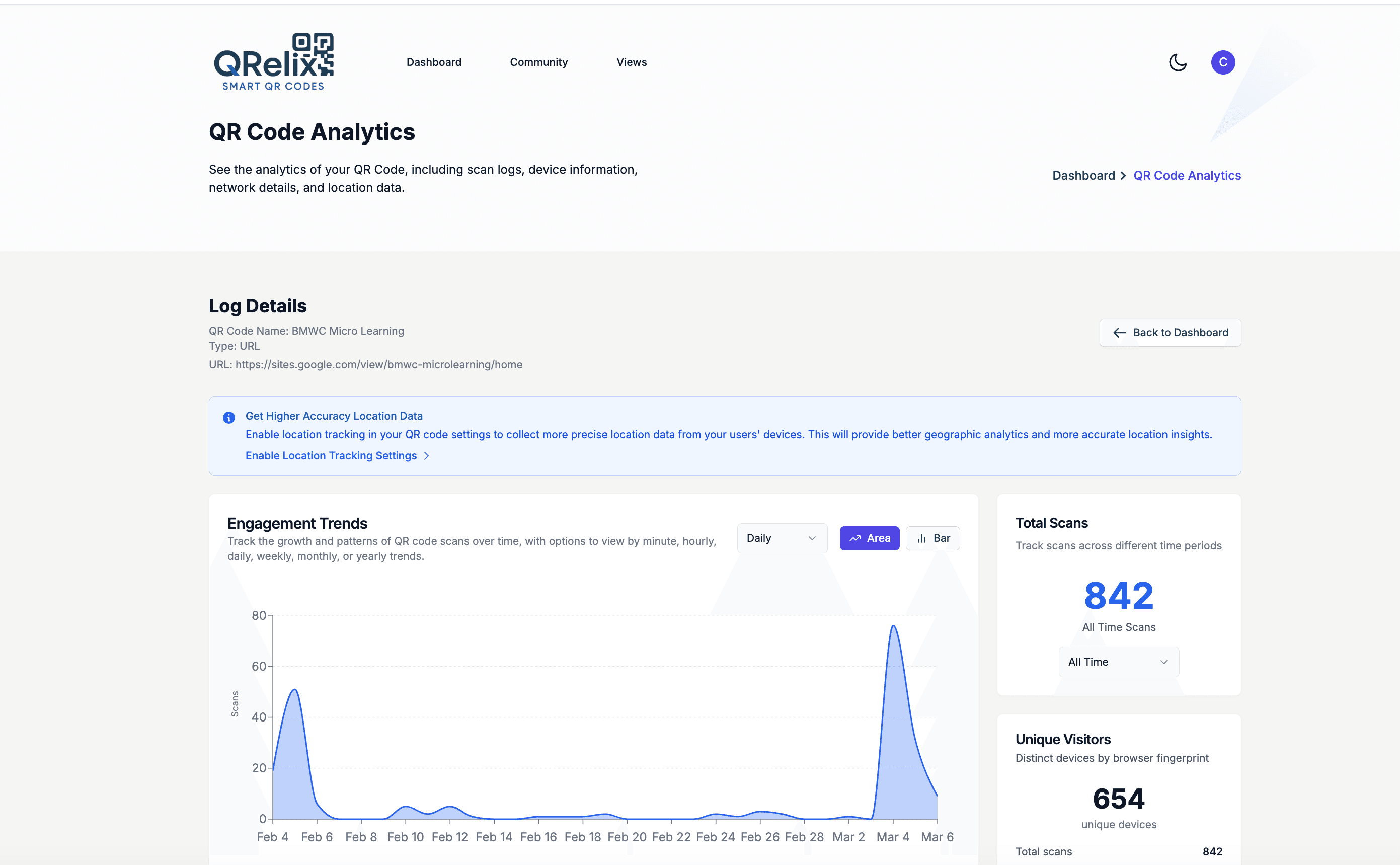
The analytics dashboard answers the question every couple asks after invitations go out: is anyone scanning this? Scan trends show activity climbing in the days after your suite hits mailboxes, so you know the RSVP code on the insert card is working. The device breakdown confirms guests are scanning from their phones, and the geography view shows which out-of-town guests have opened your wedding website before booking travel. On the day itself, the same dashboard tracks the welcome sign, the photo-share cards on each table, and the registry code — without asking a single guest whether they saw them.
How to set up your wedding QR codes in 10 minutes
- 1
Create a dynamic code for your wedding website
Go to /create-qr-code and choose the URL type. Point it at your wedding website or RSVP page. Because the code is dynamic, you can change the destination later — if the venue shifts or the RSVP deadline moves, every printed invitation keeps working without a reprint.
- 2
Match the code to your invitation suite
Set the code's colors to your wedding palette and embed a monogram or motif as the logo. Style presets with a live preview let you check readability against your paper color before anything goes to the printer. Keep the contrast high — a champagne code on ivory stock will not scan reliably.
- 3
Download 300 DPI files for your stationer
Download the code as a print-ready 300 DPI SVG or PNG and send it to your stationer or print shop. The SVG scales cleanly from a small insert card to a poster-size welcome sign. Place codes where guests naturally pause: the invitation insert, the welcome table, and each reception table.
- 4
Track scans and update details without reprinting
Watch the dashboard after invitations mail. Scan counts tell you guests are finding the RSVP page, and the geography view shows which cities your guests are scanning from. If anything changes — ceremony time, shuttle schedule, registry — edit the destination in the dashboard and every code already in the mail updates instantly.
“We put QRelix QR codes on our invitations for RSVPs and on reception tables for photo sharing. We got 95% digital RSVPs and over 2,000 guest photos collected in one night.”
QRelix user · Wedding industry
Frequently Asked Questions
How do I add a QR code to my wedding invitation?
Create a QR code in QRelix linking to your wedding website or RSVP form. Customize it with your wedding colors and optionally add your monogram or initials as a logo. Download as a 300 DPI SVG and send it to your stationery designer, since it scales perfectly to any invitation size.
Can guests share photos through a QR code?
Yes. Create a QR code linking to a shared Google Photos album, iCloud link, or wedding photo app. Place it on reception tables and guests scan to upload their photos directly. You get every candid shot without chasing people after the event.
Can I customize the QR code to match my wedding theme?
Absolutely. QRelix lets you change the QR code colors, add a logo or monogram, and choose from multiple design styles. Match your wedding palette so the QR code looks like a design element, not an afterthought.
What size should a QR code be on a wedding invitation?
Keep the printed code at least 2 x 2 cm (about 0.8 inches) so phone cameras can read it from a natural holding distance. QRelix exports print-ready 300 DPI SVG and PNG files, so the same code stays sharp on a small RSVP insert or a poster-size welcome sign. Print a test copy on your actual paper stock and scan it with both an iPhone and an Android phone before the full run.
Do wedding guests need a special app to scan QR codes?
No. Modern iPhone and Android cameras scan QR codes natively — guests point the camera at the code and tap the link that appears. That covers nearly every guest with a smartphone, including older relatives who have never installed a scanner app. For the few guests without smartphones, print your wedding website address under the code so no one is left out.
What happens to my wedding QR codes after the big day?
They keep working, and you can put them to use. Because the codes are dynamic, you can repoint the invitation code to your photo gallery or thank-you page after the wedding, so guests who kept their invitation can find the album. If you would rather retire a code, set an expiration date or scan limit in the dashboard and it stops resolving on your schedule.
Weddings guides & tutorials
- Custom QR Code Generator: How to Design Free Branded QR Codes with a Logo (2026)
- WiFi QR Code: How to Create One, Best Practices, and Why Your Business Needs It
- Customizing Your QR Code Design
- Downloading and Printing Your QR Code
Try the free tools weddings use most
Ready to Create QR Codes for Your Weddings?
Free, no credit card. Create dynamic, trackable QR codes in seconds. Upgrade to Pro to remove the QRelix-branded redirect shown on free scans and unlock unlimited scans.
Create QR Code Free