QR Codes for Education: Smarter Classrooms & Engaged Students
Link students to assignments, resources, and learning materials with a single scan. Track engagement to see which resources get the most use, and which students need help.
How Education Use QR Codes
Practical ways to integrate QR codes into your education workflow, each one trackable with real-time analytics.
Assignment & Worksheet Links
Print QR codes on handouts that link to digital worksheets, Google Forms quizzes, or submission portals. Students scan and start working instantly.
Library Resource Access
Place QR codes on library shelves that link to digital copies, audiobook versions, or related online resources for each book.
E-Learning Content Delivery
Embed QR codes in textbooks or posters that link to supplementary videos, interactive simulations, or online modules.
Parent-Teacher Communication
Send QR codes home with students that link to class newsletters, parent portals, or conference scheduling pages.
School Event Promotion
Post QR codes around campus linking to event details, RSVP forms, or ticket purchases for school plays, sports, and fundraisers.
Campus WiFi Access
Place QR codes in classrooms and common areas that let students and guests connect to the school WiFi network with one scan.
QR Code Types for Education
QRelix supports 6+ QR code types. These are the most popular for education:
See every scan, in real time
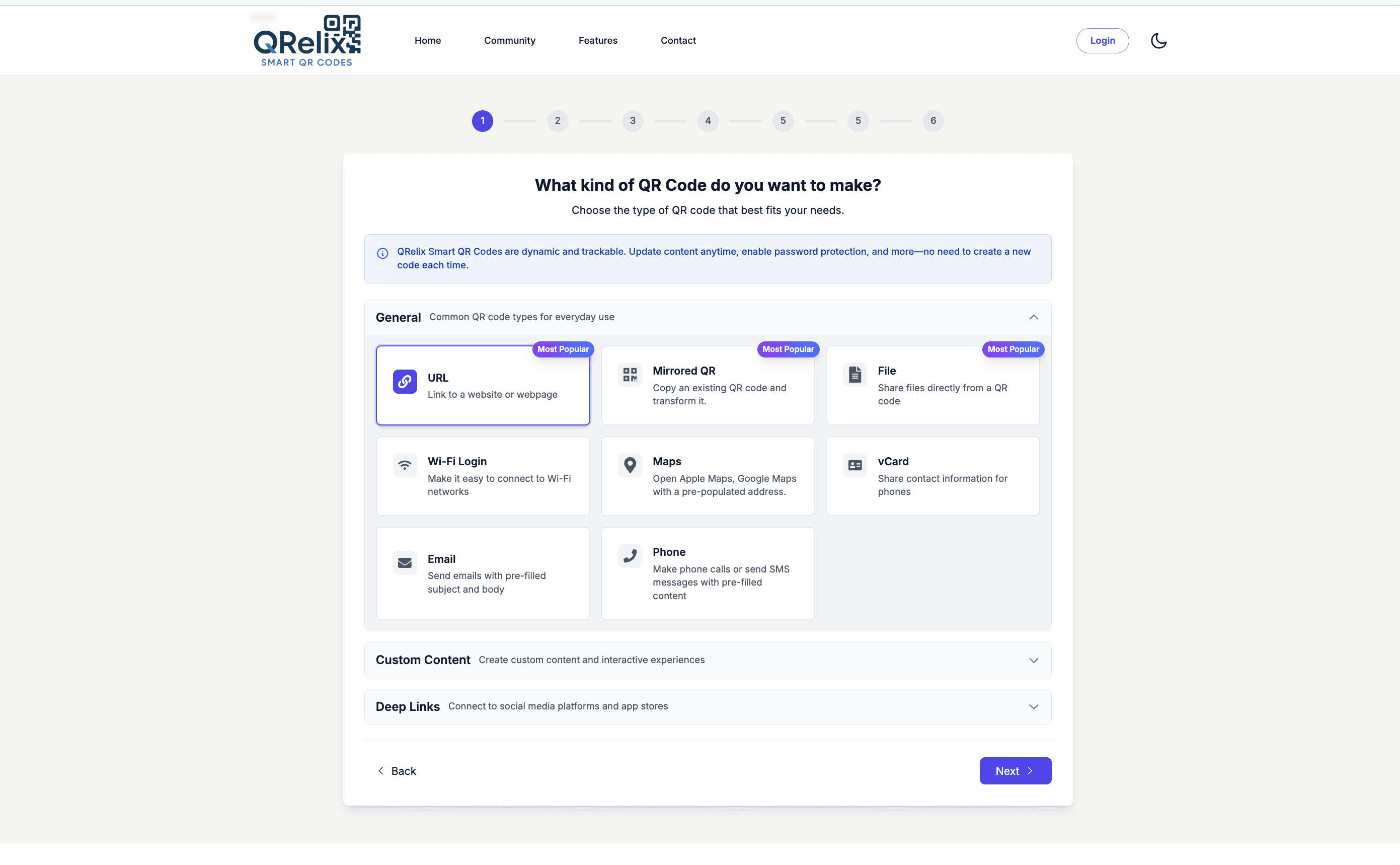
This is the creation wizard a teacher works in: pick a QR type, link the content, adjust colors, and watch the live preview update before anything gets printed. For a classroom, that means the reading list code on Monday's worksheet can be built during a planning period — in school colors, with the mascot logo if you want — and previewed before it goes to the copier. The download step hands you a 300 DPI file, so the code stays scannable even after a worksheet has been photocopied a class set at a time.
How to set up QR codes for your classroom this week
- 1
Pick the right QR type for the material
Go to /create-qr-code and match the type to the job: URL for assignments and e-learning platforms, WiFi for the guest network poster, Email for a pre-addressed parent contact code, Notes for short text instructions. If a note must open with no internet at all, use the free static text tool instead — static codes embed the text directly in the code itself. Dynamic codes let you reuse one worksheet code across units by repointing it.
- 2
Style it so students recognize it
Set school colors and add the school or class logo in the customization step, using the live preview to check readability. Keep the code dark on a light background — decorative light-on-dark codes photocopy badly. A consistent look across your handouts teaches students that your codes are safe to scan.
- 3
Print at worksheet and poster sizes
Download PNG for worksheets and handouts, and SVG for anything wall-sized like library posters or hallway displays. On a worksheet, three-quarters of an inch to one inch square is enough for a phone held at reading distance. The files are 300 DPI, so codes stay sharp through the copier.
- 4
Check who scanned, and when
Open the dashboard after the assignment goes home. Scan counts show how many students opened the resource, and the activity-by-hour chart shows whether homework happens at 4 pm or 10 pm. If a code isn't getting scanned, repoint it or re-teach it — no reprinting needed.
“I put QR codes on every lab station linking to procedure videos. Students who scan the code before starting make 40% fewer errors.”
QRelix user · Education sector
Frequently Asked Questions
How can teachers use QR codes in the classroom?
Teachers can print QR codes on worksheets, posters, and handouts linking to online assignments, videos, or interactive resources. QRelix analytics show how many students accessed each resource.
Can I create QR codes for multiple classes?
Yes. Create separate QR codes for each class or assignment. QRelix lets you organize, label, and track each one independently from your dashboard.
Do students need a special app to scan QR codes?
No. Modern smartphones (both iPhone and Android) scan QR codes natively through the camera app. No downloads required.
Will QR code links work on a school network with content filters?
A QR code opens the same URL a student could type by hand, so your district's web filters apply exactly as they would in a browser — the code itself bypasses nothing. Test each code on the student network before printing. If a destination gets blocked mid-term, a dynamic QRelix code lets you swap in an approved alternate resource without reprinting the worksheet.
How big should a QR code be on a printed worksheet?
About three-quarters of an inch to one inch (2 to 2.5 cm) square works for a phone held at normal reading distance. Go bigger for posters and anything scanned from across a room. Leave white space around the code, avoid printing it over images or colored backgrounds, and use the 300 DPI download rather than a screenshot so repeated photocopying doesn't blur the modules.
Can I tell whether students actually scanned an assignment code?
Yes, at the aggregate level. Dynamic codes report scan counts, device types, and activity by hour, and individual scan logs show the time and device of each scan — but not student names, so you can confirm 24 scans happened the night before the quiz without knowing who scanned. Students need no app or account; the phone camera works. For per-student accountability, pair the code with a form or LMS assignment that records names.
Education guides & tutorials
- WiFi QR Code: How to Create One, Best Practices, and Why Your Business Needs It
- Free QR Code Maker: How to Build Custom, Trackable QR Codes in 2026 (No Credit Card)
- QR Code Types Overview
Try the free tools education use most
Ready to Create QR Codes for Your Education?
Free, no credit card. Create dynamic, trackable QR codes in seconds. Upgrade to Pro to remove the QRelix-branded redirect shown on free scans and unlock unlimited scans.
Create QR Code Free