QR Codes for Construction Sites
Replace clipboards and binders with scannable QR codes. Link crews to safety plans, blueprints, inspection forms, and equipment logs, all from their phone, right on the jobsite.
How Construction Use QR Codes
Practical ways to integrate QR codes into your construction workflow, each one trackable with real-time analytics.
Site Safety Plans & Signage
Post QR codes at site entrances linking to the current safety plan, emergency contacts, and hazard maps. Updated centrally as conditions change.
Blueprint & Drawing Access
Attach QR codes to work areas linking to the latest revision of blueprints and drawings. No more outdated printouts causing rework.
Daily Inspection Checklists
Place QR codes on equipment and scaffold tags linking to digital inspection forms. Crews scan, fill out the checklist, and results log with timestamp and GPS.
Equipment & Tool Tracking
Tag tools and heavy equipment with QR codes linking to checkout logs, maintenance schedules, and certification records.
Subcontractor Onboarding
Provide QR codes at the site office linking to orientation materials, safety videos, and required-document upload forms for new subs.
Punch List & Deficiency Tracking
Generate QR codes for each unit or area linking to a digital punch list. Inspectors scan, log deficiencies with photos, and assign corrections.
QR Code Types for Construction
QRelix supports 6+ QR code types. These are the most popular for construction:
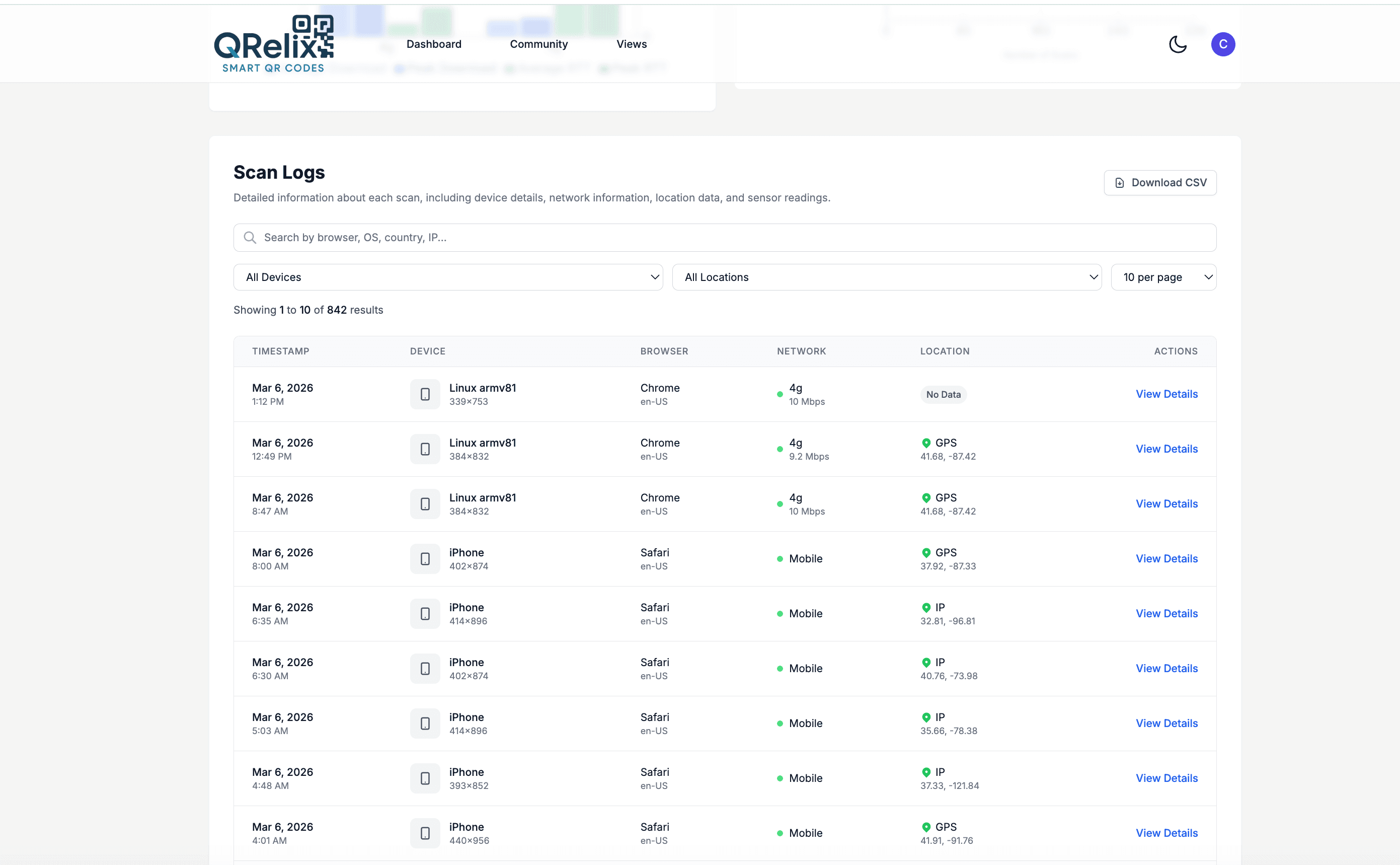
See every scan, in real time
When an OSHA inspector asks whether the crew reviewed the site-specific safety plan, a laminated sign-in sheet is a weak answer. The access log gives you a better one: every scan of the code posted at the gate, on the crane, or inside the trailer is recorded with a timestamp, device, and location. You can see that the pour checklist was pulled up at 6:40 a.m., before the concrete trucks arrived. It is a running record of what was looked at and when, built automatically.
How to set up QR codes on your jobsite in 10 minutes
- 1
Create a URL code for each site document
Go to /create-qr-code, choose the URL type, and point the code at the document crews need at that spot: the site safety plan at the gate, the lift plan at the crane, the daily checklist at the trailer. Dynamic codes let you swap in a revised PDF later without touching the signage.
- 2
Brand the code so crews trust it
Apply your company colors and logo with the live preview. On a jobsite full of stickers, a code that clearly carries the GC's branding is the one subs will actually scan. Keep the code dark on a light background for reliable reads in bright sun and low trailer light.
- 3
Download 300 DPI files and post them where work happens
Download the print-ready 300 DPI SVG or PNG and print on weatherproof material. Mount codes at eye level at the gate, on equipment, and inside the trailer — anywhere a crew member would otherwise have to walk back for paper. Print large for signs read from a ladder or lift.
- 4
Track scans and update documents from the dashboard
Watch scan counts, the access log, and scan activity by hour in your dashboard. If the checklist code is quiet before first shift, raise it at the toolbox talk. When a document is revised, edit the code's destination once and every printed sign on site points to the current version.
“Our OSHA inspector was impressed that every worker could scan a QR code and pull up the current safety plan on their phone. It used to be a binder nobody could find.”
QRelix user · Construction industry
Frequently Asked Questions
How do QR codes improve construction site safety?
Post QR codes at every entry point and hazard zone linking to the current safety plan, emergency procedures, and MSDS sheets. Workers scan for instant access, with no need to find a binder in the site trailer.
Can QR codes survive outdoor construction conditions?
QRelix SVG output prints cleanly on weatherproof stickers, metal tags, and laminated signs. If a label is damaged, print a replacement, and the dynamic URL and scan data persist.
How do I ensure crews are looking at the latest blueprints?
With dynamic QR codes, update the linked document URL whenever a new revision is issued. The same QR code on the jobsite wall now points to revision 5 instead of revision 4, with zero reprinting.
How big should a QR code be on jobsite signage?
Match the size to the scan distance. A code on a trailer door scanned at arm's length can be as small as 2 x 2 inches, but a code on fence screening or a gate sign should be printed much larger so workers can scan without stepping into traffic or a controlled zone. QRelix downloads are 300 DPI SVG files that scale cleanly to banner size. Print a test and scan it from where a worker would actually stand.
Can I password-protect drawings and contracts behind a QR code?
Yes. Any dynamic QR code can require a password before the destination opens, so a code posted in a shared trailer can lead to documents only the subs you gave the password can view. You can also set codes to expire on a date or after a set number of scans. Both controls are set in the dashboard and can be changed anytime without reprinting the sign.
What happens to my QR codes when the project wraps up?
Nothing forces you to throw them away. Because the codes are dynamic, you can repoint a code from a finished project's documents to closeout paperwork, warranty information, or the next job's plans. If a code should go dark after handover, set an expiration date on it. In the dashboard, categories and labels keep each project's codes grouped, so closing out one job and starting the next stays organized.
Construction guides & tutorials
- QR Code Compliance Tracking: How to Build a Free Audit Trail for OSHA, FDA & ISO Inspections (2026)
- QR Code Equipment Tracking: Free Setup for Tools, Machinery & Field Gear (2026)
- QR Code Data Capture: How to Build a Free Field-Inspection System (No Software Required)
- Security and Access Controls
Try the free tools construction use most
Ready to Create QR Codes for Your Construction?
Free, no credit card. Create dynamic, trackable QR codes in seconds. Upgrade to Pro to remove the QRelix-branded redirect shown on free scans and unlock unlimited scans.
Create QR Code Free