Landlord QR Codes: Venmo Rent Collection, Taped to the Fridge
Tape one QR code inside the kitchen cabinet or post it in the tenant portal. Tenants scan, Venmo opens with the rent amount and month already filled in the memo, they hit send. Same-day rent, no late calls, no checks lost in the mail.
How Landlords Use QR Codes
Practical ways to integrate QR codes into your landlords workflow, each one trackable with real-time analytics.
Venmo Rent Payment QR Codes
Generate a Venmo Pay QR code with your username, monthly rent amount, and a memo like "May 2026 rent, Unit 3B." Tenant scans, the Venmo screen is pre-filled, they tap send. Money lands in your account within minutes, with the memo intact for your bookkeeping.
Maintenance Request Forms
Print a QR code in each unit linking to your maintenance form (Google Form, Buildium, AppFolio). Tenants scan, fill in the issue with photos, and the ticket lands in your inbox, with no 11pm phone calls about a dripping faucet.
Lease & Move-In Docs
Link a QR code on move-in day to the lease PDF, house rules, appliance manuals, and emergency contacts. New tenants have one scannable hub instead of a manila envelope they'll lose by week two.
Property Listing & Tour Booking
Post a QR code on yard signs and in vacant units linking to the listing, virtual tour, and showing scheduler. Prospects scan from the curb and book a viewing without calling.
WiFi & Welcome Info
Place a QR code on the fridge with WiFi credentials, trash day, parking rules, and the local pizza number. Cuts down first-week tenant questions and looks far more professional than a sticky note.
Security Deposit & Application Fees
Create separate Venmo Pay QR codes for application fees, security deposits, and pet deposits, each with a memo that survives in the Venmo history. Track scans to see which listings convert applicants to signed leases.
QR Code Types for Landlords
QRelix supports 6+ QR code types. These are the most popular for landlords:
See every scan, in real time
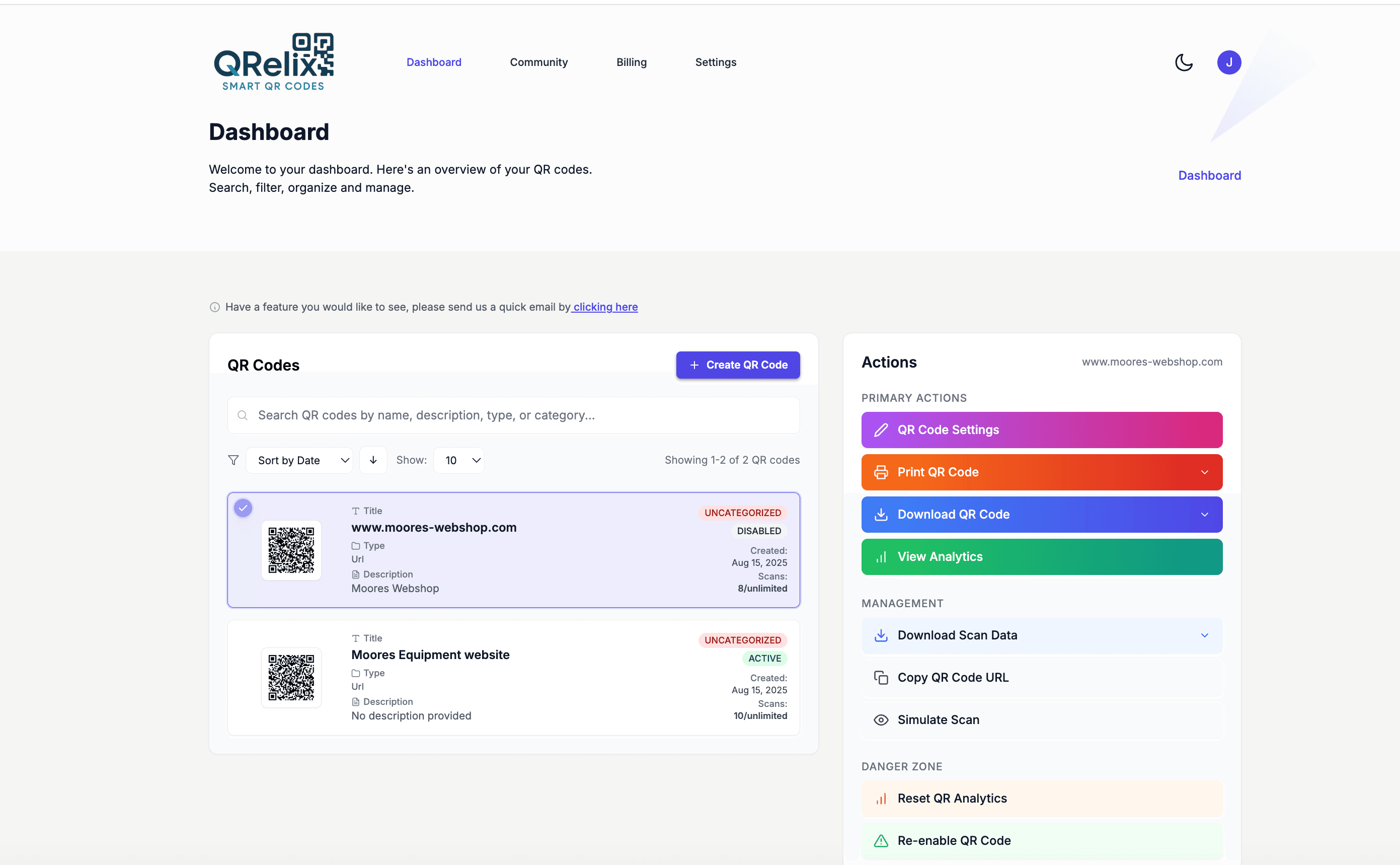
One rental generates more QR codes than you'd expect: a Venmo code for rent on the fridge, a maintenance request form inside the kitchen cabinet, the lease PDF in the move-in packet, WiFi details in the welcome binder. Multiply that by three units and you have a dozen codes to keep straight. The dashboard above is how QRelix handles it — every code grouped into categories you define, so one unit's rent, maintenance, and lease codes live together, each with quick actions to edit the destination or check its scans.
How to set up QR codes for your rental property in 15 minutes
- 1
Create one code per job, starting with rent
At /create-qr-code, make a Venmo code pointed at your rent account, a URL code for your maintenance request form, and a File code for the signed lease PDF. Each one is dynamic, so next year's lease or a new maintenance form is an edit, not a reprint.
- 2
Brand them and label them by unit
Set your colors and add a logo if you manage under a business name. In the dashboard, group the codes into a category per property and label each one — 'Unit B rent', 'Unit B maintenance' — so you always know which printout maps to which code.
- 3
Print and place them where tenants already look
Download the 300 DPI PNG, print, and post each code where it gets used: the rent code on the fridge, the maintenance code inside the kitchen cabinet door or next to the breaker panel, WiFi and welcome info in the move-in binder.
- 4
Confirm tenants actually use them
Check the dashboard for scan timestamps. A scan on the lease code confirms the tenant opened the documents; a scan on the maintenance code that never becomes a request tells you the form is confusing. When a unit turns over, edit the destinations and leave the printed codes on the wall.
“We have eight rental units and used to chase rent for the first week of every month. Since posting QRelix Venmo codes in every kitchen, more than 90% of tenants pay by the 2nd. Worth it for the texts I don't have to send.”
QRelix user · Rental property owner
Frequently Asked Questions
Can I use a Venmo QR code to collect rent?
Yes. Generate a Venmo Pay QR code in QRelix with your Venmo username, the rent amount, and a memo like "May rent, 123 Main St." Tape it inside the unit or send it digitally. Tenants scan, their Venmo app opens with everything pre-filled, they tap send. Money usually lands in your account within minutes, with the memo intact for your audit trail.
Is collecting rent through Venmo allowed for landlords?
Venmo permits rent payments between tenants and landlords on personal accounts. For portfolios beyond a few units, Venmo recommends a Venmo Business profile so payments are properly itemized, and QRelix supports both with the same QR code workflow. Standard 1099-K tax-reporting thresholds apply to landlords like any other recipient.
Can I track which tenants paid via the QR code?
Yes. Create a separate QRelix QR code for each unit. The analytics dashboard shows scan counts by date, time, and device, so you can see which units scanned by the 1st of the month and which didn't. Pair that with your Venmo activity log for full payment attribution.
What if a tenant doesn't have the Venmo app installed?
The QR code falls back to Venmo's web checkout so tenants can still pay from a browser. For tenants without Venmo at all, pair the rent QR with a backup option (Zelle, ACH) on the same printable card: one QR code, one fallback line.
Can I update the rent amount each month without reprinting?
Yes, QRelix QR codes are dynamic. Update the amount, memo, or Venmo username from your dashboard at any time and the same printed code instantly points to the new payment. Useful for rent increases, prorated months, or splitting a multi-tenant unit.
How is this better than just texting a Venmo username?
Texting a username works, but the tenant has to type the amount themselves, leading to typos, forgotten months, and "sorry I'll send it tomorrow." A QR code with the amount and memo pre-filled removes every step except 'tap send.' QRelix also tracks scans so you know who at least opened the prompt.
Can I reuse the same QR codes when a tenant moves out?
Yes — that is the point of dynamic codes. The printed code on the fridge stays put; you edit its destination in the QRelix dashboard. Swap the old lease PDF for the new one, update the welcome page for the new tenant, and reset the maintenance form. Nothing in the unit gets reprinted. If you rotate the WiFi password between tenants, a dynamic WiFi code updates the same way; a static one would need reprinting.
Can I manage QR codes for multiple properties in one account?
Yes. The QRelix dashboard organizes codes into categories with labels, so each property or unit gets its own group — rent, maintenance, lease, and WiFi codes together. Analytics stay separate per code, which means you can see that one unit's maintenance code was scanned Tuesday night while another's has not been touched in a month. One account, one login, every door you own.
Can I password-protect the lease or move-in documents?
Yes. Dynamic QRelix codes support password protection, so a code posted in a shared hallway or visible in a listing photo does not expose the lease to anyone who scans it. Give the password to the tenant at signing. You can also set a code to expire by date or after a set number of scans — useful for an application-fee code you only want live while the unit is vacant.
Landlords guides & tutorials
- QR Codes for Landlords — Venmo Rent Collection, Maintenance Forms & Lease PDFs
- WiFi QR Code: How to Create One, Best Practices, and Why Your Business Needs It
- Security and Access Controls
- Managing Your QR Codes
Try the free tools landlords use most
Ready to Create QR Codes for Your Rentals?
Free, no credit card. Create dynamic, trackable QR codes in seconds. Upgrade to Pro to remove the QRelix-branded redirect shown on free scans and unlock unlimited scans.
Create QR Code Free