QR Codes Designed for Museums & Galleries
Turn every exhibit into an interactive experience. Link QR codes to audio guides, video documentaries, AR content, and multilingual descriptions, then track which pieces captivate visitors most.
How Museums & Art Galleries Use QR Codes
Practical ways to integrate QR codes into your museums & art galleries workflow, each one trackable with real-time analytics.
Audio Tour QR Codes
Place QR codes beside each exhibit that link to narrated audio guides. Visitors scan and listen at their own pace, no bulky headset rentals required.
Exhibit Information Cards
Replace lengthy wall text with a scannable QR code linking to rich multimedia content: artist bios, historical context, high-res images, and related works.
Accessibility Content
Link QR codes to sign language videos, screen-reader-friendly text, or audio descriptions so every visitor can engage with your collection.
Ticketing & Event Registration
Place QR codes on promotional materials that link directly to ticket purchasing or special exhibition registration pages.
Visitor Feedback & Surveys
Collect visitor feedback by placing QR codes at exhibit exits. Track satisfaction by gallery, exhibition, or time period.
Gift Shop & Membership Promotions
Drive gift shop traffic and membership sign-ups with QR codes on exhibit labels that link to related merchandise or exclusive member content.
QR Code Types for Museums & Art Galleries
QRelix supports 6+ QR code types. These are the most popular for museums & art galleries:
See every scan, in real time
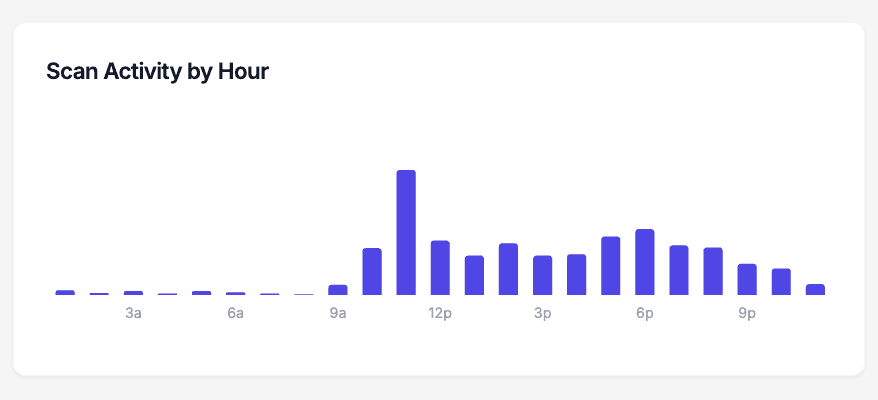
Scan activity by hour shows you when visitors actually engage with the codes on your wall labels and audio tour placards — not when you assume they do. If scans in the third-floor gallery peak at 2 pm but drop to nothing after 4, you know when docents matter most. If an evening program produces a spike on the special exhibition codes, you have evidence the format works. Every dynamic code on a label plate, vitrine, or sculpture plinth feeds this chart, turning quiet gallery traffic into data your curatorial and visitor services teams can act on.
How to set up QR codes across your galleries in an afternoon
- 1
Create one dynamic code per exhibit or tour stop
Go to /create-qr-code and create a code for each stop. Use the URL type for exhibit pages and audio tracks, or link a YouTube video for curator commentary. Because each code is dynamic, the same printed label plate can serve a rotating exhibition — you repoint the code when the object changes.
- 2
Style codes to match your exhibition graphics
Apply your institution's colors and embed your logo so the code reads as part of the exhibition design, not an afterthought. The live preview shows exactly how the styled code will look before it reaches your graphics vendor. Keep dark modules on a light ground for reliable scanning in dim gallery lighting.
- 3
Print at 300 DPI and mount at a consistent height
Download each code as a 300 DPI SVG for your large-format printer. Mount codes beside the object label at a consistent, wheelchair-accessible height so visitors learn where to look in every gallery. Leave clear space around the code — busy label typography crowding the edges makes scanning slower.
- 4
Compare engagement across galleries
In the dashboard, scan counts per code show which exhibits hold attention and which get walked past. The hour-of-day chart reveals when engagement peaks, and geography shows where visiting scanners come from. When an exhibition closes, edit the codes to point at the next show instead of reprinting signage.
“QRelix QR codes replaced our expensive audio guide hardware. Visitors love scanning exhibits on their own phones, and we finally have data on which galleries drive the most engagement.”
QRelix user · Museum & gallery sector
Frequently Asked Questions
How do museums use QR codes to enhance visitor experiences?
Museums place QR codes beside exhibits that link to audio guides, video content, artist bios, and AR experiences. Visitors scan with their phone to access rich multimedia content at their own pace. With QRelix, you can track which exhibits get the most engagement and update linked content anytime without reprinting codes.
Can I update exhibit information without replacing the QR codes?
Yes. QRelix dynamic QR codes let you change the destination URL whenever you need to. Swap out content for new exhibitions, update audio tour narration, or redirect to seasonal programming. The same printed QR code keeps working.
How do I track which exhibits visitors engage with most?
Create a unique QRelix QR code for each exhibit or gallery. The analytics dashboard shows scan counts by location, time of day, and device, helping you understand visitor flow and optimize exhibit placement and marketing.
Do QR codes work in galleries with weak cell reception?
The scan itself only needs the phone's camera, but loading the destination page requires a connection. In basement galleries or thick-walled historic buildings, offer visitor WiFi and post a WiFi QR code at the entrance so phones connect before visitors reach the exhibits. Keeping destination pages lightweight — text and compressed images rather than heavy video — also helps content load on a weak signal.
Can one QR code offer exhibit content in multiple languages?
Yes. Point the code at a landing page that lists your language options, and each visitor picks their own. Because the code is dynamic, you can add languages over the run of an exhibition without touching the printed label — edit the destination page, and every code already mounted in the gallery serves the new content.
How should QR codes be printed for outdoor sculpture gardens?
Start from the 300 DPI SVG download and print on a weatherproof substrate — laminated panels or metal plaques hold up far better than paper behind acrylic, which fogs and glares. Keep the contrast high and the code large, since visitors scan from walking paths rather than up close. Check outdoor codes seasonally; sun fading and grime degrade scannability over time.
Museums & Art Galleries guides & tutorials
- Essential QR Codes for Non-Profits: A Toolkit for Impact
- QR Codes for Event Marketing: How to Drive Registrations, Streamline Check-Ins, and Measure ROI
- Analytics and Scan Tracking
Try the free tools museums & art galleries use most
Ready to Create QR Codes for Your Museums & Art Galleries?
Free, no credit card. Create dynamic, trackable QR codes in seconds. Upgrade to Pro to remove the QRelix-branded redirect shown on free scans and unlock unlimited scans.
Create QR Code Free