QR Codes for Pet Services & Veterinary Clinics
From smart pet ID tags to digital vaccination records and appointment booking, dynamic QR codes help pet businesses modernize operations and help pet owners keep their animals safe.
How Pet Services & Veterinary Use QR Codes
Practical ways to integrate QR codes into your pet services & veterinary workflow, each one trackable with real-time analytics.
Smart Pet ID Tags
Create QR codes for pet collar tags that link to an owner contact page with the pet's name, photo, medical needs, and multiple contact numbers. Update info anytime without buying a new tag.
Digital Vaccination Records
Link QR codes to a pet's vaccination history, medications, and vet notes. Groomers, daycares, and boarding facilities scan to verify records instantly.
Appointment Booking
Place QR codes on reminder cards, clinic walls, and social media that link directly to your online booking system for vet visits, grooming, or boarding.
Pet Store Promotions
Add QR codes to product shelves, bags, or receipts linking to loyalty programs, coupons, or product information pages.
Client Check-In at Clinics
Display QR codes in the waiting room that link to a digital check-in form. Pet owners update their contact info and describe the visit reason before being called.
Lost Pet Recovery
Anyone who finds a lost pet can scan the collar QR code and instantly see the owner's contact info and instructions, no app download or account required.
QR Code Types for Pet Services & Veterinary
QRelix supports 6+ QR code types. These are the most popular for pet services & veterinary:
See every scan, in real time
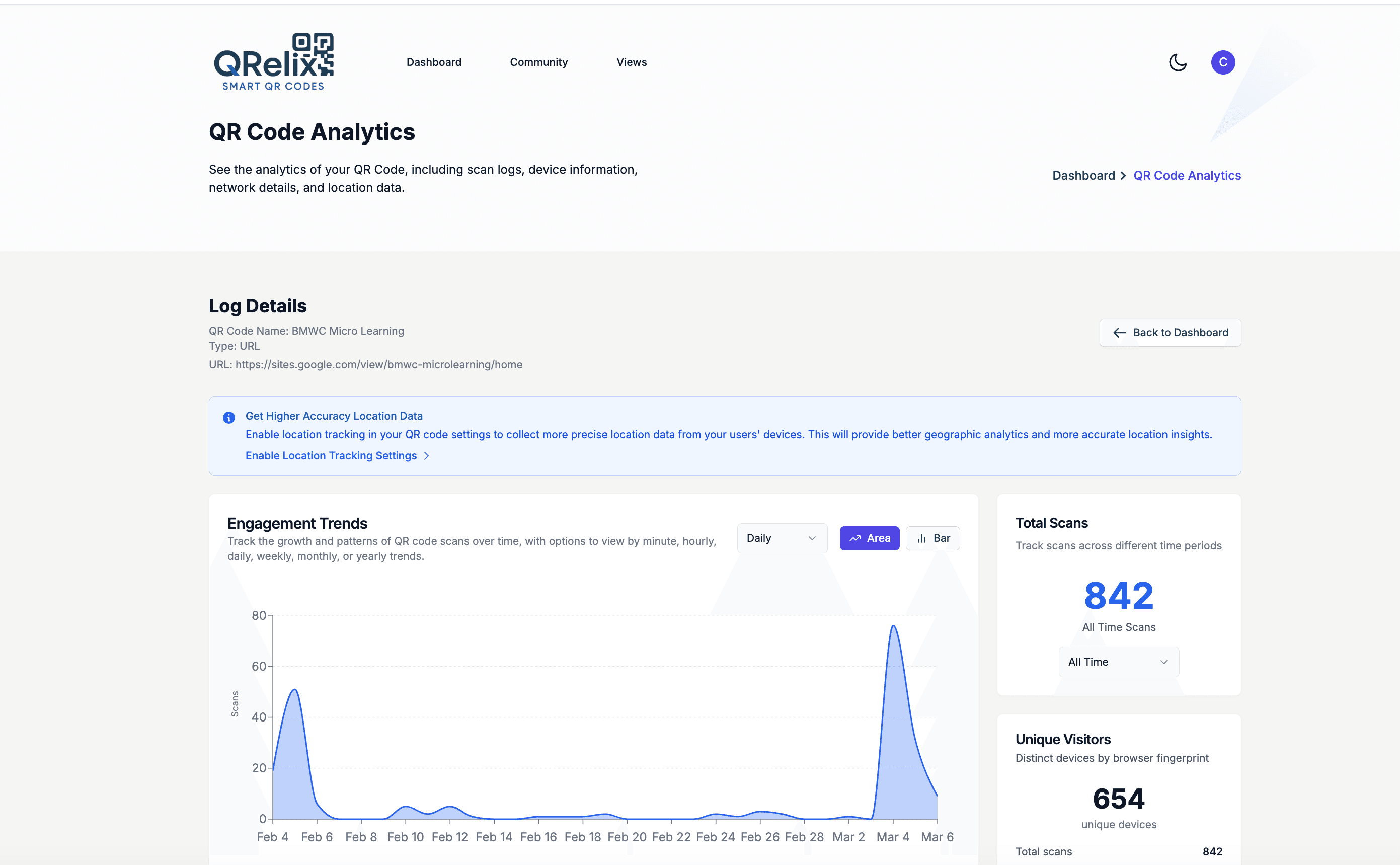
When the code on a pet tag, kennel card, or clinic counter gets scanned, this is where it shows up. The QRelix analytics dashboard breaks every scan down by device, charts scan activity over time, and maps where scans happen. For a clinic, that means seeing whether the booking code on appointment reminder cards gets used more than the one at the front desk. For a pet tag, it means something more direct: a scan that appears across town, with location attached, is a finder telling you where your client's dog is.
How to set up QR codes for your clinic or pet business
- 1
Create a dynamic code for each tag or touchpoint
Go to /create-qr-code and choose the URL type. For a pet tag, link a simple pet profile page with the owner's phone number; for the clinic, link your booking page, or share a vaccination record with the File type. Dynamic codes mean the profile or record can change while the engraved tag stays the same.
- 2
Brand it and keep the contrast high
Add your clinic's colors and logo, checking the live preview. On small items like tags, favor strong contrast over decoration — a dark code on a light background scans more reliably at that size than a heavily stylized one. Save the fuller branding for counter cards, kennel cards, and posters.
- 3
Download 300 DPI files sized for tags and counters
Export the print-ready SVG or PNG. The SVG is vector, so the same code stays sharp whether it lands on a one-inch tag, a kennel card, or a lobby poster. Place codes where they get used: the collar tag, the check-in counter, and the appointment reminder cards that go home in the bag.
- 4
Watch scan locations and booking activity
Open the dashboard. For tags, the scan log records each scan with time, device, and location — including GPS coordinates when available — so a lost pet's tag scan tells you where to look. For clinic codes, hourly scan activity shows when clients book, and scan counts show which placements pull their weight.
“We put QRelix QR codes on all our boarding intake forms and lobby signs. Digital check-in cut our front desk wait times in half and clients love the convenience.”
QRelix user · Pet services & veterinary industry
Frequently Asked Questions
How do QR codes work on pet ID tags?
Create a dynamic QR code in QRelix linking to a contact page with the pet's name, photo, owner phone numbers, and any medical info. Download the QR code and have it engraved or printed on a collar tag. If the pet is found, anyone can scan with their phone camera (no app needed) and see how to reach you.
Can I update the pet's info without replacing the tag?
Yes. QRelix dynamic QR codes let you update the linked content anytime. If you move, change your phone number, or need to add medical info, just update the destination, and the tag stays the same.
How do veterinary clinics use QR codes?
Vet clinics use QR codes for digital check-in, appointment booking, vaccination record sharing, and collecting Google Reviews. Place them on appointment cards, clinic walls, and post-visit emails to streamline operations and improve the client experience.
If someone scans my pet's tag, can I see where the scan happened?
Yes, on a dynamic code. Every scan is logged with a timestamp, device type, and location data — including GPS latitude and longitude with an accuracy estimate when the scanning device provides it. That turns a stranger scanning a lost pet's tag into a location signal: open the dashboard, check the most recent entry in the scan log, and see where and when the tag was read.
How durable is a QR code on a collar tag?
The code lasts as long as the tag it's printed or engraved on, so start from the 300 DPI SVG — vector output prints and engraves cleanly at tag size. Choose high contrast between the code and its background, leave a small blank margin around the code, and test a finished tag with both an iPhone and an Android before ordering a batch. Because the code is dynamic, a worn tag can be remade with the same code and nothing is lost.
Can we create QR codes in bulk for every patient at the clinic?
Yes. For a handful of codes, the dashboard's categories and labels keep patients, promotions, and clinic signage organized. For a whole patient roster, the QRelix REST API creates and manages codes programmatically, so tag codes can be generated as part of your intake workflow; the API and an MCP server for AI-assistant integration are documented at /docs. Each code still reports its own scans in the same dashboard.
Pet Services & Veterinary guides & tutorials
- QR Code Location Tracking: How to See Where Every Scan Happens (Free in 2026)
- QR Code for Appointments: Free Booking Links That Get You More Bookings (2026)
- Google Review QR Code: How to Get More 5-Star Reviews on Autopilot
- Managing Your QR Codes
Try the free tools pet services & veterinary use most
Ready to Create QR Codes for Your Pet Services & Veterinary?
Free, no credit card. Create dynamic, trackable QR codes in seconds. Upgrade to Pro to remove the QRelix-branded redirect shown on free scans and unlock unlimited scans.
Create QR Code Free