Sports Team QR Codes: Stop Chasing Parents for Fees
Drop one Venmo QR code in the parents' group chat or tape it to the dugout. Each parent scans, the $75 fee with their player's name in the memo is pre-filled, they tap send. Less spreadsheet, fewer Venmo-username typos, no awkward Tuesday-night reminders.
How Sports Teams Use QR Codes
Practical ways to integrate QR codes into your sports teams workflow, each one trackable with real-time analytics.
Venmo Team Fee QR Codes
Generate a Venmo Pay QR code with the team fee amount ($75, $200, $500) and a memo like "Spring season, Tigers U12." Share in the parents' group chat. Each parent scans, confirms, done. The memo keeps your bookkeeping clean and your treasurer happy.
Tournament & Travel Payments
Create a separate Venmo QR code for each tournament weekend (hotel, gas, food). Parents scan once instead of you collecting cash at the bus. Scan analytics show who paid before the trip rolls out.
Snack & Equipment Donations
Tape a $5 / $10 "snack jar" Venmo QR code to the dugout fence. Loose change disappears; the bench still gets fed. Same code works for new soccer balls, jersey replacements, or end-of-season trophies.
Game Schedule & Practice Times
Print a QR code on uniforms, water bottles, or fridge magnets linking to the live team calendar. Parents scan instead of asking the group chat "is practice on tonight?"
Team Photo & Highlight Sharing
Add a QR code on the dugout linking to the shared Google Photos album or game highlight reel. Parents scan after the game and add their own shots: one shared library, no email chains.
Fundraiser & Sponsor Pages
Running a season fundraiser? Put a Venmo Pay QR code on car-wash flyers, banners, and uniforms linking to donations with a memo like "Tigers U12 Spring Fund." Track which placements actually drive donations.
QR Code Types for Sports Teams
QRelix supports 6+ QR code types. These are the most popular for sports teams:
See every scan, in real time
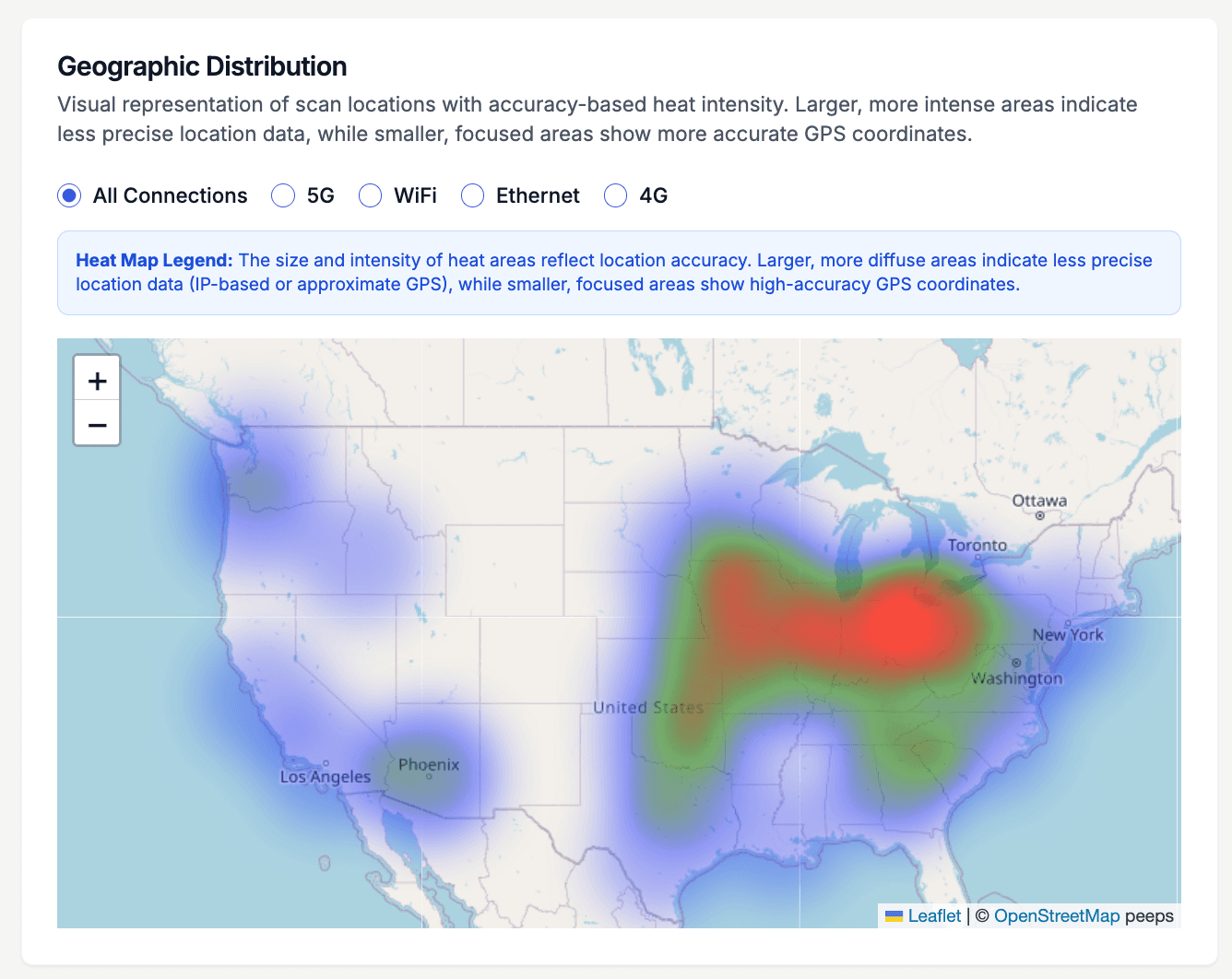
A season doesn't happen in one place. The heat map above shows where a code's scans come from — and for a travel team, that geography tells a story: a cluster at your home field, another at the tournament two states over, a scatter of parents paying fees from their kitchens. Put the same fundraiser code on the team banner, the snack bar table, and the sponsor flyer, and the map shows which venue actually produced scans. When you're deciding whether the tournament booth was worth staffing, that's the evidence.
How to set up your team's QR codes before the season starts
- 1
Create the team fee code first
At /create-qr-code, choose the Venmo QR type and point it at the team's payment account. Add a Calendar code for the practice and game schedule while you're there. Both are dynamic, so a rescheduled tournament or a new fee amount is a dashboard edit, not a reprint.
- 2
Put the team's colors and crest on it
Match the code to your jerseys with brand colors and drop the team logo in the center. The live preview shows exactly what parents will see. A code that looks like the team reads as official — which matters when you're asking for money.
- 3
Print for the banner, the table, and the packet
Download the SVG for anything large — the sideline banner, the snack-bar sign — since it scales to any size at full sharpness. Use the 300 DPI PNG for registration packets and the team email. Bigger surfaces need bigger codes: a banner scanned from ten feet needs a code around a foot wide.
- 4
Track payments against your roster
Watch scan counts in the dashboard as the fee deadline approaches. Twelve scans against a roster of eighteen tells you it's time to nudge — pair the count with your Venmo transaction list to see exactly which families are left. Next season, edit the destination and reuse every printed code.
“I used to spend the first two weeks of every season chasing checks from 14 families. We posted a QRelix Venmo code in the group chat and had 12 paid by day three. Two weeks of my life back.”
QRelix user · Youth sports
Frequently Asked Questions
How do coaches collect team fees with a Venmo QR code?
Generate a Venmo Pay QR code in QRelix with the fee amount and a memo ("Fall season, Hawks U10"). Share the QR image in the parents' group chat, tape it inside the dugout, or print it on the season info packet. Parents scan, the Venmo app opens with everything pre-filled, they tap send. Coaches we hear from report 80%+ collection in the first week instead of chasing checks all season.
Can I use one QR code across multiple tournaments or seasons?
Yes, QRelix dynamic QR codes let you update the amount, memo, and Venmo username anytime. Use the same printed code on uniform tags or water bottles, then change the destination each season ("Spring 2026," "Travel weekend," etc.) without reprinting anything.
How do I track which parents have paid?
Create a separate QRelix QR code for each fee (registration, uniforms, tournament). The analytics dashboard shows scan counts by date, so you can combine it with your Venmo activity log to reconcile who has paid. For larger leagues, generate one code per family and put the player's name in the memo.
Is Venmo allowed for collecting team payments?
Yes for casual youth and rec leagues, where parents and coaches use Venmo personal accounts the same way friends would split a check. For organized 501(c)(3) leagues handling larger sums, a Venmo Business profile is the cleaner path so payments are itemized for tax purposes. QRelix supports both.
Can I collect fundraiser donations the same way?
Absolutely. A Venmo Pay QR code with a fundraiser memo lets supporters donate in seconds, far faster than a GoFundMe page they need to log into. Print it on car-wash flyers, uniforms, or opening-day banners. Scan analytics show which fundraiser placements actually drive donations.
How big should the QR code be on a team banner?
Size it for the scanning distance. A useful rule of thumb is 10:1 — a code scanned from ten feet away should be about a foot wide. For a sideline banner parents walk past, one to two feet square works; for a snack-bar table sign, a few inches is enough. Download the SVG from QRelix rather than the PNG for banner printing, since it scales to any dimension without losing sharpness.
Will QR codes work at fields with weak cell service?
The scan itself works — a phone's camera reads a QR code without any connection. Opening the Venmo page or schedule behind it needs data, so at a dead-zone field the payment may not go through on the spot. Put the same code in the team email and group chat so parents can finish paying from home, and keep the printed code at the snack bar for fields with normal coverage.
Can I make the registration code stop working after the deadline?
Yes. Dynamic QRelix codes support expiration by date or by scan count. Set the team fee code to expire the day registration closes so a late scan can't pay into a closed roster. If you'd rather redirect than block, skip the expiration and edit the code's destination to a 'registration closed' note with the coach's email — either way, the printed code on the banner never becomes a liability.
Sports Teams guides & tutorials
- QR Codes for Sports Teams — Season Fees, Tournament Travel & Fundraisers
- Essential QR Codes for Non-Profits: A Toolkit for Impact
- Downloading and Printing Your QR Code
- Security and Access Controls
Try the free tools sports teams use most
Ready to Create QR Codes for Your Team?
Free, no credit card. Create dynamic, trackable QR codes in seconds. Upgrade to Pro to remove the QRelix-branded redirect shown on free scans and unlock unlimited scans.
Create QR Code Free