QR Codes Built for Pharmacies
Give patients instant access to dosage guides, safety info, and medication videos with a single scan. Track engagement, simplify compliance, and reduce errors, all from one dashboard.
How Pharmacies Use QR Codes
Practical ways to integrate QR codes into your pharmacies workflow, each one trackable with real-time analytics.
Medication Information QR Codes
Print QR codes on prescription labels that link to dosage instructions, side-effect information, and drug-interaction warnings. Update content anytime without relabeling.
Anti-Counterfeiting & Authentication
Add serialized QR codes to packaging so patients and distributors can verify medication authenticity with a single scan, meeting GS1 and FDA UDI standards.
Patient Education Videos
Link QR codes on packaging to medication-specific usage videos, helping patients understand proper administration, storage, and potential side effects.
Prescription Refill & Adherence
Place QR codes on pill bottles that link to your refill portal or set up dosage reminders, improving medication adherence and patient outcomes.
Inventory & Supply Chain Tracking
Track product movement from manufacturer to shelf with dynamic QR codes. Monitor scan data in real-time to reduce stock discrepancies and anticipate restocking needs.
Regulatory Compliance Documentation
Embed QR codes on products linking to electronic package inserts, safety data sheets, and recall notices, replacing bulky printed inserts while staying compliant.
QR Code Types for Pharmacies
QRelix supports 5+ QR code types. These are the most popular for pharmacies:
See every scan, in real time
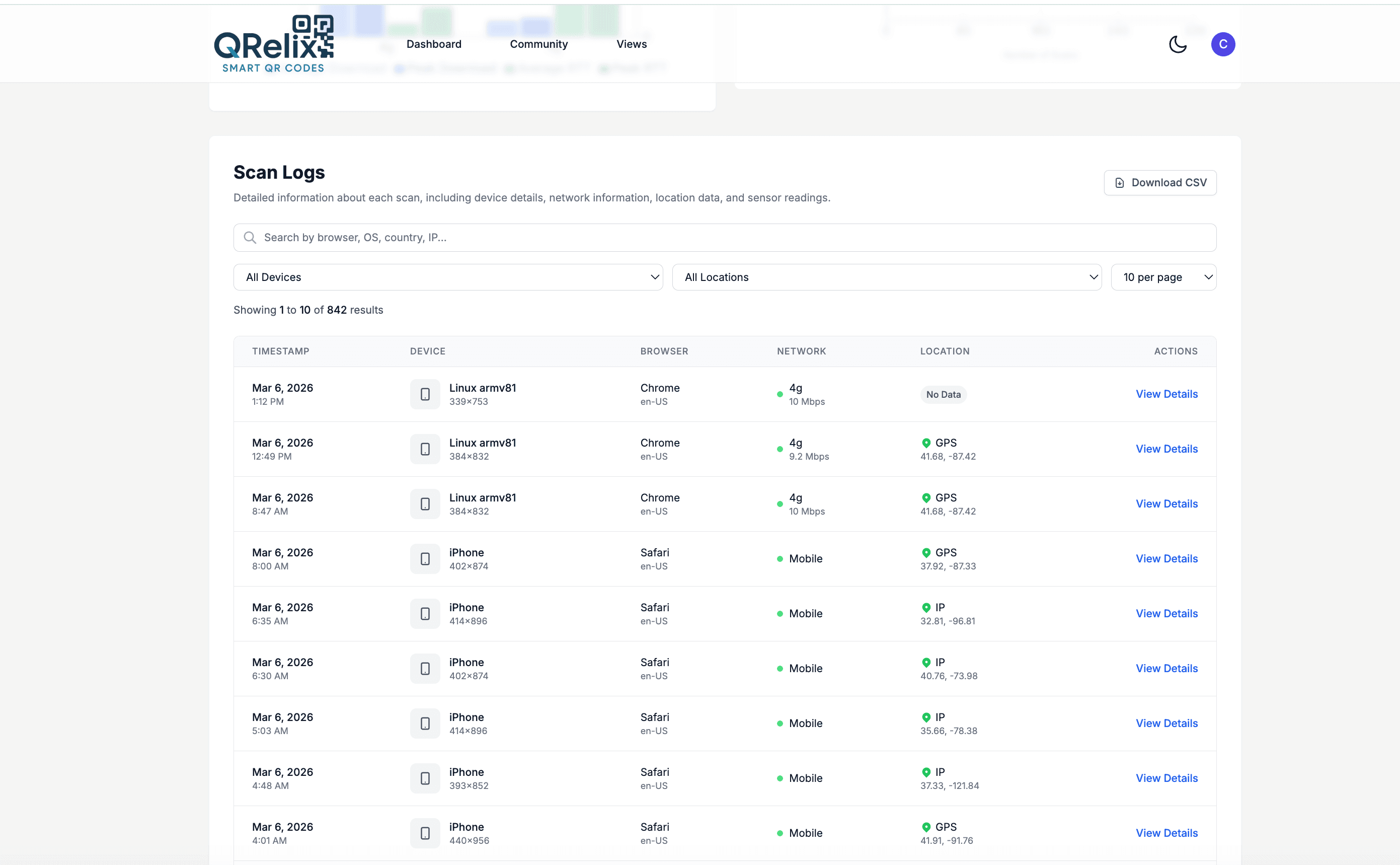
When a QR code on a prescription bag links to a medication guide, it helps to know the guide was actually opened. The access log records every scan as its own row — timestamp, device, and location — so you can see that the code on Tuesday's pickup bags was scanned that evening, mostly on phones, mostly within a few miles of the store. For codes on counter signs, bag stuffers, and shelf talkers, the same log turns patient education from a printed hope into something you can review and document.
How to set up QR codes for your pharmacy in 10 minutes
- 1
Create a dynamic code for each patient touchpoint
At /create-qr-code, pick the File type to serve a medication guide PDF, the URL type for your refill portal, or the Phone type so patients can tap to call the pharmacist line. Dynamic codes matter here: when a guide is revised, you replace the file and every bag already in circulation points at the current version.
- 2
Brand the code so patients trust the scan
Add your pharmacy's colors and logo and check the live preview. On something as sensitive as medication information, a branded code that matches the bag and signage reads as official rather than suspicious, and patients are more likely to scan it.
- 3
Download 300 DPI files sized for bags and labels
Export the print-ready 300 DPI SVG or PNG. The SVG scales without losing sharpness, which matters when the same code appears on a counter sign and a small bag stuffer. Keep codes at least 2 cm square on printed pieces and test-scan at real size before sending anything to the label printer.
- 4
Review the access log and set your controls
Watch scan counts and the per-scan access log in your dashboard to see which materials patients actually open, and when. For staff-only documents, add password protection; for time-limited programs like a flu clinic, set the code to expire by date or by scan count.
“We added QRelix QR codes to every prescription bag. Patients love scanning for medication videos, and our pharmacists spend less time repeating instructions.”
QRelix user · Pharmacy industry
Frequently Asked Questions
How do I add QR codes to prescription labels?
With QRelix, create a dynamic QR code linking to your patient information portal or medication guide. Download in high-resolution SVG format and integrate it into your label template. Update the linked content anytime (dosage changes, new warnings, or recall notices) without reprinting labels.
Can QR codes help meet FDA serialization requirements?
Yes. QRelix dynamic QR codes support GS1-standard encoding for unique product identifiers. Each code can link to serialized data, authentication portals, and chain-of-custody records. The upcoming 2027 2D barcode mandate makes this transition essential.
How do I track patient engagement with medication information?
QRelix analytics show scan counts by code, device, time, and location. Create separate codes for each medication or educational resource to measure which materials patients access most and optimize your patient education program.
Can a pharmacy QR code be disabled when a document goes out of date?
Yes, two ways. Edit the dynamic code's destination so it serves the current document — bags and signs already printed immediately point at the new version — or set an expiration by date or scan count so the code stops resolving on a schedule. For recurring materials like seasonal vaccine information, editing the destination is usually the better choice because printed pieces keep working.
How small can a QR code be on a prescription label?
Plan on roughly 2 cm (0.8 inches) square as a working minimum for a code scanned at arm's length, and larger if the label wraps a curved bottle. QRelix exports 300 DPI SVG and PNG, and the SVG keeps edges crisp at small sizes where a low-resolution image would blur into an unscannable smudge. Always test-scan a printed proof of the actual label before a production run.
Can we password-protect QR codes for staff-only documents?
Yes. Dynamic codes support password protection, so a code posted in the dispensary can link to SOPs, compounding references, or training material that only staff with the password can open. The public-facing codes on bags and counter signs stay open. Both kinds appear in the same dashboard, where categories and labels keep patient-facing and internal codes separated.
Pharmacies guides & tutorials
- QR Code Pharma Labeling for Patient Safety: What's Actually Allowed in 2026
- QR Codes on Pharmaceutical Packaging: The 2026 Compliance & Anti-Counterfeiting Guide
- QR Code Compliance Tracking: How to Build a Free Audit Trail for OSHA, FDA & ISO Inspections (2026)
- Security and Access Controls
Try the free tools pharmacies use most
Ready to Create QR Codes for Your Pharmacies?
Free, no credit card. Create dynamic, trackable QR codes in seconds. Upgrade to Pro to remove the QRelix-branded redirect shown on free scans and unlock unlimited scans.
Create QR Code Free