Travel & Tourism QR Codes for Better Guest Experiences
Give guests instant access to check-in portals, local guides, and itinerary details with a single scan. Update information seasonally without reprinting a thing.
How Travel & Tourism Use QR Codes
Practical ways to integrate QR codes into your travel & tourism workflow, each one trackable with real-time analytics.
Hotel Self-Check-In
Place QR codes at the front desk or in confirmation emails that link to your digital check-in system. Reduce wait times and front desk bottlenecks.
Tourist Information Guides
Install QR codes at landmarks, museums, or points of interest linking to historical info, audio guides, or AR experiences in multiple languages.
Travel Itinerary Access
Send travelers a QR code linking to their complete itinerary (flights, hotels, activities) updated in real-time as plans change.
Local Attraction Promotions
Partner with local businesses to place QR codes in hotel rooms linking to restaurant deals, tour discounts, or attraction tickets.
Transportation Schedules
Post QR codes at bus stops, shuttle pickups, or hotel lobbies linking to live transportation schedules and route maps.
Guest Feedback & Reviews
Place QR codes in hotel rooms or at checkout linking to review platforms. Capture feedback while the experience is top of mind.
QR Code Types for Travel & Tourism
QRelix supports 6+ QR code types. These are the most popular for travel & tourism:
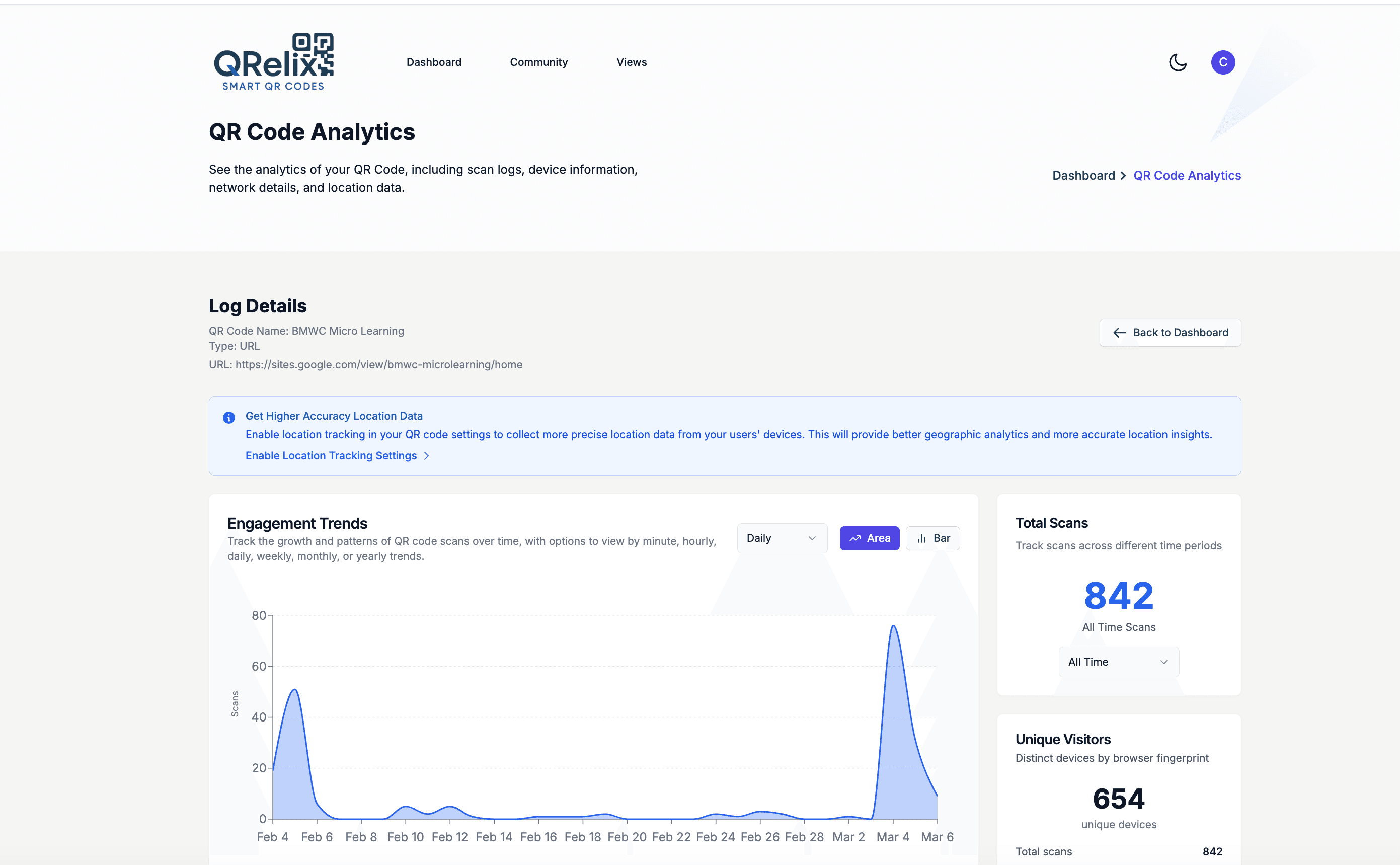
See every scan, in real time
A hotel lobby, an airport visitor rack, and a tour van each put the same brochure in front of different travelers. This dashboard shows what happens after they scan: total scans over the season, the iPhone and Android split among your guests, and the geographic spread of scans, so a brochure racked at the visitor center and a tent card in room 214 can be compared side by side. It replaces guessing about which printed pieces guests actually use.
How to set up QR codes for your hotel or tour company in 10 minutes
- 1
Create a WiFi code and a guest guide code
At /create-qr-code, build a WiFi QR code so guests join your network without typing a password, then a dynamic URL code pointing at your area guide, digital itinerary, or booking page. One session covers both — the WiFi code for the front desk, the guide code for everywhere else.
- 2
Brand the codes with your property's identity
Add your logo and brand colors using the live preview. Guests are cautious about scanning anonymous codes in public spaces, and a code carrying the hotel's mark on a matching tent card reads as part of the room, not something a stranger left behind.
- 3
Print at 300 DPI along the guest journey
Download the print-ready 300 DPI SVG or PNG and place codes where guests pause: the check-in desk, key card sleeves, in-room tent cards, the elevator, and tour brochures. Keep a short label on each — 'Scan for WiFi,' 'Scan for the area guide' — so the purpose is obvious.
- 4
Track the season and update without reprinting
The dashboard shows scan trends over the season, the device split among guests, and scan geography. When winter arrives, edit the guide code to point at the ski shuttle schedule instead of the beach map — every printed tent card updates instantly, with nothing reprinted.
“We replaced the entire in-room info binder with 4 QRelix QR codes. Guests love it, housekeeping saves 5 minutes per room, and we update info centrally.”
QRelix user · Travel & tourism industry
Frequently Asked Questions
Can QR codes support multiple languages for international tourists?
Yes. Use dynamic QR codes that link to multi-language pages or update the destination URL to point to a language-specific version based on your current guest demographics.
How can hotels use QR codes to improve guest experience?
Place QR codes in rooms linking to room service menus, WiFi login, local restaurant guides, spa booking, and checkout. Each code replaces a stack of printed materials that go out of date.
Can I use the same QR code across seasonal promotions?
Absolutely. Dynamic QR codes let you update the linked content anytime. Point a lobby QR code to summer activities in June and ski passes in December: same code, different destination.
Do QR codes work for international guests without a data plan?
WiFi QR codes do. A WiFi code stores the network name and password inside the code itself, so a guest's camera can join your network without any internet connection or typing. That makes the front desk WiFi card the natural first scan: once the guest is online, every other code on the property — area guides, menus, tour bookings — works normally. Modern iPhone and Android cameras handle all of this natively, no app required.
Where should hotels and tour operators place QR codes to get the most scans?
Put codes where guests are already waiting or deciding: the check-in desk, key card sleeves, in-room tent cards, the elevator, and the seat backs of the tour van. Give each spot its own code and the dashboard tells you which locations actually get scanned — a tent card by the coffee maker and a sign in the lobby will perform differently, and per-code scan counts show exactly how.
Can guests reach our concierge on WhatsApp by scanning a code?
Yes. QRelix supports a WhatsApp QR type that opens a chat with your number when scanned, which suits international guests who use WhatsApp instead of SMS. The same setup works for tour pickup questions or late checkout requests. For guests who prefer to call, a Phone QR type dials the front desk directly. Both are dynamic, so the number can be updated later without reprinting the in-room cards.
Travel & Tourism guides & tutorials
- WiFi QR Code: How to Create One, Best Practices, and Why Your Business Needs It
- QR Code Booking System: How to Build a Free One in 2026 (Calendly, Cal.com & Resy)
- Google Review QR Code: How to Get More 5-Star Reviews on Autopilot
Try the free tools travel & tourism use most
Ready to Create QR Codes for Your Travel & Tourism?
Free, no credit card. Create dynamic, trackable QR codes in seconds. Upgrade to Pro to remove the QRelix-branded redirect shown on free scans and unlock unlimited scans.
Create QR Code Free