QR Codes for Beauty Salons & Spas
Make booking, rebooking, and reviewing effortless. QR codes on mirrors, business cards, and product shelves connect clients to your booking page, Instagram, and loyalty program.
How Beauty & Salons Use QR Codes
Practical ways to integrate QR codes into your beauty & salons workflow, each one trackable with real-time analytics.
Appointment Booking
Print QR codes on business cards, mirrors, and receipts linking to your online booking system. Clients scan to schedule their next visit before they leave.
Stylist Portfolio & Instagram
Display QR codes at each station linking to the stylist's Instagram or portfolio page. Clients browse their work while waiting.
Product Recommendations
Place QR codes on retail shelves linking to product details, reviews, and how-to videos. Clients scan to learn about the products used during their service.
Loyalty & Referral Programs
Add QR codes to appointment reminder cards enrolling clients in your loyalty program. Track visits and reward your regulars automatically.
Google Review Collection
Place a QR code at checkout linking directly to your Google Business review page. Clients leave a review while the great experience is fresh.
Service Menu & Pricing
Post QR codes in the waiting area linking to your full service menu with descriptions and current pricing. Update seasonally without reprinting.
QR Code Types for Beauty & Salons
QRelix supports 6+ QR code types. These are the most popular for beauty & salons:
See every scan, in real time
A black-and-white checkerboard square rarely earns a spot in a salon that spent months on its interior. The creation wizard fixes that: pick the QR type, match the code to your brand palette, drop your logo in the center, and watch the live preview update before anything gets printed. The result is a code that belongs on a mirror decal next to a client's reflection, on the station card at each chair, and on the little easel by the register — styled like everything else you print.
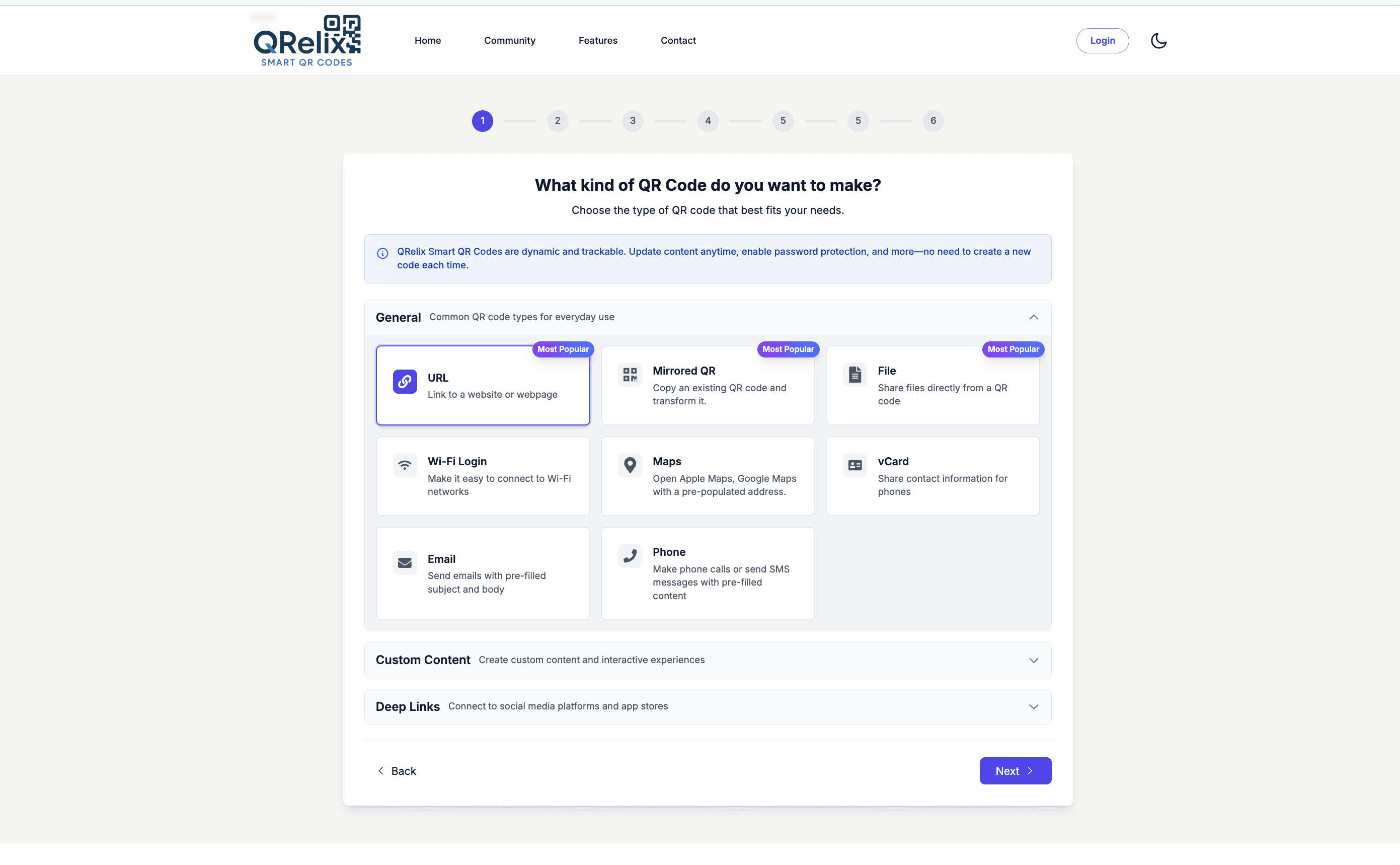
How to set up QR codes for your salon in 10 minutes
- 1
Create a dynamic code for your booking link
Go to /create-qr-code and choose the URL type for your booking page, or the Instagram type for a stylist's portfolio. Make each placement its own code — mirror decal, front desk, window cling — so you can compare them later. Dynamic codes let you change the destination whenever your links change.
- 2
Style the code to match your brand
Use the customization step to apply your salon's colors and set your logo in the center. The live preview shows exactly how the finished code looks, so you can match the decal to your interior before sending anything to the printer. Keep enough contrast that phone cameras read it in soft salon lighting.
- 3
Print at 300 DPI for decals, cards, and clings
Download the 300 DPI SVG for vinyl decals and window clings, or the PNG for station cards and shelf talkers. Clients spend an entire appointment facing a mirror, which makes a decal at seated eye level the highest-traffic placement in the building. Add one at the register for checkout.
- 4
Check the dashboard to see which placements work
Scan counts, device breakdown, and scan times show up in your dashboard for every code. Compare the mirror decal against the front-desk card, and check scan activity by hour to see whether codes get used mid-appointment or at checkout. Repoint any code to a seasonal promotion without reprinting a thing.
“Our Google reviews went from 40 to 180 in three months after we put a QRelix QR code at the checkout counter. Turns out clients are happy to review, they just need a nudge.”
QRelix user · Beauty & salon industry
Frequently Asked Questions
How do salons use QR codes to get more bookings?
Place QR codes on business cards, mirrors, and receipts linking to your online booking page. Clients scan to schedule their next appointment before leaving. No phone tag, no forgotten callbacks.
Can QR codes help salons get more Google reviews?
Absolutely. Place a QR code at checkout that links directly to your Google Business review page. Clients leave a 5-star review in 30 seconds while they're still feeling great about their new look.
How do I promote retail products with QR codes?
Add QR codes to product shelves linking to ingredient lists, tutorial videos, or online purchase pages. QRelix analytics show which products get the most scans, helping you stock what clients want.
Can each stylist or booth renter have their own QR code?
Yes. Create a separate code per stylist — an Instagram code for their portfolio or a URL code for their personal booking link — and put it on their station card or mirror. Each code tracks its own scans, so booth renters see their own numbers and owners can compare stations. In the dashboard, labels and categories keep every stylist's codes grouped and easy to manage.
Where should QR codes go inside a salon?
Put codes where clients wait with a phone in hand: on the mirror at each station at seated eye level, at the front desk for checkout, on the retail shelf beside products, and on the window for after-hours walk-bys. Skip spots clients only pass while walking. Since each placement can be its own dynamic code, the dashboard will tell you which locations actually get scanned.
How do I manage QR codes across multiple salon locations?
Run every location from one QRelix dashboard. Use categories to group codes by location and labels for the type — booking, reviews, retail — then compare scan counts between locations to see which storefronts pull. The geographic view and per-scan logs show where scans happen, which helps when the same window cling design hangs in three different neighborhoods. Update any location's destination remotely without visiting the store.
Beauty & Salons guides & tutorials
- QR Code for Appointments: Free Booking Links That Get You More Bookings (2026)
- Social Media QR Code: How to Get More Followers From the Real World
- Custom QR Code Generator: How to Design Free Branded QR Codes with a Logo (2026)
- Venmo Tip Jar QR Codes — Baristas, Bartenders & Service Pros
Try the free tools beauty & salons use most
Ready to Create QR Codes for Your Beauty & Salons?
Free, no credit card. Create dynamic, trackable QR codes in seconds. Upgrade to Pro to remove the QRelix-branded redirect shown on free scans and unlock unlimited scans.
Create QR Code Free