Manufacturing QR Codes for the Factory Floor
Attach scannable QR codes to inventory, equipment, and workstations. Link workers to SOPs, safety data sheets, and maintenance logs, updated centrally and accessed instantly.
How Manufacturing Use QR Codes
Practical ways to integrate QR codes into your manufacturing workflow, each one trackable with real-time analytics.
Inventory & Parts Tracking
Tag pallets, bins, and individual components with QR codes linking to lot numbers, expiry dates, and warehouse locations. Scan to update counts in real-time.
Equipment Manuals & SOPs
Attach QR codes to machines that link to digital operating manuals, training videos, and standard operating procedures. Always up-to-date, always accessible.
Safety Data Sheets (SDS)
Place QR codes on chemical containers and workstations linking to the correct SDS. Workers scan for instant access to hazard info and first-aid procedures.
Maintenance Request & Logs
Stick QR codes on equipment that link to maintenance request forms and service history. Technicians scan, log the issue, and track resolution.
Quality Control Checklists
Link QR codes at inspection stations to digital QC checklists. Inspectors scan, fill out the checklist on their phone, and results are logged automatically.
Compliance & Audit Documentation
Generate QR codes for compliance boards linking to ISO certificates, audit reports, and regulatory documentation, always audit-ready.
QR Code Types for Manufacturing
QRelix supports 6+ QR code types. These are the most popular for manufacturing:
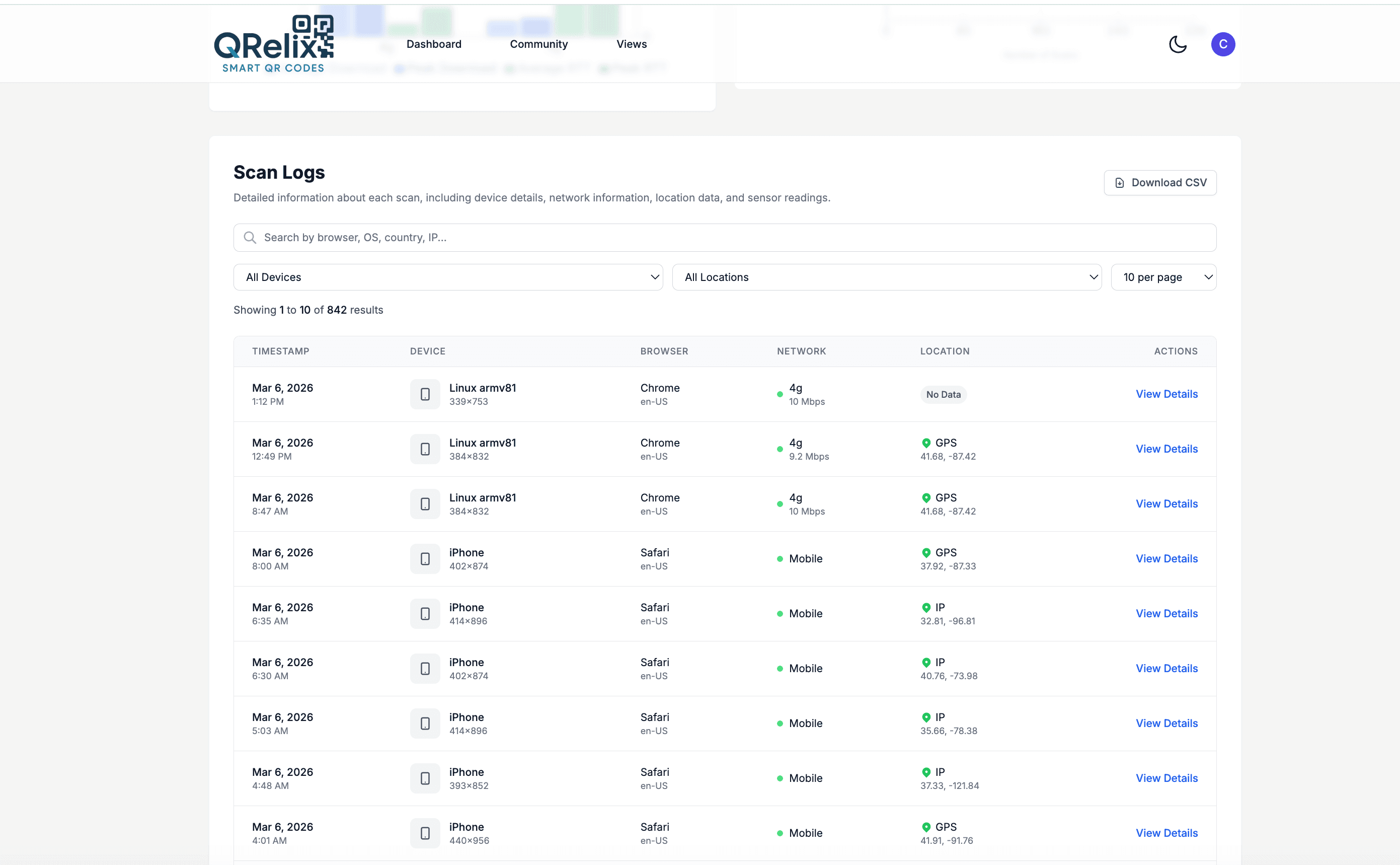
See every scan, in real time
A QR code on a machine housing, a pallet label, or a tool crib shelf becomes a record the moment someone scans it. This access log lists every individual scan with a timestamp, device, and location details, so you can see that a technician pulled the SOP for the CNC mill at 2 a.m. on third shift, or that nobody has opened the safety data sheet posted at the solvent cabinet in months. That level of detail turns wall-mounted codes into evidence of what your floor actually reads.
How to put QR codes on your factory floor in 10 minutes
- 1
Create a dynamic code for each machine and document
At /create-qr-code, make one code per asset: a URL or File code linking the equipment manual, SOP, or safety data sheet, and an Email code that opens a pre-addressed maintenance request. One code per machine keeps the scan history clean and specific to that asset.
- 2
Set high-contrast colors and organize by line
Keep the code high-contrast — dark modules on a light background scan most reliably under shop lighting — and add your plant's logo. In the dashboard, group codes with categories and labels by production line or department so document revisions are easy to find later.
- 3
Print durable labels and mount at the point of use
Download the 300 DPI SVG, print on laminated or industrial label stock, and mount each code on the machine housing at eye level, on the pallet rack face, or at the tool crib counter. The code should be readable where the work happens, not filed in a binder.
- 4
Review access logs and lock down sensitive docs
The access log records each scan with a timestamp, device, and location details — a running record of who pulled which SOP and when. Add password protection to codes linking internal documents, and set expiration by date or scan count for contractor-facing codes.
“We tagged every CNC machine with a QRelix QR code. Operators access the right SOP in seconds instead of flipping through binders. Setup errors dropped by 30%.”
QRelix user · Manufacturing industry
Frequently Asked Questions
How do QR codes improve manufacturing workflows?
QR codes eliminate paper manuals, binders, and log books. Workers scan a code on any machine or product to instantly access the right document (SOPs, safety sheets, maintenance logs) reducing errors and downtime.
Can QR codes survive harsh factory environments?
QRelix generates high-resolution SVG files that can be printed on durable labels, metal tags, or laminated cards. The QR code itself is digital, so if a label is damaged, print a new one pointing to the same dynamic URL.
How do I track which equipment gets the most maintenance requests?
Create a unique QR code for each piece of equipment. QRelix analytics show scan frequency by code, helping you identify machines with the most issues and prioritize preventive maintenance.
What happens to printed labels when we revise an SOP or safety data sheet?
Nothing — that is the point of dynamic codes. The label on the machine stores a redirect, and you update the destination in the dashboard to point at the new revision. Every printed label across the plant serves the current document immediately, with no relabeling and no window where line 2 has the new revision while line 5 still shows the old one. Document codes should always be dynamic rather than static for this reason.
Do QR codes work in areas of the plant without WiFi or cell coverage?
The camera reads the code anywhere, since decoding happens on the phone, but opening a linked document requires a data connection. For dead zones like basements or metal-clad buildings, use a static Text QR code instead: it stores the words inside the code itself, so the phone displays them with no connection at all. Static codes cannot be edited or tracked after creation, so reserve them for short, stable content like lockout steps or a maintenance phone number.
Can we control who opens documents linked from floor QR codes?
Yes. Dynamic codes support password protection, so a code at the tool crib can require a password before the linked document opens — useful when supplier details or unreleased procedures sit behind a code in a space contractors walk through. You can also set expiration by date or scan count, which fits temporary contractor access. The access log then records each scan with a timestamp, device, and location details.
Manufacturing guides & tutorials
- How to Use QR Codes for Inventory: A Step-by-Step Tutorial (Free 2026)
- QR Code Equipment Tracking: Free Setup for Tools, Machinery & Field Gear (2026)
- QR Code Compliance Tracking: How to Build a Free Audit Trail for OSHA, FDA & ISO Inspections (2026)
- QR Code Data Capture: How to Build a Free Field-Inspection System (No Software Required)
Try the free tools manufacturing use most
Ready to Create QR Codes for Your Manufacturing?
Free, no credit card. Create dynamic, trackable QR codes in seconds. Upgrade to Pro to remove the QRelix-branded redirect shown on free scans and unlock unlimited scans.
Create QR Code Free