QR Codes Built for Hotels & Hospitality
Deliver a seamless guest experience with dynamic QR codes for contactless check-in, digital room service menus, instant WiFi access, and post-stay review collection, all tracked from one dashboard.
How Hotels & Hospitality Use QR Codes
Practical ways to integrate QR codes into your hotels & hospitality workflow, each one trackable with real-time analytics.
Contactless Check-In & Check-Out
Place QR codes at the front desk or in confirmation emails that link to your digital check-in form. Guests skip the line and head straight to their room.
Digital Room Service Menus
Replace paper room service menus with a QR code on the nightstand. Update items, prices, and availability in real-time without reprinting.
Guest WiFi Access
Display WiFi QR codes in rooms and lobbies so guests connect to your network with a single scan, no typing long passwords.
Concierge & Local Guide
Link QR codes in the lobby to a digital concierge page with local restaurants, attractions, transportation, and booking links.
Guest Feedback & Reviews
Place QR codes at checkout or in rooms linking to your TripAdvisor, Google Reviews, or feedback form. Capture reviews while the experience is fresh.
Spa & Amenity Booking
Print QR codes on in-room brochures that link directly to your spa, pool, or activity reservation system.
QR Code Types for Hotels & Hospitality
QRelix supports 6+ QR code types. These are the most popular for hotels & hospitality:
See every scan, in real time
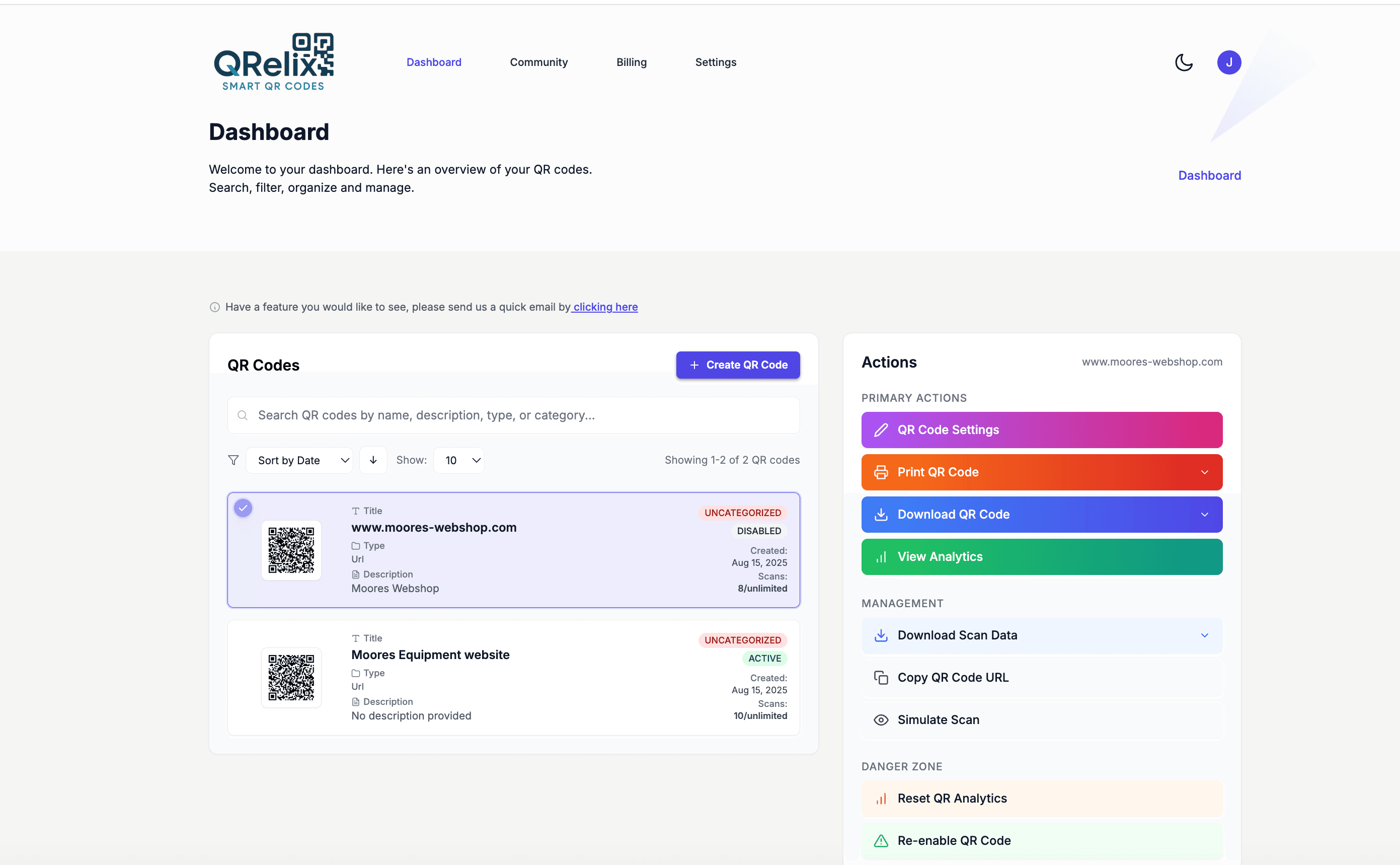
A hotel runs on dozens of QR codes at once: the tent card on every nightstand, the WiFi card at the front desk, the spa menu in the elevator, the checkout instructions inside the door. This is the QRelix organizer view that keeps them straight — every code grouped into categories like rooms, dining, and amenities, with labels and quick actions on each one. When the room service menu changes or the spa switches booking systems, you find the right code in seconds and repoint it. Housekeeping never has to touch a single card.
How to roll out QR codes across your hotel property
- 1
Create dynamic codes for your guest touchpoints
Go to /create-qr-code and start with the highest-traffic items: the URL type for your room service menu or digital guest guide, and the WiFi type for guest network access. Because the codes are dynamic, the menu link, concierge guide, and feedback form can all change later without reprinting a single tent card.
- 2
Brand each code to match your property
Apply your hotel's colors and place your logo at the center of each code, checking the live preview as you go. A branded code looks intentional on a nightstand card, and guests are likelier to trust and scan a code that carries the property's identity than a plain black-and-white square.
- 3
Print tent cards, key sleeves, and elevator posters
Download the 300 DPI SVG or PNG files and send them to your printer. Place codes where guests already pause: nightstand tent cards for room service, key card sleeves for WiFi, elevator posters for the spa, and a checkout card on the inside of the room door.
- 4
Organize by department and prune what guests ignore
In the dashboard, group codes into categories by floor or department. Scan counts show whether the pool menu outperforms the lobby poster, and scan activity by hour shows when room service demand peaks. Repoint underperforming codes to better content instead of designing and printing new signage.
“We placed QRelix QR codes in every room for room service and WiFi. Front desk calls dropped 40% and our Google review count doubled in three months.”
QRelix user · Hotel & hospitality industry
Frequently Asked Questions
How do hotels use QR codes for contactless check-in?
Create a dynamic QR code in QRelix linking to your check-in form or PMS portal. Include it in booking confirmation emails or display it at the front desk. Guests scan, fill in their details, and receive their room assignment, reducing wait times and front desk congestion.
Can I update the room service menu without reprinting QR codes?
Yes. QRelix dynamic QR codes let you change the linked content anytime. Update menu items, prices, or seasonal offerings and every QR code in every room instantly points to the new menu, with zero reprinting.
How do I track which hotel amenities get the most interest?
Create separate QR codes for each amenity: spa, restaurant, pool, concierge. QRelix analytics show scan counts, peak times, and device data so you know exactly which services guests engage with most.
Can we password-protect QR content for registered guests only?
Yes. Dynamic QRelix codes support password protection, so a code printed in guest rooms can require a password you share at check-in — useful for guest-only perks, late-checkout requests, or amenity pages you don't want public. You can also set codes to expire by date or scan count. Public-facing codes, like the one on your sidewalk sign, stay open while in-room content stays with guests.
Can a QR code expire after a promotion or event ends?
Yes. Dynamic codes can be set to expire on a date or after a set number of scans. That fits time-boxed hotel offers well: a weekend package flyer, a conference welcome page, or a happy-hour promotion. When the expiration hits, the code stops resolving instead of sending guests to a stale offer. You can also simply edit the destination and reuse the same printed piece for the next promotion.
How do we manage QR codes across multiple properties?
Keep every property's codes in one QRelix dashboard and separate them with categories and labels — one category per property, labels for floor or department. Each code reports its own scan count, device breakdown, and scan activity, so you can compare how the same nightstand card performs across locations. For larger groups, the REST API lets you create and manage codes programmatically; it's documented at /docs.
Hotels & Hospitality guides & tutorials
- WiFi QR Code: How to Create One, Best Practices, and Why Your Business Needs It
- Google Review QR Code: How to Get More 5-Star Reviews on Autopilot
- Security and Access Controls
- Managing Your QR Codes
Try the free tools hotels & hospitality use most
Ready to Create QR Codes for Your Hotels & Hospitality?
Free, no credit card. Create dynamic, trackable QR codes in seconds. Upgrade to Pro to remove the QRelix-branded redirect shown on free scans and unlock unlimited scans.
Create QR Code Free