QR Codes Built for Law Firms
Streamline client intake, share documents securely, and modernize your business cards with dynamic QR codes. Track which materials drive the most client engagement, all with enterprise-grade security.
How Law Firms & Legal Use QR Codes
Practical ways to integrate QR codes into your law firms & legal workflow, each one trackable with real-time analytics.
Client Intake Forms
Place QR codes in your lobby or on appointment confirmations that link to digital intake forms. Clients complete paperwork before they arrive, saving everyone time.
Digital Business Cards (vCard)
Generate QR codes that save your name, firm, phone, email, and office address directly to a prospect's contacts with one scan, replacing paper business cards.
Secure Document Sharing
Share case documents, retainer agreements, or informational packets via password-protected QR codes. Set expiration dates for sensitive materials.
Office Wayfinding
Place QR codes in building lobbies and elevators that link to your office location, directions, and parking instructions.
Event & Seminar Registration
Promote CLE seminars, webinars, or networking events with QR codes on flyers and email signatures that link directly to registration pages.
Client Review Collection
Include QR codes in post-case follow-ups linking to Google Reviews or Avvo. Capture testimonials while client satisfaction is highest.
QR Code Types for Law Firms & Legal
QRelix supports 6+ QR code types. These are the most popular for law firms & legal:
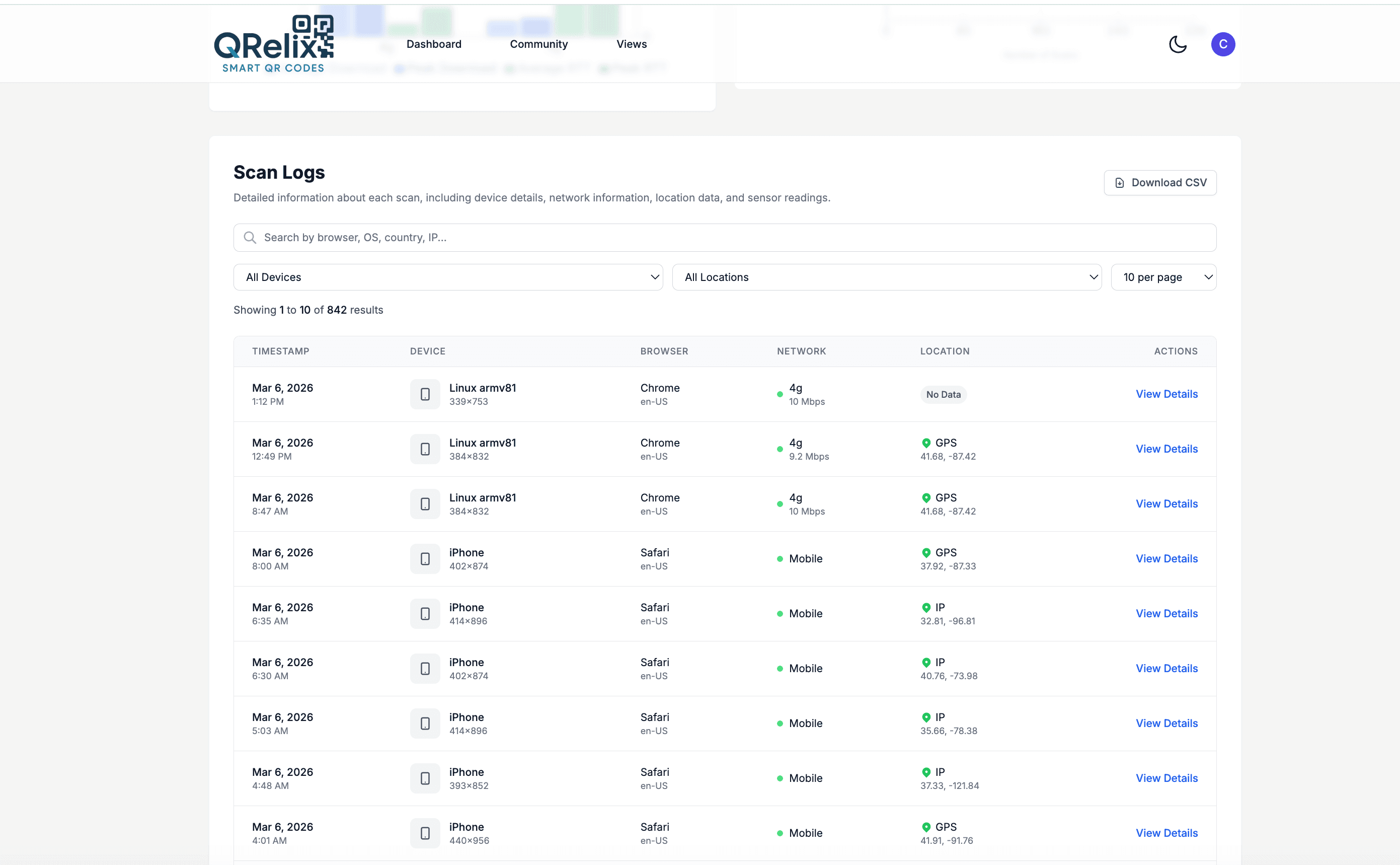
See every scan, in real time
Law firms run on knowing who received what, and when. This is the QRelix access log: every scan of a code is recorded as its own line item with a timestamp, the device that scanned it, and the location it came from. Put a code on an engagement letter, a seminar handout, or the intake card at reception, and you get a running record of when each piece was actually acted on. When a client says they never got to the intake form, the log answers the question. It reads less like marketing analytics and more like a paper trail — which is the point.
How to set up QR codes for your firm in 15 minutes
- 1
Create codes for your card and your intake form
Go to /create-qr-code. Choose the vCard type for your business card, so a scan lets a prospect save your name, firm, phone, and email straight to their contacts. Then create a dynamic URL code pointed at your client intake form — dynamic, so when the form moves or changes, every printed card still works.
- 2
Brand the codes to match your letterhead
Apply your firm's colors and logo, checking the live preview as you go. A branded code on a business card or engagement letter reads as part of the firm's identity rather than an afterthought, and clients are likelier to trust and scan a code that carries the logo they already recognize.
- 3
Print at 300 DPI on cards, letters, and signage
Download the print-ready SVG or PNG. Put the vCard code on the back of business cards, the intake code on reception signage and consultation folders, and a directions code on mailed engagement letters. Test each printed proof with an iPhone and an Android before committing to the full print run.
- 4
Lock down document codes and watch the access log
For codes linked to client-facing documents, add password protection and an expiration date or scan limit in the security settings. Then check the dashboard: the access log shows each scan's time, device, and location, and per-code scan counts show which placements — cards, seminars, mailers — actually generate contact.
“We added QRelix QR codes to our lobby for client intake. New clients now arrive with paperwork already completed, and our front desk staff reclaimed hours every week.”
QRelix user · Legal industry
Frequently Asked Questions
How do law firms use QR codes for client intake?
Create a dynamic QR code linking to your online intake form (Clio, Lawmatics, or a custom form). Display it in your waiting room, include it in appointment confirmations, or add it to your website. Clients complete their information digitally, reducing data entry errors and saving staff time.
Are QR codes secure enough for sharing legal documents?
Yes. QRelix offers password-protected QR codes and expiration dates, so you control who accesses the linked content and for how long. For highly sensitive documents, combine QR codes with your firm's secure document portal rather than linking directly to files.
Can I put a QR code on my attorney business card?
Absolutely. Create a vCard QR code with your name, firm, title, phone, email, and office address. Download as a high-resolution SVG and send it to your card printer. When scanned, your contact info saves directly to the person's phone.
Can a QR code be deactivated when a matter closes?
Yes. Dynamic codes can be set to expire on a specific date or after a set number of scans, and you can edit or retire the destination at any time from the dashboard. That means a code printed on a closing binder or matter-specific correspondence doesn't outlive the engagement — when the matter closes, the code stops resolving instead of pointing at a stale or sensitive page.
How do we know which marketing placement brought in a client?
Create a separate dynamic code for each placement — business cards, seminar handouts, direct mail, office signage — even when they all point to the same intake form. Each code tracks its own scan count, device breakdown, and scan log, so the dashboard shows exactly which placement generated the contact. Label the codes by campaign in the dashboard and the comparison takes a glance rather than a spreadsheet.
Can several attorneys manage their codes in one place?
Yes. The QRelix dashboard organizes every code with categories and labels, so each attorney or practice group can have its own category — estate planning's seminar codes never get tangled with litigation's intake code. Each code carries its own analytics, so an attorney can check their card's scan history without wading through the firm's full list. For firms generating many codes, the REST API automates creation; see /docs.
Law Firms & Legal guides & tutorials
- Elevate Your Business Card: How to Create QR Code with Tracking for Impact
- QR Code Lead Capture: Turn Every Scan Into a Real Lead (Free 2026 Setup)
- Google Review QR Code: How to Get More 5-Star Reviews on Autopilot
- Security and Access Controls
Try the free tools law firms & legal use most
Ready to Create QR Codes for Your Law Firms & Legal?
Free, no credit card. Create dynamic, trackable QR codes in seconds. Upgrade to Pro to remove the QRelix-branded redirect shown on free scans and unlock unlimited scans.
Create QR Code Free