QR Codes Built for Cannabis Compliance
Meet state-mandated QR code requirements for product labeling, dispensary verification, and lab result transparency. Create dynamic codes that update as regulations change, and track every scan.
How Cannabis & Dispensaries Use QR Codes
Practical ways to integrate QR codes into your cannabis & dispensaries workflow, each one trackable with real-time analytics.
Product Label Compliance Codes
Generate QR codes for cannabis product packaging that link to lab results, COAs (Certificates of Analysis), ingredient lists, and dosage information, meeting state labeling mandates.
Dispensary Verification QR Codes
Display storefront QR codes that let customers verify your dispensary license status, as required in California, New York, and other regulated markets.
Seed-to-Sale Traceability
Link QR codes to your seed-to-sale tracking system so consumers can trace product origin, cultivation methods, and supply chain journey with a single scan.
Digital Menu & Product Catalog
Create scannable dispensary menus showing real-time inventory, strain details, THC/CBD percentages, and pricing, updated instantly as stock changes.
Loyalty & Rewards Programs
Print QR codes on receipts and packaging that enroll customers in your loyalty program. Track repeat visits and reward your best customers.
Age Verification & Education
Link QR codes to responsible use guides, dosage calculators, and age-gated content that reinforces compliance while educating first-time consumers.
QR Code Types for Cannabis & Dispensaries
QRelix supports 6+ QR code types. These are the most popular for cannabis & dispensaries:
See every scan, in real time
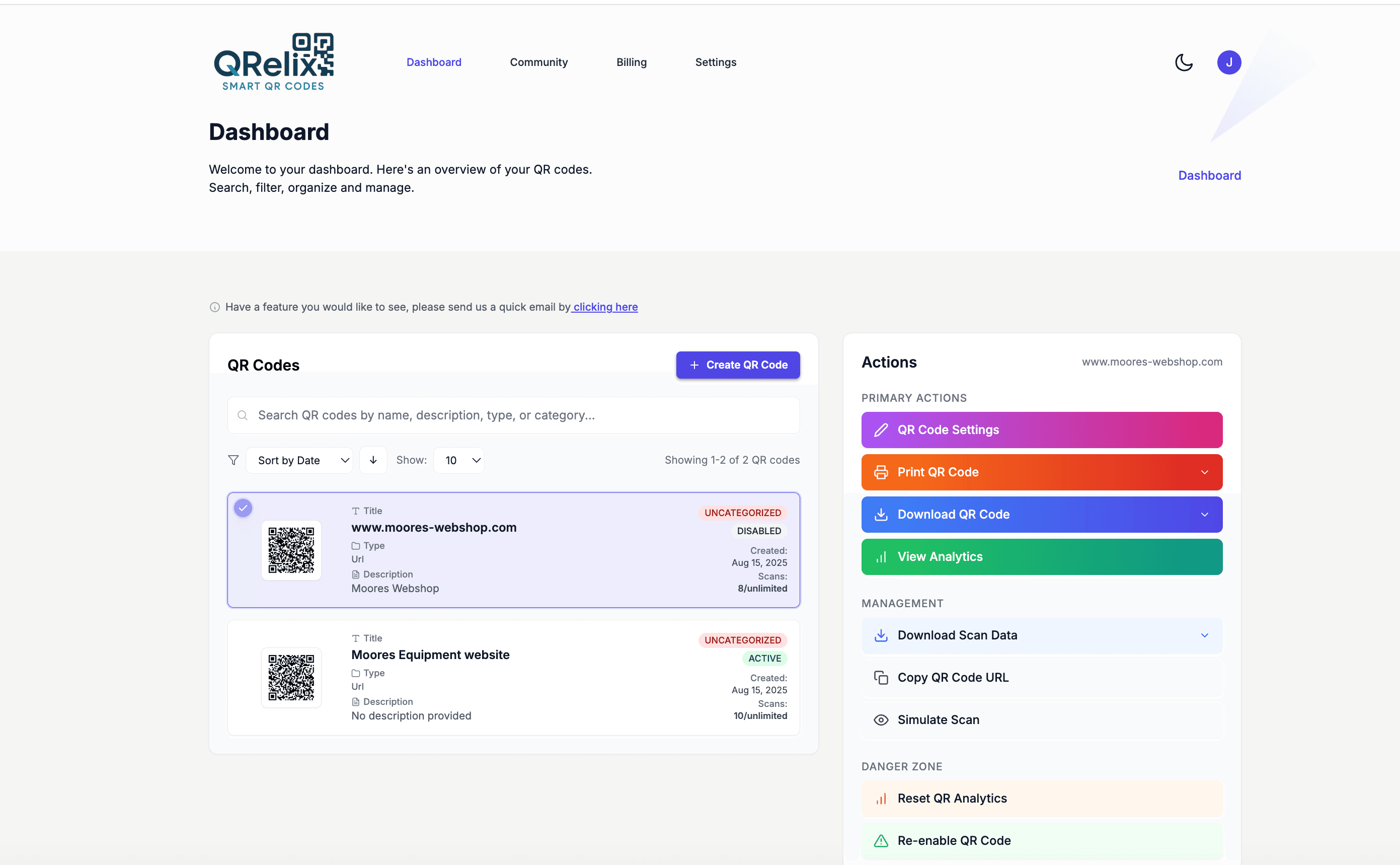
A dispensary rarely runs one QR code — it runs dozens at once. Every batch gets a COA code on the jar label, the register has a menu code, the storefront window carries a license verification code, and checkout has a loyalty signup. The dashboard keeps that inventory manageable: group codes into categories by product line or location, label each one by batch number, and edit a code's destination the moment a new lab result comes in. When a regulator or a customer scans a label, the right document is already behind it.
How to set up compliant dispensary QR codes in 10 minutes
- 1
Create a dynamic code for each batch COA
Go to /create-qr-code and create one code per batch. Use the File type to host the COA PDF directly, or the URL type to link your lab's results portal. Because the code is dynamic, a corrected or updated COA replaces the old one instantly — the printed jar labels never change.
- 2
Brand the code without hurting scannability
Add your dispensary's colors and logo with the live preview, but keep contrast high — codes on small jar labels and dark packaging fail when the modules blend into the background. Style presets give you a starting point that stays readable. Test the styled code on your actual label stock before a production run.
- 3
Download 300 DPI files for your label printer
Export each code as a print-ready 300 DPI SVG or PNG for your label vendor. Place COA codes on jar labels and exit bags, the menu code at the register and on shelf talkers, and the verification code on the storefront window where customers can check it before walking in.
- 4
Track scans and rotate batches from the dashboard
Scan counts show which products customers actually research, and individual scan logs record the timestamp, device, and location of every scan. As batches rotate, edit each code's destination to the current COA and archive retired ones with labels — so your printed packaging always resolves to the right document.
“QRelix made our compliance rollout painless. We generate QR codes for every product batch that link to real-time lab results, and updating them when regulations change takes seconds.”
QRelix user · Cannabis industry
Frequently Asked Questions
Which states require QR codes on cannabis products?
California, New York, New Mexico, Utah, Indiana, and Oregon have QR code requirements for cannabis products or dispensary storefronts. Requirements vary. Some mandate QR codes on product labels linking to lab results, while others require storefront QR codes for license verification. QRelix dynamic codes let you update linked content as regulations evolve.
Can I link QR codes to lab test results and COAs?
Yes. Create a QRelix dynamic QR code that links to your lab's Certificate of Analysis page or a hosted PDF. When new test results come in, update the destination URL without reprinting the product label.
How do QR codes help with dispensary compliance?
States like California and New York require dispensaries to display QR codes near their entrance that link to official license verification databases. QRelix lets you create branded, trackable QR codes for storefront display while monitoring scan activity to measure foot traffic and customer engagement.
What happens to a COA QR code when the batch sells out?
You have two clean options. Edit the code's destination to the current batch's COA so the same label design keeps working, or retire the code by setting an expiration date or scan limit so it stops resolving once the product is gone. Either way, the dashboard's categories and labels make it easy to find the exact batch code you need to update.
How small can a QR code be on a cannabis jar label?
Aim for at least 2 x 2 cm (about 0.8 inches) of clear, high-contrast code — smaller than that and budtenders and customers will struggle to scan through curved glass and shrink wrap. Export the 300 DPI SVG so the code stays crisp at small sizes, leave quiet space around it, and test-scan a printed label on the actual jar before committing to a full label run.
Can I password-protect QR codes meant for staff only?
Yes. Dynamic codes support password protection, so a code posted in the back of house — linking to SOPs, intake checklists, or internal inventory sheets — only opens for staff who know the password. Your public-facing COA and menu codes stay open, while internal codes stay internal even if a customer photographs one. You can also set expiration dates on codes for time-limited staff documents.
Cannabis & Dispensaries guides & tutorials
- QR Codes for Cannabis Retail: The Free 2026 Setup for Dispensary COAs, Inventory & Compliance
- QR Code Compliance Tracking: How to Build a Free Audit Trail for OSHA, FDA & ISO Inspections (2026)
- How to Use QR Codes for Inventory: A Step-by-Step Tutorial (Free 2026)
- Security and Access Controls
Try the free tools cannabis & dispensaries use most
Ready to Create QR Codes for Your Cannabis & Dispensaries?
Free, no credit card. Create dynamic, trackable QR codes in seconds. Upgrade to Pro to remove the QRelix-branded redirect shown on free scans and unlock unlimited scans.
Create QR Code Free