QR Codes for Gyms & Fitness Facilities
Put QR codes on every machine, every poster, and every check-in desk. Link members to workout videos, class sign-ups, and training bookings. No app required.
How Fitness & Gyms Use QR Codes
Practical ways to integrate QR codes into your fitness & gyms workflow, each one trackable with real-time analytics.
Equipment Tutorial Videos
Attach QR codes to gym machines linking to proper-form video demonstrations. New members feel confident and injury risk drops.
Class Schedule & Sign-Up
Post QR codes in lobbies and locker rooms linking to your live class schedule. Members scan to view times and reserve their spot instantly.
Member Check-In
Replace key fobs with QR code check-in. Members scan at the door and you track attendance patterns across hours and days.
Personal Training Bookings
Place QR codes on trainer bios and around the gym floor linking to online booking pages for personal training sessions.
Workout Plan Access
Trainers create QR codes for clients linking to their personalized workout plans, progress trackers, and nutrition guides.
Membership Promotion & Referral
Print QR codes on guest passes and referral cards linking to membership sign-up pages with tracked promo codes.
QR Code Types for Fitness & Gyms
QRelix supports 6+ QR code types. These are the most popular for fitness & gyms:
See every scan, in real time
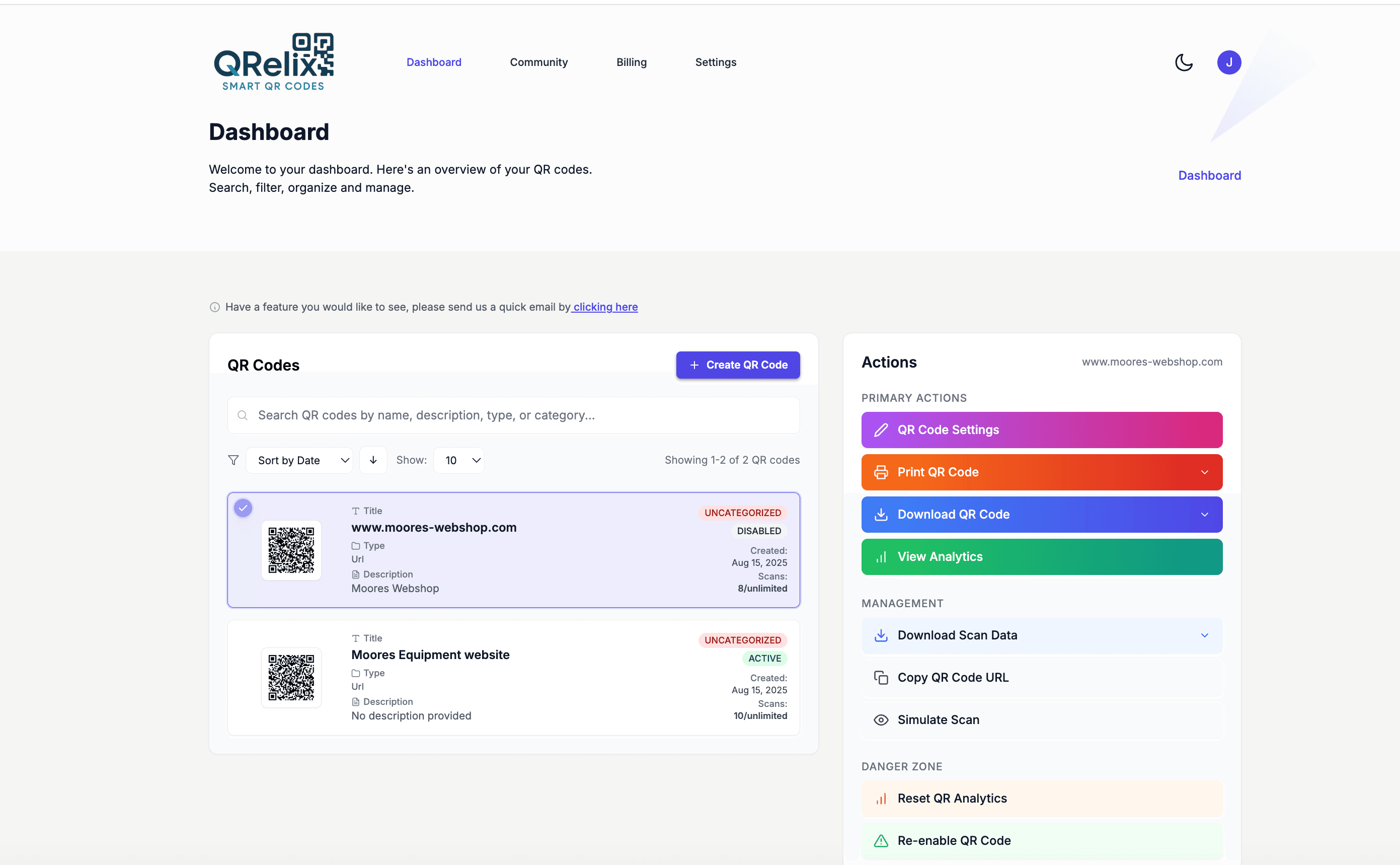
A mid-size gym ends up with dozens of QR codes fast: one on every treadmill and cable machine linking a demo video, one on the studio door for the class schedule, one at the front desk for WiFi, one on the wall for personal training bookings. This dashboard keeps them all in one place with categories and labels — cardio deck, free weights, studios, front desk — so when you re-record a demo video or move a class time, you find the right code in seconds instead of walking the floor scanning tags.
How to set up QR codes across your gym in 10 minutes
- 1
Create codes for equipment, classes, and the front desk
At /create-qr-code, use the YouTube type to link each machine's demo video, a URL code for the class schedule and personal training booking page, and a WiFi code for member internet at the front desk. Dynamic codes mean a re-recorded demo swaps in without touching the tag.
- 2
Add your gym's colors and logo
Style the codes with your brand colors and logo using the live preview. Members are more willing to scan a tag on a squat rack when it visibly belongs to the gym, and consistent styling makes official codes easy to tell apart from random stickers.
- 3
Print durable tags where members pause
Download the print-ready 300 DPI SVG, print on laminated stock, and mount tags on equipment frames away from grips and wipe-down zones, on studio doors next to the schedule, and at the front desk. Eye level, with a one-line label like 'Scan for the demo.'
- 4
Group by zone and watch what gets scanned
Organize codes into categories — cardio deck, free weights, studios — and watch the dashboard. Scan activity by hour shows when the floor is busiest, and per-code counts show which machines' demos members actually open, which tells you where form coaching is needed most.
“We put QRelix QR codes on every piece of equipment. New member onboarding is essentially self-service now, and our trainers can focus on coaching instead of explaining machines.”
QRelix user · Fitness industry
Frequently Asked Questions
How can gyms use QR codes on equipment?
Stick a QR code on each machine linking to a video tutorial showing proper form and suggested sets/reps. QRelix tracks scans so you can see which machines members need the most guidance on.
Can QR codes replace gym membership cards?
Yes. Members can save a QR code to their phone's wallet and scan it at check-in. QRelix tracks scan times so you can analyze peak hours and staffing needs.
How do I promote new classes with QR codes?
Create QR codes for posters and social media that link to class descriptions and sign-up pages. Update the destination when the schedule changes, no reprinting needed.
How do I keep QR code tags readable on heavily used equipment?
Laminate the tag or print on durable stock, and mount it away from grip zones and the areas members wipe down. Download the SVG rather than the PNG for tags — vector output stays sharp at any size and reprints cleanly. Because the code is dynamic, a worn tag is a two-minute fix: print the same file again and the link keeps working. You never have to generate a new code or update the video behind it.
Can I limit a referral or promo QR code to a set number of scans?
Yes. Dynamic codes support expiration by scan count as well as by date, so a first-25-members referral offer can shut off automatically once it hits the limit. A date-based expiration suits a January promotion that should stop working in February. The scan counter in the dashboard shows how close the offer is to its cap in real time, so the front desk is never surprised.
Can I manage QR codes for multiple gym locations in one account?
Yes. The dashboard organizes codes with categories and labels, so each location gets its own group — downtown, westside, and so on — with equipment, class, and front-desk codes under it. Per-code analytics then compare locations directly: scan counts, device mix, and geography show which club's members actually use the demo videos and booking links. One account covers the whole operation.
Fitness & Gyms guides & tutorials
- QR Code Booking System: How to Build a Free One in 2026 (Calendly, Cal.com & Resy)
- Social Media QR Code: How to Get More Followers From the Real World
- QR Code Lead Capture: Turn Every Scan Into a Real Lead (Free 2026 Setup)
Try the free tools fitness & gyms use most
Ready to Create QR Codes for Your Fitness & Gyms?
Free, no credit card. Create dynamic, trackable QR codes in seconds. Upgrade to Pro to remove the QRelix-branded redirect shown on free scans and unlock unlimited scans.
Create QR Code Free