QR Codes for Churches & Ministries
Make giving, connecting, and engaging frictionless for your congregation. One scan links to your giving page, bulletin, sermon archive, or volunteer sign-up. No apps required.
How Churches & Worship Use QR Codes
Practical ways to integrate QR codes into your churches & worship workflow, each one trackable with real-time analytics.
Online Giving & Tithing
Place QR codes on pew cards, bulletins, and lobby signage linking directly to your online giving platform. Members tap to give during the offering.
Digital Bulletins & Announcements
Replace printed bulletins with a QR code at the entrance linking to this week's order of service, announcements, and prayer requests.
Sermon Recordings & Notes
Add QR codes to bulletin inserts linking to the sermon recording, discussion questions, or pastor's notes. Members revisit the message during the week.
Event & Ministry Registration
Post QR codes in lobbies and hallways linking to registration for small groups, VBS, retreats, or community service projects.
Visitor Welcome & Connection
Place QR codes on visitor cards linking to a welcome page with service times, staff bios, beliefs, and a connection form for follow-up.
WiFi Access for Guests
Display WiFi QR codes in lobbies and kids' areas so visitors connect to the church network without asking for a password.
QR Code Types for Churches & Worship
QRelix supports 6+ QR code types. These are the most popular for churches & worship:
See every scan, in real time
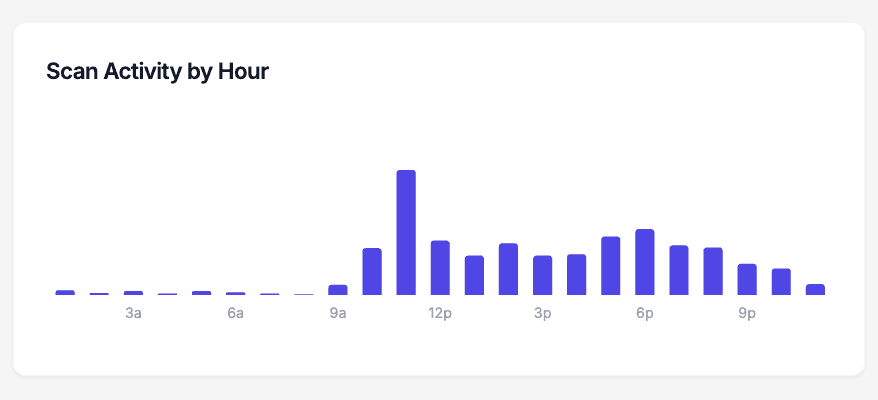
Sunday has a rhythm, and your scan data shows it. This chart is the scan-activity-by-hour view from the QRelix dashboard: every time someone scans the code on a pew card, bulletin insert, or lobby banner, it lands in an hourly bar. You can see whether the giving code gets scanned during the 9 a.m. service or the 11 a.m., whether sermon-notes scans spike right after the message, and whether the welcome-card code gets used midweek. That tells you which service to mention the code in, and which printed pieces are actually reaching people.
How to set up QR codes for your church before Sunday
- 1
Create a dynamic QR code for your giving page
Go to /create-qr-code and choose the URL type. Paste your giving page link, or start with the sermon archive or a visitor connect form. Because the code is dynamic, you can point it at a Christmas offering page in December and back to the general fund in January without touching a single printed piece.
- 2
Match the code to your church branding
Add your church colors and place your logo at the center of the code. The live preview shows exactly what will land on pew cards and bulletins. Keep strong contrast between the code and its background so it scans as reliably in a dim sanctuary as it does in the lobby.
- 3
Print it on pew cards, bulletins, and slides
Download the print-ready 300 DPI SVG or PNG. The SVG scales cleanly from a bulletin insert to a lobby banner. Place codes where people sit still with their phones: pew backs, bulletin covers, the welcome desk, and the final slide of the announcement loop before service starts.
- 4
Watch scans by service time in the dashboard
Open your dashboard after the first Sunday. Scan activity by hour shows which service scans more, the device breakdown shows how many iPhones versus Androids you serve, and per-code scan counts show whether the pew card or the bulletin is doing the work. Edit the destination anytime — nothing gets reprinted.
“Online giving increased 35% the first month we put QRelix QR codes on our pew cards. Members who never carried cash started giving consistently.”
QRelix user · Church & ministry sector
Frequently Asked Questions
How do churches use QR codes for giving?
Place QR codes on pew cards, offering envelopes, and lobby screens linking to your online giving platform (Tithe.ly, Pushpay, etc.). Members scan during the offering and complete their gift in seconds. QRelix analytics show giving engagement trends over time.
Can QR codes replace printed church bulletins?
Yes. A single QR code at the entrance links to a digital bulletin updated weekly. You save on printing costs, reduce waste, and can include interactive elements like links to sign-up forms and sermon videos.
How do I help visitors connect with our church?
Place a QR code on visitor welcome cards linking to a connection page with service times, campus map, kids' ministry info, and a form to request follow-up. You capture visitor info digitally instead of relying on paper cards.
What size should a QR code be on a bulletin or pew card?
Big enough to scan from a seated position without leaning in — for handheld pieces like bulletins and pew cards, roughly postage-stamp size or larger is a safe starting point. QRelix exports print-ready 300 DPI SVG and PNG files, so the same code scales from a bulletin corner to a lobby banner without blurring. Print one proof and test it from a pew with both an iPhone and an Android before running the full batch.
Can older members scan a QR code without downloading an app?
Yes. Modern iPhone and Android cameras scan QR codes natively — members open the camera, point it at the code, and tap the link that appears. No app, no account. For members on older devices, print a short URL next to the code so no one is left out. In practice, a brief "open your camera and point it here" from the platform handles most of the learning curve.
How do we keep track of QR codes across ministries or campuses?
Use the QRelix dashboard's categories and labels. Give each ministry — youth, worship, missions — or each campus its own category, so one campus's giving code never gets confused with another's. Every code reports its own scan count, so you can compare how each ministry's printed pieces perform. When a ministry leader changes a signup form, you edit that one code's destination and every printed copy keeps working.
Churches & Worship guides & tutorials
- QR Codes for Churches: How to Drive Giving, Engagement & Attendance in 2026
- Essential QR Codes for Non-Profits: A Toolkit for Impact
- WiFi QR Code: How to Create One, Best Practices, and Why Your Business Needs It
- Downloading and Printing Your QR Code
Try the free tools churches & worship use most
Ready to Create QR Codes for Your Churches & Worship?
Free, no credit card. Create dynamic, trackable QR codes in seconds. Upgrade to Pro to remove the QRelix-branded redirect shown on free scans and unlock unlimited scans.
Create QR Code Free