QR Codes for Smarter Logistics
Attach QR codes to packages, pallets, and shipping documents that link to live tracking, delivery instructions, and proof of delivery, scanned and logged at every stop.
How Logistics & Shipping Use QR Codes
Practical ways to integrate QR codes into your logistics & shipping workflow, each one trackable with real-time analytics.
Package Tracking Links
Generate QR codes on shipping labels that link customers directly to real-time tracking pages. One scan shows exactly where their package is.
Delivery Instructions
Attach QR codes to packages linking drivers to delivery notes, gate codes, and special handling instructions for each address.
Proof of Delivery
Drivers scan a QR code at delivery to log timestamp, GPS location, and photo confirmation. Customers receive instant delivery verification.
Warehouse Bin Locations
Tag warehouse shelves and bins with QR codes linking to contents, stock levels, and pick-list priorities. Workers scan to confirm the right item.
Supply Chain Documentation
Attach QR codes to pallets linking to bills of lading, customs documents, and chain-of-custody records. Paperwork follows the shipment digitally.
Fleet & Vehicle Inspection
Place QR codes on delivery vehicles linking to pre-trip inspection checklists. Drivers scan, complete the form, and results log automatically.
QR Code Types for Logistics & Shipping
QRelix supports 6+ QR code types. These are the most popular for logistics & shipping:
See every scan, in real time
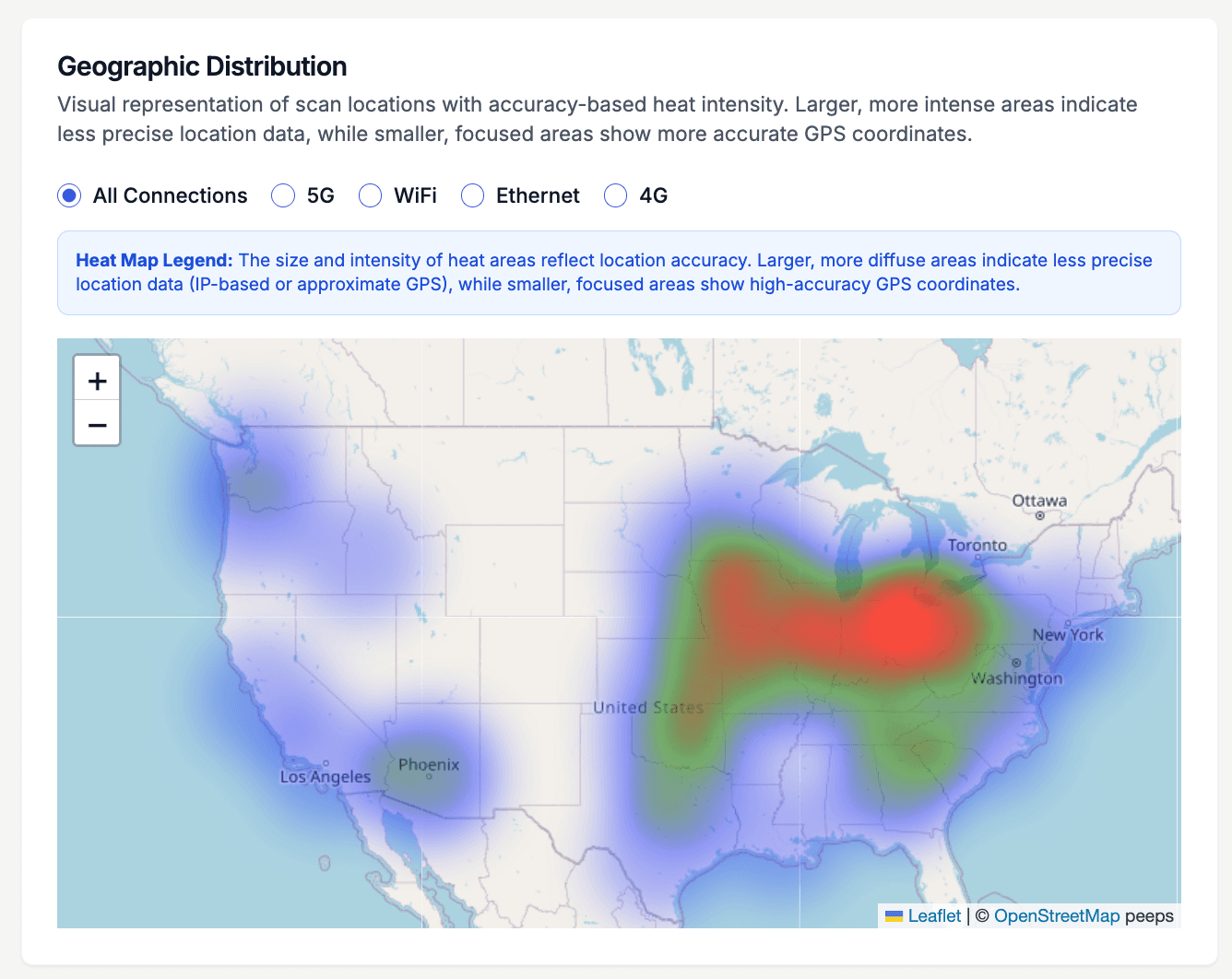
A pallet label scanned at the origin dock, a bin tag scanned during a cycle count, a delivery-instruction code scanned curbside — each event lands on this map. The geographic heatmap shows scan density across your entire network, so you can see which distribution centers actually use the bin codes you printed, where drivers pull up gate instructions, and which lanes go quiet. Every dynamic code feeds the same dashboard, whether it is taped to a trailer placard or laminated on a rack upright.
How to set up QR codes for your logistics operation in 10 minutes
- 1
Create a dynamic URL code for each label
Go to /create-qr-code and pick the URL type. Point each code at what the person standing there needs: a bin's putaway rules, a trailer's manifest, a customer's live tracking page. Because the codes are dynamic, you can repoint a bin label to a new SKU without printing a new tag.
- 2
Add your company colors and logo
Recognizable codes get scanned; anonymous ones get ignored. Apply your brand colors and drop your logo into the center using the live preview. Keep strong contrast between the code and its background so phone cameras read it quickly in dim warehouse aisles.
- 3
Print at 300 DPI and mount at scan height
Download the print-ready 300 DPI SVG so labels stay sharp at any size. Print bin codes at rack level where a forklift operator can reach them, gate instructions at driver-window height, and pallet codes on two adjacent sides so a scan never requires turning the load.
- 4
Watch the scan map and logs in your dashboard
Open the dashboard to see scan counts, a geographic heatmap, and individual scan logs with timestamp and device. If a receiving dock never scans its codes, retrain or reposition. Use categories to group codes by facility so each site's labels stay organized and easy to find.
“We added QRelix QR codes to every outbound pallet. Our warehouse error rate dropped 18% because workers scan to confirm the right items before loading.”
QRelix user · Logistics industry
Frequently Asked Questions
How do QR codes improve package tracking?
Each package gets a unique QR code linking to its tracking page. Customers scan to see real-time status. You can also track how often customers check, since high scan frequency may indicate delivery anxiety worth addressing.
Can QR codes work in cold chain or outdoor conditions?
QRelix generates high-resolution SVG files printable on weatherproof labels. The QR code links to a dynamic URL, so even if you need to reprint a damaged label, the same URL and tracking data persist.
How do I track scans across multiple warehouse locations?
Create location-specific QR codes or use QRelix analytics to identify scan origins by geography and device. This gives you visibility into which handoff points are scanning consistently and which are skipping steps.
How large should a QR code be on a pallet label or rack sign?
Size the code for the scan distance. A code scanned at arm's length works at about 2 x 2 inches, while codes read from a forklift or across an aisle should be printed several times larger. QRelix exports print-ready 300 DPI SVG files that scale to any size without losing sharpness, so the same code can be printed at label size and banner size. Test a sample at the real distance before printing a full run.
Can I restrict who opens the documents behind a warehouse QR code?
Yes. Dynamic QR codes on QRelix support password protection, so a scan prompts for a password before the destination loads. You can also set a code to expire on a date or after a set number of scans, which is useful for temporary gate instructions or a carrier's one-time pickup details. Access controls are managed from the dashboard and can be changed anytime without reprinting the label.
Do QR codes work in warehouse dead zones with no cell signal?
The camera reads the code offline, but opening a dynamic code's destination requires a data connection because the scan is redirected and logged. For true dead zones, generate a static text QR code with QRelix's free browser tools: the handling instructions are encoded directly in the code itself, so they display without any connection. The tradeoff is that static codes cannot be edited or tracked after printing.
Logistics & Shipping guides & tutorials
- How to Use QR Codes for Inventory: A Step-by-Step Tutorial (Free 2026)
- QR Code Track and Trace: Free Asset, Inventory & Supply Chain Tracking (2026)
- QR Code Location Tracking: How to See Where Every Scan Happens (Free in 2026)
- Managing Your QR Codes
Try the free tools logistics & shipping use most
Ready to Create QR Codes for Your Logistics & Shipping?
Free, no credit card. Create dynamic, trackable QR codes in seconds. Upgrade to Pro to remove the QRelix-branded redirect shown on free scans and unlock unlimited scans.
Create QR Code Free