QR Codes for Musicians: Get Tipped, Heard & Followed
Print one QR code on your tip jar, mic stand, or merch table. Fans scan to Venmo you a tip, follow you on Spotify, or grab a shirt. No apps to download, no cash to fumble, no logins in the way.
How Musicians Use QR Codes
Practical ways to integrate QR codes into your musicians workflow, each one trackable with real-time analytics.
Venmo Tip QR Codes
Generate a Venmo Pay QR code with your username and a suggested amount ("$5 tip for tonight's set"). Fans scan, the Venmo app opens to a pre-filled payment screen, they tap send. Tape it to your tip jar, your mic stand, or the inside of your guitar case.
Spotify, Apple Music & Bandcamp
Replace "search for us on Spotify" with one scan. Print the QR code on your stage banner, merch, or business cards, and fans land directly on your artist page, ready to save your latest single.
Merch Table Checkout
Create a Venmo Pay QR code for each item: $25 shirt, $30 vinyl, $45 hoodie. Fans scan, the amount is pre-filled, they hit send. Faster than Square, no card reader, no per-swipe fees eating your night.
Mailing List & Fan Capture
Add a QR code linking to your email signup. Build a fan list you actually own, outside Spotify, outside Instagram, with no algorithm deciding who hears about your next show.
Social Follow & Smart Links
One QR code links to your Linktree, Instagram, TikTok, or a "save this track" smart link. Track scans by venue to see which rooms grow your following the fastest.
Gig Calendar & Booking
Print a QR code on your business cards and stage backdrop linking to your upcoming shows or booking inquiry form. Venue owners and bookers scan to see availability without typing email addresses.
QR Code Types for Musicians
QRelix supports 6+ QR code types. These are the most popular for musicians:
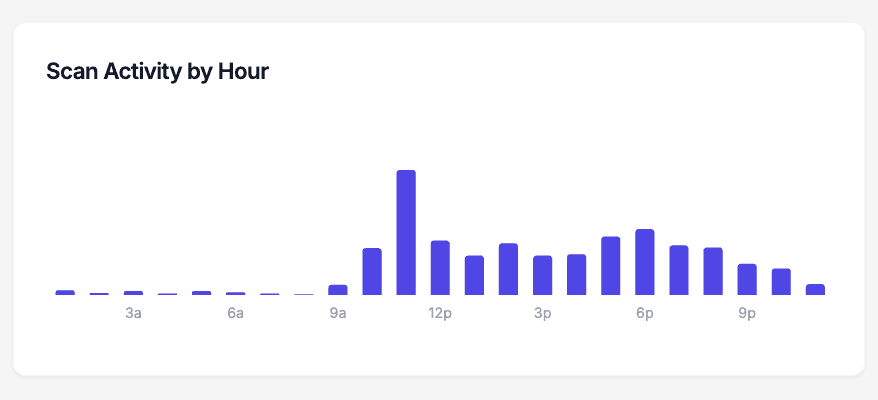
See every scan, in real time
The scan-by-hour chart answers the question every gigging musician has after load-out: did anyone actually use the code? Scans on your tip jar placard, merch table sign, and guitar-case sticker are plotted against the hour of day, so you can see the spike during your set, the bump right after the encore, and whether the code on the flyer by the door did anything at all. Compare charts across gigs and you learn which rooms — and which set times — put money in the jar.
How to set up QR codes before your next gig
- 1
Create codes for tips, merch, and follows
At /create-qr-code, make a Venmo code for tips, a URL code for your merch or streaming smart link, and an Instagram code for follows. Keep them as separate dynamic codes so each one reports its own scans — and so you can repoint the merch code at the new single next month.
- 2
Style the codes to match your act
Set colors that fit your album art and put your logo in the center, checking the live preview as you go. A code styled like your merch reads as part of the act; a plain black-and-white square taped to the jar reads as an afterthought.
- 3
Print big enough for the back of the room
Download the 300 DPI SVG and size it for the placement: card-sized on the merch table, larger on a stage banner. A rough rule: a code needs about one inch of width for every ten inches of scanning distance. Test-scan from where fans will actually stand before you print the final run.
- 4
Compare gigs in your dashboard
After the show, check scan counts, the hour-by-hour chart, and the device split for each code. Label codes by venue or tour leg with categories so Friday's club show and Saturday's festival slot are easy to compare, then bring the codes that earned scans to the next gig.
“I pulled $180 in tips on a Saturday after taping a QRelix Venmo code to my tip jar, twice what I usually make in cash. People who never carry bills will Venmo you in a heartbeat if you make it one scan.”
QRelix user · Gigging musician
Frequently Asked Questions
How do musicians use Venmo QR codes for tips?
Generate a Venmo Pay QR code in QRelix with your Venmo username and an optional default tip amount (say $5). Print it once and tape it to your tip jar, mic stand, or guitar case. When a fan scans, their Venmo app opens with your payment screen already filled in, so they just tap send. No cash, no card reader, no app to download for the audience.
Can I track which gigs earn the most tips?
Yes. Create a separate QRelix QR code for each venue or each night. The analytics dashboard shows scan counts by date, time, and device, so you can compare a Tuesday open mic against a Saturday bar set and double down on the rooms that pay.
Do my fans need a special app to tip me?
They just need the Venmo app, which most U.S. concert-goers already have on their phone. If they don't, the QR code falls back to the Venmo web checkout so they can still tip from their browser. You don't need any app, just generate the QR code in QRelix once and reuse the same printed sign at every gig.
Can I use one QR code for tips, merch, and streaming?
Yes. Point it to a single landing page (Linktree, Beacons, or your own site) with buttons for tip, merch, and streaming. Or print separate QRelix QR codes for each, sized for different surfaces. Both flows are trackable and the dynamic links never break, even if you switch services later.
Why use QRelix instead of the built-in Venmo QR code?
The QR code shown in your Venmo app only opens your profile, so fans have to type the amount themselves. A QRelix Venmo QR code pre-fills the amount and note, lets you swap the destination later without reprinting, and tracks scans so you can see which gigs actually convert. The Venmo app QR also can't be combined with your Spotify, mailing list, or merch links.
How big should a QR code be on a stage banner or drum head?
Size it for scanning distance: roughly one inch of code width per ten inches of distance, so a fan twenty feet back needs a code around two feet wide. The 300 DPI SVG download scales to banner size with no quality loss. High contrast helps under stage lighting — dark modules on a light block — and a test scan from the back of the room beats any rule of thumb.
Can I reuse the same printed QR codes for a whole tour?
Yes — that is the point of dynamic codes. The printed code never changes; the destination does. Point the merch code at the presale for the next city, swap the smart link when the new single drops, or send the tips code to a different page for a benefit show. Edit it from your phone between soundcheck and doors, and the banner, stickers, and table signs stay exactly as printed.
Will my QR codes work in a basement venue with no signal?
The scan itself needs a data connection: a fan's phone reads the code instantly, but loading the destination — and logging the scan — requires internet. In dead-zone venues, ask for the WiFi password and post it, or place codes where reception is better: the bar, the merch line, near the door. Codes on hand-out items like stickers keep working after fans leave, so the scan often just happens later.
Musicians guides & tutorials
- QR Codes for Musicians — Venmo Tips, Merch & Streaming Links
- Venmo Tip Jar QR Codes — Baristas, Bartenders & Service Pros
- Social Media QR Code: How to Get More Followers From the Real World
- QR Code Lead Capture: Turn Every Scan Into a Real Lead (Free 2026 Setup)
Try the free tools musicians use most
Ready to Create QR Codes for Your Gigs?
Free, no credit card. Create dynamic, trackable QR codes in seconds. Upgrade to Pro to remove the QRelix-branded redirect shown on free scans and unlock unlimited scans.
Create QR Code Free