QR Codes for Data-Driven Marketing
Turn every print ad, direct mail piece, and billboard into a measurable digital touchpoint. Track scans in real-time, A/B test destinations, and prove ROI on offline campaigns.
How Marketing Use QR Codes
Practical ways to integrate QR codes into your marketing workflow, each one trackable with real-time analytics.
Print Ad Tracking
Add QR codes to magazine ads, newspaper inserts, or brochures. Track exactly how many readers engage and which publications drive the most traffic.
Direct Mail Campaigns
Embed QR codes in postcards and mailers linking to personalized landing pages. Measure response rates by region, timing, and audience segment.
A/B Test Landing Pages
Create identical QR codes pointing to different URLs. Update the destination mid-campaign to test which landing page converts better.
Billboard & OOH Tracking
Add QR codes to billboards and outdoor ads. QRelix analytics show scan times and locations, proving which placements work.
Business Card QR Codes
Replace static contact info with a dynamic QR code that links to your digital portfolio, LinkedIn, or latest campaign page.
Social Media Cross-Promotion
Create QR codes for print materials linking directly to your Instagram, TikTok, or YouTube, deep-linking to the right platform.
QR Code Types for Marketing
QRelix supports 6+ QR code types. These are the most popular for marketing:
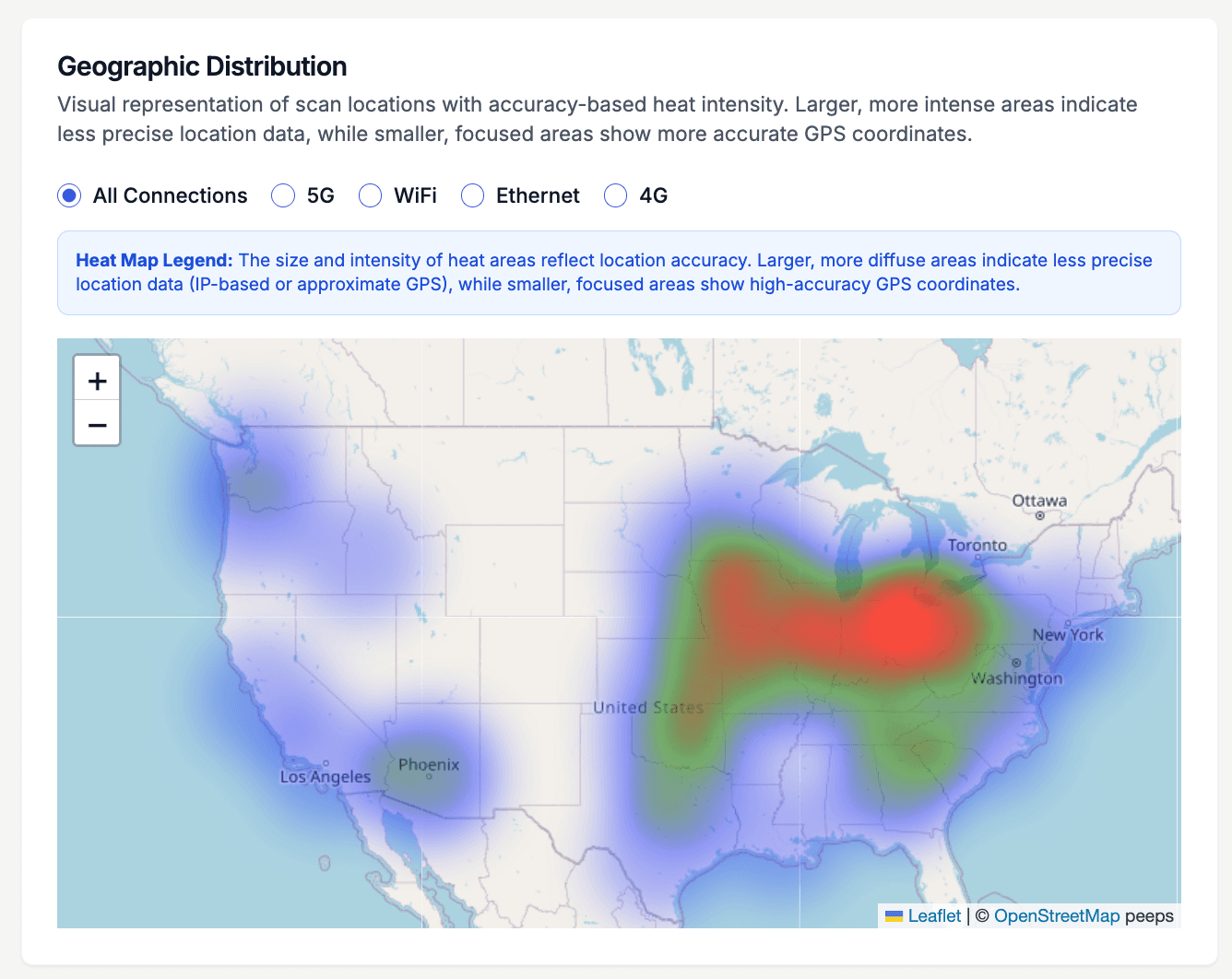
See every scan, in real time
When a direct mail drop covers three ZIP codes and a billboard sits on one highway, the question is which placement actually moved people. This heat map shows scan density across the country for a single QR code, so a regional magazine ad, a transit poster, and a trade show handout each show exactly where their scans came from. Give each placement its own code and the map becomes a side-by-side comparison of your media buy.
How to set up trackable campaign QR codes in 10 minutes
- 1
Create one dynamic code per placement
At /create-qr-code, make a separate URL code for each placement — the postcard, the billboard, the magazine ad. Point each at a landing page tagged with UTM parameters so GA4 sees the campaign too. Separate codes are what make placement-level comparison possible later.
- 2
Brand every code before it ships to print
Apply your campaign colors and logo with the style presets and live preview. In an era of QR phishing, a branded code signals legitimacy on a poster where nobody can hover over a link — and it keeps the creative consistent across every placement.
- 3
Send 300 DPI files to your print vendor
Download the print-ready 300 DPI SVG for large-format work like billboards and transit posters, and the PNG for mailers and print ads. Test-scan a physical proof at the real viewing distance before approving the run — a code that scans on screen can fail at billboard distance.
- 4
Compare placements and shift budget
Watch the dashboard as the campaign runs: scan counts per code, device split, the geographic heat map, and activity by hour. When one placement clearly outperforms, edit any code's destination on the fly — redirecting a weak placement's traffic without reprinting anything.
“We tracked a 340% increase in landing page visits from our direct mail campaign using QRelix QR codes. First time we could actually measure offline-to-online conversion.”
QRelix user · Marketing industry
Frequently Asked Questions
How do QR codes help measure offline marketing ROI?
Every QR code scan is tracked with timestamp, location, device type, and more. This turns untraceable offline touchpoints (print ads, mailers, signage) into measurable digital interactions with clear attribution.
Can I change where a QR code points mid-campaign?
Yes. Dynamic QR codes let you update the destination URL at any time. Run an A/B test by pointing the same printed code to different landing pages in different weeks, then compare scan-to-conversion rates.
How many QR codes should I create per campaign?
Create a separate QR code for each placement (magazine A vs magazine B, postcard vs flyer) so you can compare performance. QRelix makes it easy to organize and track multiple codes from one dashboard.
Do QR code scans show up in Google Analytics?
Yes, if you point the code at a UTM-tagged URL. Create a dynamic QR code whose destination carries utm_source, utm_medium, and utm_campaign parameters, and GA4 attributes every scan-through visit to that placement. The QRelix dashboard adds a layer GA4 does not capture on its own: raw scan counts, device type, scan geography with a heat map, and scan activity by hour of day.
What file format should I send my print vendor for QR codes?
Send the 300 DPI SVG for anything large-format — billboards, transit posters, banners — because vector files scale to any size without losing edge sharpness. The 300 DPI PNG works for postcards, flyers, and magazine ads at standard sizes. Either way, ask for a proof and test-scan it at the real viewing distance before the full run; matte stock and curved surfaces can behave differently than a screen.
How do I retire a QR code when the campaign ends?
Set an expiration when you create the code, either a calendar date or a maximum scan count, and the code stops working on schedule. If you would rather keep old print alive, edit the destination instead and point it at an evergreen page. Scan-count expiration also fits limited offers — the first scans up to your cap get the deal, and later scans do not.
Marketing guides & tutorials
- QR Campaign Tracking: How to Measure Multi-Channel QR Campaigns Free (2026)
- QR Code Tracking in Google Analytics 4: The UTM Setup Guide That Actually Works
- QR Code Campaigns: Real Examples That Worked (and Why)
- 7 Costly QR Code Mistakes Sabotaging Your Campaigns
Try the free tools marketing use most
Ready to Create QR Codes for Your Campaigns?
Free, no credit card. Create dynamic, trackable QR codes in seconds. Upgrade to Pro to remove the QRelix-branded redirect shown on free scans and unlock unlimited scans.
Create QR Code Free