Venmo Tip Jar QR Codes for Service Workers
Print one QR code at the counter. Customers scan, the Venmo app opens to a pre-filled tip, and they hit send. No cash on hand, no Square fees, no app downloads for guests, just tips landing in your account.
How Tip Jars Use QR Codes
Practical ways to integrate QR codes into your tip jars workflow, each one trackable with real-time analytics.
Counter & Register Tip Jars
Generate a Venmo Pay QR code with a suggested amount ($2, $5, $10) and tape it to the counter, register, or pickup window. Customers paying with card no longer skip the tip, they scan and send while they wait for their drink.
Mobile & Pop-Up Service
Food trucks, valets, baristas at events, and mobile detailers can print one QR code on their setup. No card reader required, no cell signal needed for the customer's payment, Venmo handles it.
Pre-Filled Tip Amounts
Lock in a default tip so customers don't have to think. "$5 Tip" with a note like "Thanks!" appears on their Venmo screen pre-filled. They tap send. The whole interaction is faster than handing over a five.
Multi-Staff Tip Pools
Print separate QRelix QR codes for each shift, bar, or station. The analytics dashboard shows who's collecting how much, useful for transparent tip pools or just knowing which shift generates the most goodwill.
Receipt & To-Go Bag Tipping
Print the Venmo QR code on receipts, to-go bag stickers, or pickup-shelf labels. Customers who walk out without tipping at the counter still have a one-scan way to come back and tip when their order made their day.
Review & Loyalty Add-Ons
Pair the tip QR code with a Google Review or loyalty signup QR code. Happy customers leave a review while they're waiting and tip while they're scanning, both in the same 30 seconds.
QR Code Types for Tip Jars
QRelix supports 6+ QR code types. These are the most popular for tip jars:
See every scan, in real time
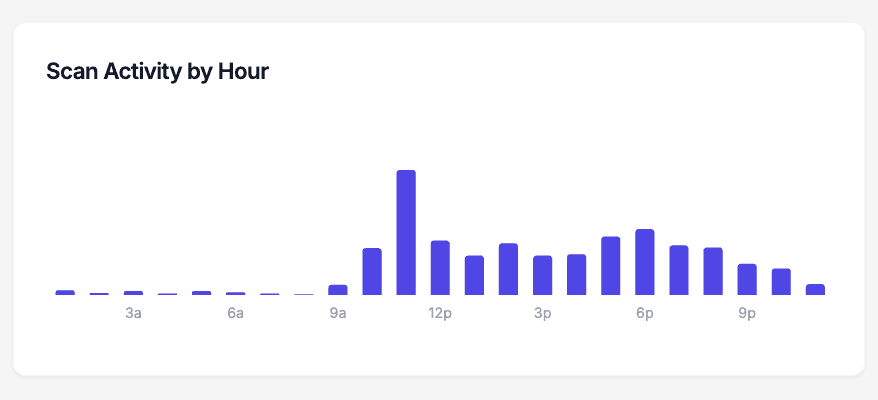
Tips follow shifts. The scan-activity chart above shows exactly when your tip jar QR code gets scanned — the 7 am espresso rush, the lunch counter turnover, the Friday close behind the bar. That matters when you are deciding where the laminated card lives: taped to the register, propped against the jar, or stuck to the espresso machine at eye level. Every scan of a dynamic QRelix code is logged by hour, so you can compare a slow Tuesday against weekend brunch and see whether moving the card actually changed anything.
How to set up a Venmo tip jar QR code in 10 minutes
- 1
Create a Venmo QR code for your tips
Go to /create-qr-code and choose the Venmo QR type. Enter the Venmo username tips should go to — yours, or the shared account your bar uses. Because the code is dynamic, you can point it at a different username later without printing anything new.
- 2
Style it so customers trust it
Add your shop's colors and drop your logo into the center of the code. The live preview shows the result as you adjust it. A code that matches the menu board and the cups reads as part of the business, not a sticker someone left on the counter.
- 3
Print it and put it at eye level
Download the print-ready 300 DPI PNG or SVG. Print it at least one inch square, laminate it, and place it where hands already go: on the jar itself, beside the register screen, or on a small table tent at the pickup counter.
- 4
Watch the scan-by-hour chart
Open your QRelix dashboard after a week. Scan counts, device breakdown, and the activity-by-hour chart show which shifts produce scans. If the card gets ignored at the register, move it to the pickup counter and compare the next week's numbers.
“We put a QRelix Venmo tip jar code next to the register and our barista tips went from $40 a shift to over $120, and that's just from people who used to say 'sorry, no cash.' It paid for itself in a day.”
QRelix user · Food service industry
Frequently Asked Questions
How does a Venmo tip jar QR code actually work?
You generate a Venmo Pay QR code in QRelix with your Venmo username and a suggested tip amount. Print it once and place it at the counter. When a customer scans, the Venmo app opens with the tip amount and note pre-filled, so they just confirm and send. The tip lands in your Venmo balance immediately.
Why use a Venmo QR code instead of cash tip jars?
More than 80% of in-person transactions are now card or mobile, meaning fewer people carry cash to tip with. A Venmo QR code captures the tips that would otherwise be skipped because the customer "didn't have anything on them." Service workers we've talked to report 2-3x higher tip totals after putting one out.
Do customers need the Venmo app to scan?
Yes for the smoothest experience, since most U.S. customers already have it. If they don't, the QR code falls back to Venmo's web checkout so they can still tip from a browser. No scan goes to waste.
Can I change the tip amount or my Venmo username later?
Yes, QRelix QR codes are dynamic. Update the linked Venmo username or default amount anytime in your dashboard and the same printed code immediately points to the new destination. Swap a $3 default for a $5 default during the holidays without reprinting a thing.
How is this better than Square's built-in tipping?
Square tipping only works if the customer is paying through Square, and it takes a percentage cut. A Venmo QR code works on cash transactions, card transactions, or no transaction at all. Venmo doesn't take a cut for personal transfers, and you get the money instantly instead of waiting for Square's payout cycle.
Can I track how much my tip jar QR code is being scanned?
Yes. The QRelix dashboard shows scan counts by date, time, and device. You can see whether your tip jar gets more action on weekend evenings or weekday mornings and adjust signage, placement, or staffing accordingly.
What size should a printed tip jar QR code be?
At least one inch square for counter distance. A common rule of thumb is a 10:1 ratio between scan distance and code width, so a code customers scan from arm's length can stay small, while one posted behind the bar should be several inches wide. QRelix exports print-ready 300 DPI PNG and SVG files, so you can print at any size without the code blurring.
Will a tip QR code work if the café WiFi goes down?
Yes — the code does not depend on your WiFi. A customer's phone camera reads the code on its own, and the Venmo page loads over their cellular data. The only scenario that breaks is a customer with no signal at all, which is rare at a counter. If you also post a WiFi QR code for guests, that one keeps working too, since the network details are stored in the code itself.
How do I stop someone from swapping my tip code with their own?
Make your code visibly yours and mount it so tampering is obvious. A code printed in your shop's colors with your logo in the center is hard to counterfeit with a generic black-and-white sticker. Laminate it or put it in a stand rather than leaving a loose card. Then watch your scan counts in the dashboard — a sudden drop to zero on a busy weekend is a sign to walk over and check the counter.
Tip Jars guides & tutorials
- Venmo Tip Jar QR Codes — Baristas, Bartenders & Service Pros
- Google Review QR Code: How to Get More 5-Star Reviews on Autopilot
- QR Codes for Musicians — Venmo Tips, Merch & Streaming Links
- Downloading and Printing Your QR Code
Try the free tools tip jars use most
Ready to Create QR Codes for Your Tip Jar?
Free, no credit card. Create dynamic, trackable QR codes in seconds. Upgrade to Pro to remove the QRelix-branded redirect shown on free scans and unlock unlimited scans.
Create QR Code Free