QR Codes for Smarter Food & Beverage Packaging
Add dynamic QR codes to product labels that link to ingredient details, sourcing info, allergen disclosures, recipe ideas, and promotional offers. Update content after printing and track consumer engagement.
How Food & Beverage Packaging Use QR Codes
Practical ways to integrate QR codes into your food & beverage packaging workflow, each one trackable with real-time analytics.
Ingredient & Nutrition Info
Link QR codes on packaging to a detailed ingredient list, nutrition facts, and allergen disclosures, especially useful when label space is limited.
Farm-to-Table Traceability
Let consumers scan to see sourcing details such as farm origin, harvest date, batch number, and certifications. Build trust through transparency.
Recipe & Pairing Suggestions
Print QR codes on packaging that link to recipe pages, cocktail guides, or food pairing ideas featuring your product.
Promotional Campaigns & Coupons
Run on-pack promotions by linking QR codes to limited-time offers, loyalty sign-ups, or contest entry pages. Swap campaigns without changing packaging.
Allergen & Dietary Compliance
Provide scannable allergen warnings, vegan/kosher/halal certifications, and dietary information that goes beyond what fits on a physical label.
Product Authenticity Verification
Combat counterfeiting by linking QR codes to a verification page where consumers confirm their product is genuine.
QR Code Types for Food & Beverage Packaging
QRelix supports 5+ QR code types. These are the most popular for food & beverage packaging:
See every scan, in real time
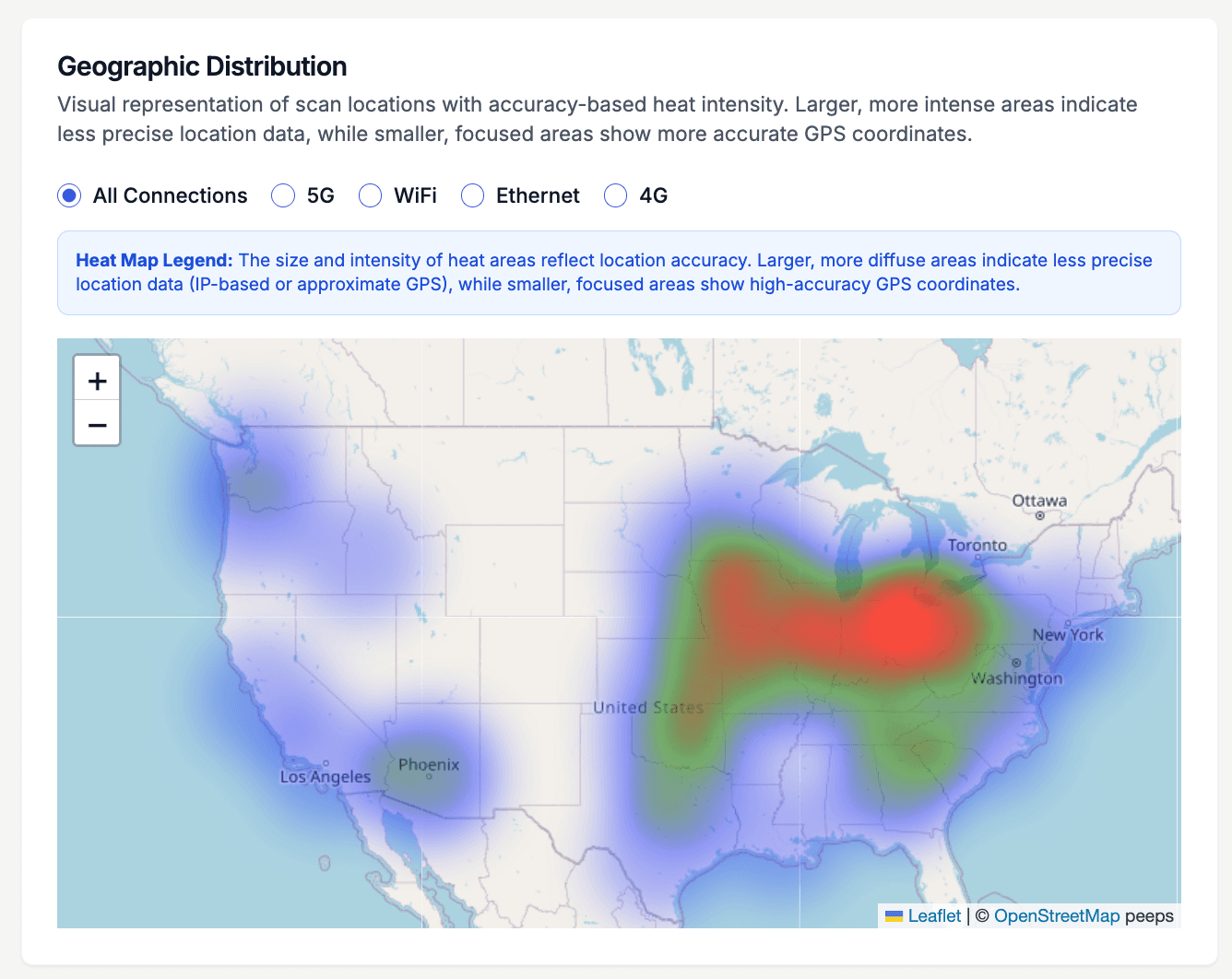
Once a case ships, most brands lose sight of the product. This is the QRelix geographic heat map, and it hands that visibility back: every scan of the code on your label, carton, or shelf talker shows up as density on a map of the United States. You can see whether the new SKU is getting scanned in the region your distributor just opened, whether farmers-market states outperform grocery placements, and where a promotion actually reached shelves. It is the closest thing to standing in every aisle at once, powered by the code already printed on the package.
How to add a dynamic QR code before your next label run
- 1
Create one dynamic URL code per SKU
Go to /create-qr-code, choose the URL type, and link your product page, nutrition and allergen details, or a batch traceability page. Give each SKU its own code so the analytics stay separate. Because the code is dynamic, you can repoint it at a recall notice or a seasonal recipe later without touching the plates.
- 2
Style the code to sit naturally on the label
Match the code to your packaging with brand colors and your logo, using the live preview to check it against the label design. Keep strong contrast between the code and its background, and leave a clear margin of empty space around it — label art bleeding into the code is the most common scanning failure.
- 3
Export a 300 DPI SVG for your printer
Download the print-ready SVG — vector output scales from a single-serve sticker to a case-side panel without degrading. Place the code on a flat panel of the package, away from seams, crimps, and tight curves, and scan a physical proof printed on the actual substrate before approving the run.
- 4
Watch where and when the product gets scanned
After launch, open the analytics: the geographic heat map shows which markets scan most, the device breakdown shows iPhone versus Android shoppers, and hourly activity shows when scans happen. When a promotion ends or recipe season changes, edit the code's destination in the dashboard — every package in the field keeps working.
“We added QRelix QR codes to our craft beer labels linking to tasting notes and food pairings. Customer engagement went from zero to thousands of scans per month.”
QRelix user · Food & beverage industry
Frequently Asked Questions
How do I add a QR code to food packaging?
Create a dynamic QR code in QRelix linking to your product's information page. Download it as a 300 DPI SVG file. This vector format scales to any label size without losing quality, so you can send the SVG to your packaging designer or printer.
Can I change the linked content after the packaging is printed?
Yes. Dynamic QR codes from QRelix let you update the destination URL anytime. Launch a new recipe page, swap in seasonal promotions, or update ingredient info, and the printed QR code on shelves stays the same.
How do QR codes help with FDA food labeling requirements?
QR codes provide extended label space for detailed ingredient lists, allergen info, and nutritional data that may not fit on a physical label. This supports FDA smart labeling guidelines and gives consumers access to comprehensive product information.
What's the minimum printable size for a QR code on a label?
A common working rule is to keep the printed code at least 2 by 2 centimeters — about 0.8 inches — and larger if shoppers will scan from a shelf at arm's length. QRelix exports 300 DPI SVG and PNG files, so the code stays sharp at any label size. The real test is physical: print a proof on the actual film or paperboard and scan it with both an iPhone and an Android under store-style lighting.
Will a QR code still scan on glossy, curved, or frozen packaging?
Usually, if you design for it. Print the code on the flattest panel available — wrapping it around a tight curve distorts the pattern. Glossy films can throw glare, so a matte varnish over the code area helps. Condensation and frost on frozen packaging can block scanning until wiped, which is worth weighing when you choose placement. High contrast, a clear margin around the code, and a scanned physical proof catch most of these problems before production.
Should every SKU and batch get its own QR code?
Give every SKU its own code at minimum — that keeps scan analytics separate, so you know which product is driving engagement instead of reading a blended number. For batch-level traceability, create a code per production run and organize them in the QRelix dashboard with categories and labels. If you run many SKUs, the REST API can create codes programmatically; it's documented at /docs.
Food & Beverage Packaging guides & tutorials
- QR Code for Product Tracking: The Free 2026 Guide to Item-Level Traceability
- QR Codes in Agriculture: The Free 2026 Playbook for Farm Traceability, Livestock & Marketing
- QR Code Track and Trace: Free Asset, Inventory & Supply Chain Tracking (2026)
- Downloading and Printing Your QR Code
Try the free tools food & beverage packaging use most
Ready to Create QR Codes for Your Food & Beverage Packaging?
Free, no credit card. Create dynamic, trackable QR codes in seconds. Upgrade to Pro to remove the QRelix-branded redirect shown on free scans and unlock unlimited scans.
Create QR Code Free