QR Codes for Freelancers: Get Paid the Day You Invoice
Stop chasing "sorry, I forgot the link." Add a Venmo Pay QR code to every invoice with the amount and project name pre-filled. The client scans, Venmo opens already loaded, they hit send. Same-day payment, no Stripe fee on small jobs, every transaction tagged to the project.
How Freelancers Use QR Codes
Practical ways to integrate QR codes into your freelancers workflow, each one trackable with real-time analytics.
Venmo Invoice Payment QR Codes
Generate a Venmo Pay QR code with the invoice amount and a memo ("Logo redesign, Acme Co"). Drop it on the invoice PDF or paste in the email. Client scans, Venmo opens pre-filled, they tap send. Faster than Stripe links, no 2.9% cut on small projects.
Portfolio & Case Study Links
Add a QR code to your business card or email signature linking to your portfolio site or curated case studies. Prospects scan from a coffee shop meeting and see your work before they leave the table.
Booking & Discovery Calls
Link a QR code to your Calendly or Cal.com page. Prospects you meet at events scan once and book a discovery call without typing your URL into Safari while you stand there watching.
Deposit & Retainer Collection
Create separate Venmo Pay QR codes for project deposits, monthly retainers, and rush fees, each with a clear memo. Track scans to see which proposal templates actually convert clients to paid deposits.
Quick Profile Linking
Generate a Venmo Profile QR code for casual situations like splitting a project lunch, getting reimbursed for a client expense, or 'send me whatever you think is fair' tip work. One scan opens your profile, no fumbling for the username.
Testimonials & Reviews
After a project wraps, hand the client a QR code linking to your Google Business, Clutch, or Upwork review page. They scan while the great experience is fresh and you bank social proof for the next pitch.
QR Code Types for Freelancers
QRelix supports 6+ QR code types. These are the most popular for freelancers:
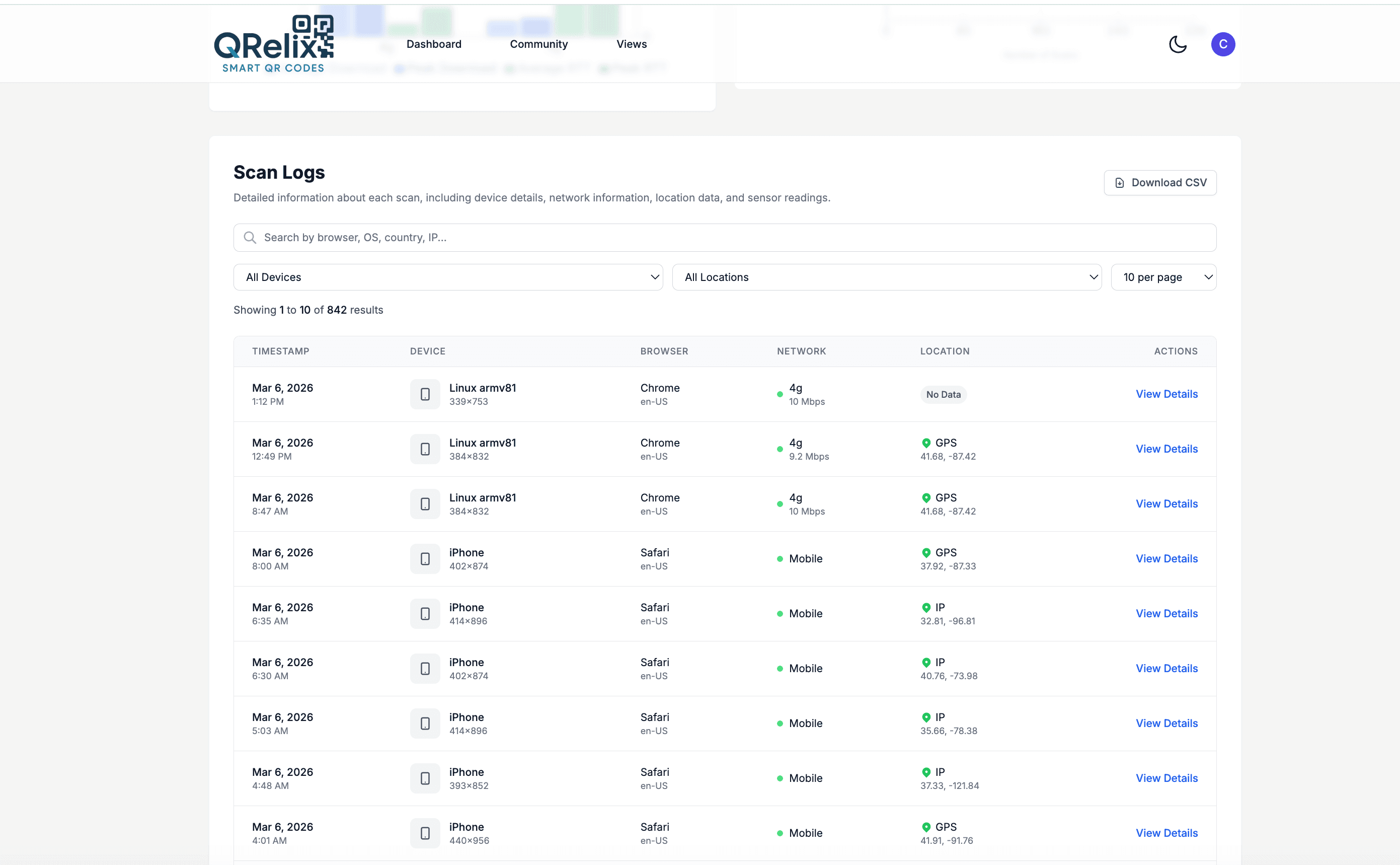
See every scan, in real time
You emailed the invoice Tuesday. By Friday you're wondering whether the client even opened it. The access log above answers that: every scan of your payment code, listed with a timestamp, device, and location. A 9:40 pm iPhone scan the day the invoice landed means it's been seen — silence after that is a follow-up, not a mystery. The same log works on the QR code on your business card and portfolio one-pager, turning 'I handed out cards at the conference' into a dated list of scans you can act on.
How to put a payment QR code on your invoices in 10 minutes
- 1
Create a Venmo code for invoice payments
Go to /create-qr-code and pick the Venmo QR type, pointed at the account you invoice under. Because the code is dynamic, the day you outgrow Venmo you can repoint the same code at a different payment link — and every invoice already sent keeps working.
- 2
Make it match your brand, not a generator's
Set the code's colors to your brand palette and embed your logo in the center, checking the live preview as you go. On an invoice, an obviously generic code looks like an afterthought; one styled like the rest of the document reads as part of how you do business.
- 3
Drop the SVG into your invoice template
Download the SVG and place it in your invoice footer next to the payment terms, sized about an inch square. It's vector, so it stays crisp in the PDF and in print. Reuse the same file on the back of your business card and your portfolio one-pager.
- 4
Use the access log to time your follow-ups
Check the dashboard a few days after sending. A scan logged Wednesday with no payment by Friday is a nudge-worthy client; no scan at all means the invoice itself got buried — resend it. Over a quarter, the scan patterns show which clients pay the day they scan and which sit on it.
“I put a QRelix Venmo code on the last page of every invoice PDF. Same-day payment rate went from about 20% to over 70%. Clients who used to take three weeks now pay before they close the email.”
QRelix user · Freelance design
Frequently Asked Questions
Should I use Venmo or Stripe for client invoices?
Both have a place. Stripe is right for invoices over $500 to $1,000, foreign clients, or anything that needs legitimate-looking business infrastructure. Venmo is right for smaller domestic jobs where Stripe's 2.9% + $0.30 eats your margin, repeat clients you trust, and projects where speed beats paperwork. A Venmo Pay QR code on the invoice makes it as one-tap as Stripe without the cut.
Can clients pay a Venmo invoice without the Venmo app?
QRelix Venmo QR codes fall back to Venmo's web checkout, so clients can pay from a browser if they don't have the app. Most U.S. clients under 45 already have it installed. If your client base skews older, pair the Venmo QR with a Stripe or ACH backup option on the same invoice.
How do I track which clients have paid?
Create a separate QRelix QR code per invoice or per client. The analytics dashboard shows scan counts and timestamps, so you can combine it with your Venmo activity log to know exactly who paid and when. For ongoing retainers, use one code per client and update the memo each month.
Does Venmo report freelance income for taxes?
Yes. Venmo issues 1099-Ks once payments exceed the IRS threshold (currently $5,000 in 2024, dropping in coming years). Whether you use Venmo or not, freelance income is taxable. Tag every payment with a clear memo so your bookkeeper can sort business vs. personal at year-end. Most freelancers move to a Venmo Business profile once monthly revenue clears a couple thousand.
Can I put the same QR code on every invoice?
Yes, if you want one universal "pay me" QR with no amount pre-filled. Better: generate a unique QRelix QR code per invoice with the amount and project memo pre-filled, so clients can't pay the wrong amount, and your analytics show which invoices got scanned. Dynamic QR codes let you update without reprinting anything.
What's the difference between a Pay QR and a Profile QR?
A Pay QR opens Venmo with the amount, recipient, and memo pre-filled, best for invoices and fixed-price work. A Profile QR just opens your Venmo page so the payer types whatever amount they want, best for tip work, splitting costs with a client, or generic networking. QRelix supports both from the same dashboard.
Should the QR code on my business card be static or dynamic?
Dynamic, if the card is worth printing. QRelix's free vCard tool makes a static code entirely in your browser — free, no signup, no branding baked in — but it's frozen: change your phone number and 500 printed cards go stale. A dynamic code is also free to create on QRelix's free plan (no credit card required), updates anytime, and logs scans, so you learn which events actually produce contacts. Use static for a one-off; use dynamic for anything printed in bulk.
Can a client scan a QR code from a PDF invoice on their screen?
Yes. A phone camera reads a QR code off a laptop or desktop monitor the same way it reads paper — modern iPhone and Android cameras do it natively, no app needed. That's what makes a payment code on an emailed invoice work: the client opens the PDF on their computer, points their phone at the footer, and lands on your Venmo page. Keep the code around an inch on the page so it stays sharp.
Can I password-protect a proposal or deliverable link?
Yes. Dynamic QRelix codes support password protection, so a QR code on a printed proposal can lead to pricing or unreleased work that only your client can open. You can also set the code to expire on a date or after a set number of scans — practical for a proposal that's only valid for 30 days. Both controls live in the dashboard and can be changed after the document is already in the client's hands.
Freelancers guides & tutorials
- QR Codes for Freelancers — Same-Day Invoice Payment via Venmo Pay
- Elevate Your Business Card: How to Create QR Code with Tracking for Impact
- QR Code for Appointments: Free Booking Links That Get You More Bookings (2026)
- Static vs. Dynamic QR Codes
Try the free tools freelancers use most
Ready to Create QR Codes for Your Freelance Business?
Free, no credit card. Create dynamic, trackable QR codes in seconds. Upgrade to Pro to remove the QRelix-branded redirect shown on free scans and unlock unlimited scans.
Create QR Code Free